Written by Lisa
Edited on
15 September 2026
·
08:43
This is how you connect your Bosch or Siemens appliance
Do you want Free Washing and Dishwashing? Connect your appliance to Coolblue Energy. In this article, you can read how to do that step by step.
Step 1: connection to the Home Connect app
Make sure your appliance is connected to the Home Connect app. You can see how to do this in this video or read about it step-by-step at the bottom of this website.
- Download the Home Connect app on your phone.
- You can find the app in the Play Store on Android devices and in the App Store on iPhone models and iPad models.
- Open de app and tap 'Create account'.
- Fill out your information and top 'Next'.
- You'll receive a confirmation email. Click on the link in the confirmation email to confirm your registration.
- Open the app again and log in.
Step 2: connect your appliance to Coolblue Energy
You're almost there!
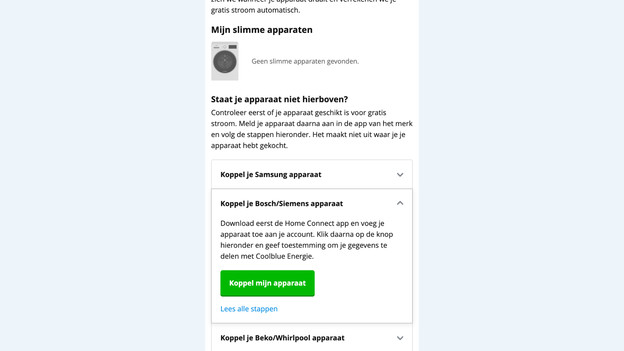
- Log in to My Coolblue.
- Click on 'Connect your Bosch/Siemens appliance'.
- Click on 'Connect my appliance'.
Step 3: give permission in Home Connect
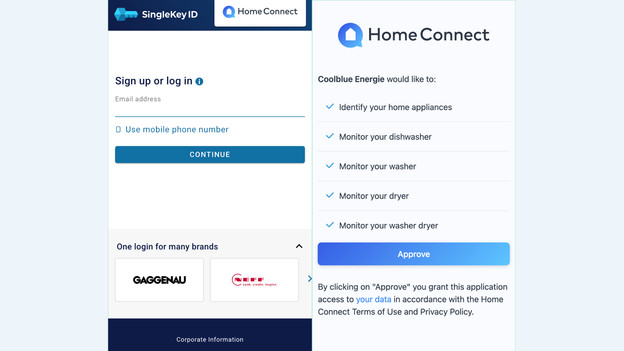
- It'll then open the log in page for Home Connect automatically.
- Fill out your Home Connect information and log in.
- Give permission now. You confirm that Coolblue Energy can use the data from your washing machine or dishwasher to settle Free Washing or Dishwashing.
- Click on 'Approve'.
Step 4: start with Free Washing and Dishwashing
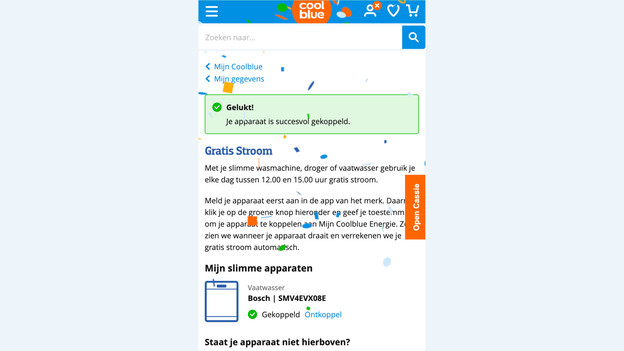
Have you gone through all steps? You'll receive a confirmation email. From now on, you can wash and do your dishes for free between 12:00 and 15:00 and automatically control your appliance with your smartphone.
Connecting once is enough
Do you have multiple appliances that you can use Free Washing and Dishwashing with? You only have to give permission to share your data with Coolblue Energy once. So you don't have to do it again. You can add appliances and give permission once.