How do you smart charge your car in the Coolblue App?
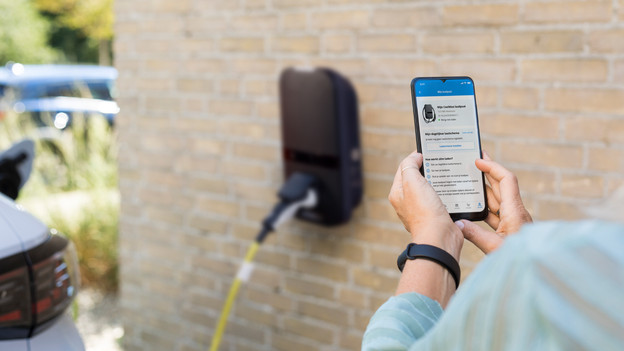
Smart charging in the Coolblue App
With the following steps, you can set up a charging schedule for the future.
- Step 1. Go to Coolblue Energy.
- Step 2. Go to the overview.
- Step 3. Set up your charging schedule.
- Step 4. Plug in your charger and scan your charge card.
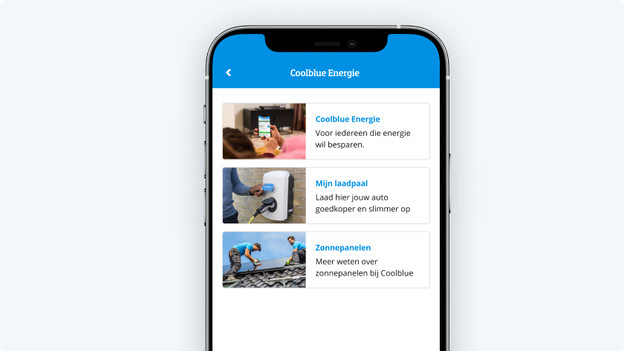
Step 1: go to Coolblue Energy
Open the Coolblue App and go to 'My Coolblue'. Log in and click 'Coolblue Energy'.
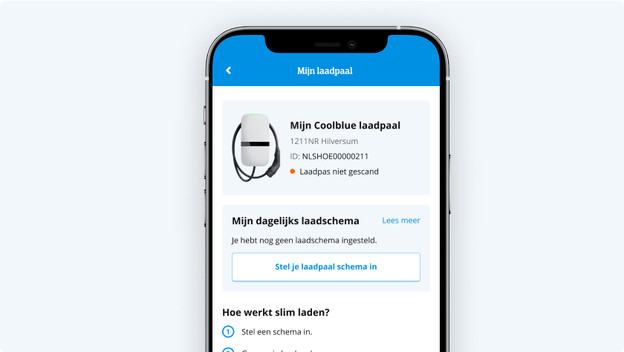
Step 2: go to the overview
When you tap 'My charging station', you'll get to the overview. Here, you'll see all the information on the charging schedule and your charging station. For example, the ID of your charging station and your address.

Step 3: set up your charging schedule
Tap 'Set up your charging station schedule'. Here, you specify the days and times you want your car to charge automatically.

Step 4: plug in your charger and scan your charge card
Did you set up your schedule? It's important to plug in your charger and scan your charge card. You'll receive a notification if you haven't done this yet.

Successful!
Your car now charges smartly via the charging schedule. In the app, you can see when your car is charging. You can easily adjust the charging schedule or turn it off temporarily, like when you're going on vacation. You can also easily charge off schedule and without the app without having to turn it off.

Update: the switch to daylight savings is solved
In the latest version of our software, your charging schedule works as intended. Was your schedule set from 23:00 to 05:00? Your car was charging from 00:00 to 06:00 since the start of daylight savings. This problem is now solved.
What does this mean for you?
Update the Coolblue App to the latest version.
- Did you adjust the schedule manually? Change it back to the original times.
- Didn't notice the change or didn't you have a schedule yet? Leave your schedule as it is.
Frequently asked questions
How does smart charging work?
With smart charging, you can easily charge your electric car. Download the Coolblue App and set up charging times yourself. Based on this schedule, your car will charge automatically. Make sure to connect the charging cable and unlock the charging station with your charge card.
What are the advantages of setting up a daily charging schedule?
Setting up a daily charging schedule for your car has various benefits: Convenience: with a fixed charging schedule, you don't have to think about charging your car. Simply plug the charging cable into the car and the charging schedule will do the rest. Save money: do you have a dynamic energy contract or solar panels on your roof? Set up charging times for when you generate a lot of power or when the prices are low. That way, you can save money when you charge your electric car. Grid stability: if you charge your electric car during the day or at night, you both save on energy costs and prevent the power grid from being overloaded at high peaks.
Why is the status of my charging station not up to date?
The Coolblue App and your charging station are connected to our Coolblue systems. That's why there's a small delay between the app and your charging station. Is the status of your charging station still not updated in the app after 5 minutes of charging? Refresh the app first by swiping downwards. Doesn't this work? Place your charge card in front of the charging station again or check your charging schedule.
Why can't I see my other charging station?
Unfortunately, you can't add a second charging station. We're building a new version that allows you to do this.
Can I also view my charging sessions?
When you have a charging station package, you can also easily see your charging sessions. Log in with your email address on your computer and choose 'Charging stations'. You'll go to an overview with your charging station, charge cards, charging sessions, and invoices.