Logitech H800 Stereo Wireless Headset
Never available again
View alternatives in the sidebar
According to our office headset expert
Note: the headset isn't compatible with iOS. The headset does work on macOS.
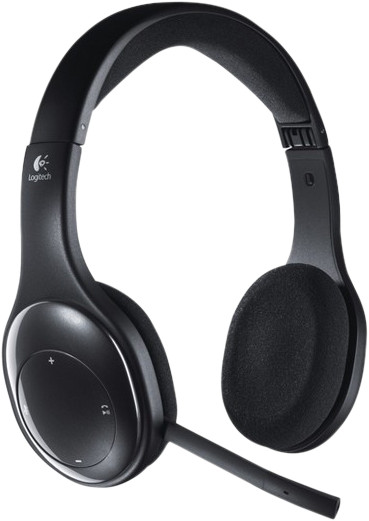
You can connect the Logitech Wireless Headset H800 to your laptop, netbook, or PC with the included USB nano adapter. In addition, you can connect this model to your smartphone or tablet using Bluetooth. The noise-suppressing microphone eliminates background noise during a chat session or phone call. The buttons on the headset can be used to skip songs, mute the microphone, or pick up phone calls.
Headphones wearing method | Over your head | |
|---|---|---|
Connection type | Wireless | |
Office headset suitable for device | PC, Smartphone |
5 stars
44
4 stars
48
3 stars
6
2 stars
0
1 star
1
Sound quality
Wearing comfort
Design
Options
Really another example of the comfort and ease of use Logitech puts in their headsets and I am very satisfied with it.
kevin
4 February 2013
Automatically translated from Dutch
Professionally I often use GSM, but also other means of communication on a computer (Skype, GoToMeeting, Lync, ...). That's why I was looking for a headset that was easy to connect to a computer and mobile phone. It was important to be able to switch easily from one device to another.
Earlier I had already tried to use a bluetooth headset that allows pairing with multiple devices. That seemed to work well in the beginning, but in the end it was often not easy to switch between devices.
This headset has two connection options: USB dongle and bluetooth. I use the USB dongle for connection to the computer and bluetooth for connection to the mobile phone. As a result, I can switch from one device to another and back again with a simple push of the button.
The control buttons on the headset (mainly volume and mute functions) are also intuitive to find and easy to operate. The quality of the microphone is also very good. I naturally speak quite quietly, but the microphone transmits the sound perfectly.
In short, an absolute must for people who call a lot via different means of communication.
Jiri De Jagere
6 June 2014
Automatically translated from Dutch
For my laptop I was looking for a headset that I could use wirelessly, Because my laptop itself does not have a bluetooth setting, it can also be connected via a USB-nano plug. the headphones can also be connected via bluetooth to, for example, a smartphone, it is easy to switch between bluetooth and nano plug. Also produces a good sound. depending on other wireless devices, it may give a slight noise.
Olaf van Ess
5 January 2012
Automatically translated from Dutch
Order via Coolblue B2B. As a business customer, you can request a quotation, you get a fixed contact person, and you can pay afterwards.
Product number | 153744 | |
|---|---|---|
Manufacturer code | 981-000338 | |
Brand | Logitech | |
Warranty | 2 years | |
Processing of your defect | Via Coolblue | |
Old product returned for free |
Office headset suitable for device | PC, Smartphone | |
|---|---|---|
Pick up/hang up phone call | ||
Standby time | 46 hours | |
Spoken notifications |
Built-in microphone | ||
|---|---|---|
Microphone recording type | Stereo | |
Microphone mute function | ||
How to mute | Via the button on the cord | |
Collapsible microphone |
Connection type | Wireless | |
|---|---|---|
Bluetooth | ||
Bluetooth version | 4.0 | |
Nano receiver | ||
Software compatibility | ||
USB port |
Type of ear cushions | On-ear | |
|---|---|---|
Ear cushion material | Fabric | |
Headphones wearing method | Over your head | |
Number of ear cups | 2 | |
Rotatable ear cups | ||
Foldable |
Power source | ||
|---|---|---|
Base station |
Weight | 1,5 kg | |
|---|---|---|
Material | Plastic | |
Finish | Matte and glossy | |
Color | Black |