Background
I spend a lot of time on a laptop for my work, and I often change desks. Working on a laptop is not very ergonomic and often there are no external mice or keyboards nearby. Finding an external keyboard doesn't get any easier either, since I prefer to type on a QWERTY. So I decided to buy myself a keyboard and mouse with a view to ease of use and ergonomics.
keyboard
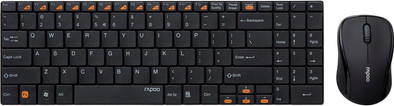
The keyboard is very compact. Every square centimeter is covered with keys. The small footprint along with the absence of cables gives a more tidy feeling to your desk. Because the keyboard is somewhat shorter, there is more room for the mouse, which contributes to user comfort. Personally, I think the imprint on the keys is a bit big and it looks like stickers that stick on them (although they can't be removed). The F keys and arrows have useful functions such as media, volume and scroll keys (pgup, pgdn, end and home) so you certainly don't miss the middle block keys that you do have with a full-length keyboard.
The keyboard rests on a bump at the back where the batteries are located (two AAAs). This tilts the keyboard slightly to an almost perfect angle for pleasant typing. Due to its sturdy aluminum back plate, it does not bend noticeably while typing unless you type directly on an old-fashioned typewriter. I can best compare the keys with those of a standard laptop. They have a “scissor-switch” mechanism that means they don't wobble, require very little force and don't need to be pushed far in to strike. This makes for a very smooth typing experience.
The keys of the numpad are in a slightly different layout than I am used to on a keyboard. Everything has been pushed together to keep the keyboard as compact as possible. Among others, the Enter key is not long but wide, at the expense of the “zero” key which is now a small square instead of wide. As a result, the “dot” key has moved upwards. All the changes together mean that the numpad takes a little more time to get used to than the rest of the keyboard.
mouse
I'd describe it as a standard wireless mouse: no game quality but it doesn't feel like free junk. The mouse uses two AA batteries. To install it, the entire top of the mouse comes off, exposing the buttons and scroll wheel. This doesn't exactly show build quality, but we have to keep in mind that this is definitely a bargain and that the mouse does feel sturdy when everything is installed correctly.
The mouse glides smoothly over three “pads” at the bottom. I do expect that these will have to be replaced after three years of intensive use. The sensor uses invisible light and is clearly not equally sensitive on every surface. I cannot recommend this mouse for competitive gaming, but it is more than sufficient for boring office work.
USB dongle and connectivity
Few words to waste: you plug the USB into your PC and within a second you can start using your new desk accessories. It's that simple. I don't experience any glitches or hiccups.
Both at the bottom of the mouse and in the bump at the bottom of the keyboard there is a place to store the USB dongle. I think this is a very nice gift that I did not expect in a purchase of 35 euros!
conclusion
The keyboard is sturdy, types quickly and is pleasantly compact. The layout of the keys on the numpad is somewhat different from the standard, so you have to get used to it.
The keyboard has clearly started to run with a larger share of the budget. The mouse, on the other hand, feels a bit simpler, but is certainly sufficiently suitable for normal computer use. So far I have not encountered any connectivity issues: Plug & Play! Or rather: Plug & Work!