Microsoft Arc Touch Mouse Black
Never available again
View alternatives in the sidebar
View alternatives in the sidebar
According to our mouse expert
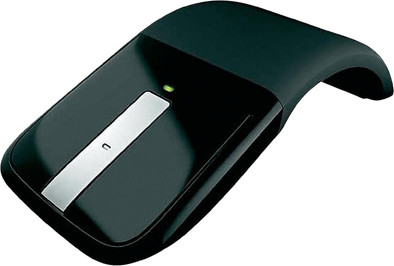
The Microsoft Arc Touch Mouse Black uses BlueTrack technology and has a unique look. Actually, everything about this Arc Touch mouse is unique. Take its unique design for instance. You can curve the wireless USB mouse to work as comfortably as possible and flatten it again when you want to store it. The touch surface of the Microsoft Arc Touch Mouse Black is even more useful. No more buttons to click, just tap your finger on the surface. By swiping your finger on the surface, you can scroll through the pages on your screen.
Connection type | Wireless | |
|---|---|---|
Mouse model | Full-size | |
Left or right-handed | Left-handed, Right-handed | |
Ergonomic design | ||
Suitable for gaming | ||
Bluetooth | ||
Silent mouse | ||
Depth | 111 mm |
5 stars
38
4 stars
15
3 stars
6
2 stars
0
1 star
0
After using a Microsoft Touch Mouse, the Microsoft Arc Touch Mouse is a good alternative for those who regularly have to move or are on the track. The mouse not only fits well in the hand, it is also very easy to use and a pleasure to work with.
In addition, you can tweak the gestures, scroll functionality and middle mouse button if desired by means of Microsoft Mouse & Keyboard sensor. This way you can have feedback when scrolling if you prefer.
The only downside I've noticed is that the batteries sometimes come loose.
Tom Kerkhove
16 October 2013
Automatically translated from Dutch
If you are looking for the ideal mouse for your laptop, this is a must! The mouse is nice and flat to transport and still works handy when you curl it. It also turns it off or on immediately. This mouse installs itself, works accurately, weighs next to nothing and looks great too! I'm only questioning the scrolling mechanism... if you're thinking of buying this one, check out how it works to make sure you like it.
Elie Van Looveren
9 March 2013
Automatically translated from Dutch
This mouse is exactly what I was looking for. If you also travel a lot with your laptop, you should take it with you. It fits well in the hand and slides smoothly. The system to straighten or straighten the mouse (switch on and off) works well and feels solid. In addition, there is a strong magnet with which you can "stick" the received at the bottom of the mouse to take with you. So very practical!
Only minus is perhaps the middle button. This touch-sensitive scroll pad is not very precise to operate. Where you could easily make "a click" with a traditional roll, this is a bit more difficult here. ... not a big problem in itself.
Elie Van Looveren
23 February 2013
Automatically translated from Dutch
Product number | 228912 | |
|---|---|---|
Manufacturer code | RVF-00050 | |
Brand | Microsoft | |
Processing of your defect | Carry-in warranty | |
Old product returned for free |
Mouse model | Full-size | |
|---|---|---|
Input | Laser | |
Number of buttons | 2 | |
Ergonomic design | ||
Left or right-handed | Left-handed, Right-handed | |
Adjustable DPI | ||
Mouse controls | Touch | |
Suitable for gaming | ||
Programmable buttons | ||
Number of programmable buttons | 0 | |
Lighting peripherals | ||
Silent mouse | ||
Horizontal scrolling | ||
Mouse surface | Matte surface |
Connection type | Wireless | |
|---|---|---|
Nano receiver | ||
Frequency bands | 2.4GHz | |
Bluetooth |
Plug and Play | ||
|---|---|---|
Compatible with operating system | Windows, macOS |
Power supply type | Rechargeable battery | |
|---|---|---|
Rechargeable battery | ||
Battery level indicator | ||
Replaceable battery |
Color | Black | |
|---|---|---|
Width | 58,8 mm | |
Height | 36,5 mm | |
Depth | 111 mm | |
Material | Plastic | |
Finish | Matte and glossy |
