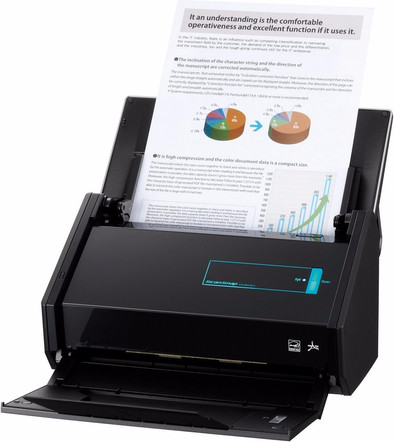
Fujitsu ScanSnap iX500
Never available again
View alternatives in the sidebar
View alternatives in the sidebar
Scanner type | File scanner | |
|---|---|---|
Scan sizes | A4, A5, A6 | |
Automatic document feeder (ADF) | ||
Automatic duplex scanning |
According to our scanner expert
With the Fujitsu ScanSnap iX500 document scanner, you can archive all your contracts and invoices with a speed of 50 pages per minute. Position the scanner within range of your WiFi network and you'll be able to wirelessly send your scans to your iOS or Android smartphone, or to the cloud. Automatic text recognition lets you easily turn scans into searchable text documents, allowing you to find important documents with a simple Ctrl+F shortcut. The scanner has double input detection, which means it won't scan post-its, for instance. The scanner also lets you save time with duplex scanning, and thanks to the automatic document feeder, you won't have to insert all your pages separately.
5 stars
127
4 stars
44
3 stars
4
2 stars
0
1 star
0
Works great fast. Open the cover and start at the push of a button. Connecting via Wi-Fi takes a little longer than via USB (10 seconds instead of 1 or 2 seconds) but you can work with that. Nice materials, not old. The scan quality is very good and also the text recognition works well enough to search the PDFs. This cannot be set in Dutch, but I suspect that this only serves for optimization. With English the result is fine. There is a lot to personalize within the ScanSnap software. It is also useful that you can switch between your own profiles from the tray icon; for example, 'Business scans' and 'Private scans' if you want to store them in different ways. Scanning to Evernote, e-mail or a few cloud services is also possible, but always with the intervention of a computer/phone. That is also the only drawback, the device remains dependent on another device and does not work autonomously. OCR is also not available in the mobile app, for which a PC is required, while it is done by the processor of the scanner. All good to live with and therefore a perfect device to get rid of those piles of paper. Do backup!
Simon
3 August 2015
Automatically translated from Dutch
Just a great thing, super simple installation and works right away. Quickly scans stacks of paper and automatically detects duplicates. The detection of blank pages also works flawlessly.
Scans up to 600dpi, so if you're looking for more (for a photo scanner) you'll have to look elsewhere, but for regular paperwork this is really THE choice.
Roelof Reineman
12 January 2014
Automatically translated from Dutch
After varying experience with all-in-ones and an ever-increasing need for the smooth effort of large amounts of documents, I finally decided to purchase this rather expensive dedicated scanner. However, it fully lives up to expectations: hassle-free installation of the software (MAC). Scan snap manager works great on mac. All the features in the product specifications I tested work flawlessly. The only comment from the reviews that I can confirm is not always correctly recognizing the page direction. With the latest firmware update, the device now also scans wirelessly to PC/Mac. Scanning and converting to searchable PDF in the same time is an incredible plus.
Koen Van Eygen
18 November 2013
Automatically translated from Dutch
Product number | 294674 | |
|---|---|---|
Manufacturer code | PA03656-B301 | |
Brand | Fujitsu | |
Processing of your defect | Carry-in warranty | |
Old product returned for free |
Maximum optical scan resolution height | 600 dpi | |
|---|---|---|
Maximum optical scan resolution width | 600 dpi | |
Scan speed (PPM) | 25 ppm | |
Automatic duplex scanning | ||
Maximum paper weight ADF | 80 g/m2 | |
Maximum paper size ADF | A4 | |
ADF capacity | 50 | |
Color scanner | ||
Color depth output | 48 bpp | |
Automatic document feeder (ADF) | ||
Maximum scan size | A4 (21x29.7cm) | |
Gray tones output | 8 bpp | |
Scan to | Cloud, Email, Evernote, File, Google Docs, Image, Microsoft Excel, Microsoft PowerPoint, Microsoft SharePoint Connector, OCR, PC (local), Searchable PDF | |
Scan without PC/laptop | ||
Scanner type | File scanner |
OCR | ||
|---|---|---|
Scan drivers | Own operating system | |
Double input detection | ||
Portable (mobile use) | ||
Skew correction | ||
Skip blank page | ||
Digital photo optimization |
Network connector | ||
|---|---|---|
Port type | Power connector, USB | |
Total number of ports | 2 | |
Type of USB port | Standard USB-B (2.0 form) | |
Number of USB ports | 1 | |
Female standard USB-B (2.0 form) port version | 2.0 | |
Number of female standard USB-B (2.0 form) ports | 1 |
Built-in WiFi | ||
|---|---|---|
WiFi direct | ||
Bluetooth |
Built-in screen | ||
|---|---|---|
USB port | ||
Width | 29,2 cm | |
Depth | 15,9 cm | |
Height | 16,8 cm | |
Number of USB ports | 1 | |
Compatible with operating system | Windows, macOS | |
Color | Black | |
Weight | 3 kg | |
USB version | USB 3.0 |
Coolblue takes care of everything, from taking out an insurance to repairs
For almost all accidents
More coverage in case of damage than your standard warranty
No deductible
First, add your scanner to your shopping cart. On the next page, choose the Protection Plan below. You always have a 30-day return window and pay no deductible in case of damage.
2-year Protection Plan
31,99
one-time3-year Protection Plan
53,-
one-time