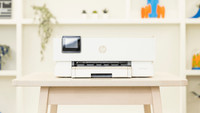
Samsung Xpress M2070FW

Never available again
View alternatives in the sidebar
View alternatives in the sidebar
According to our printer expert
The Samsung Xpress M2070FW is a black-and-white laser printer that can print, scan, copy, and fax. Connect the printer to your network to send print jobs via WiFi. With its print speed of 20 pages per minute, there'll never be a queue for the printer. Use the automatic document feeder (ADF) to copy, fax, or scan multiple documents at once. Print school reports, presentations, and articles with the M2070FW. Use the NFC function on your smartphone to connect it to the printer and you'll be able to send print jobs straight from your smartphone.
Print technology | Laser | |
|---|---|---|
Printer type | All-in-one | |
Automatic duplex printing | ||
Automatic document feeder (ADF) | ||
Automatic duplex scanning | ||
Color printer | ||
Maximum print size | A4 | |
Photo paper drawer |
5 stars
40
4 stars
51
3 stars
3
2 stars
0
1 star
1
So many printers tried before gave problems: network connection failure, crumpled paper, the ink ran out after 3 pages, etc. Finally a printer that allows really carefree printing, the Samsung Xpress M2070FW.
INSTALLATION Installation is almost completely automatic and takes barely 10 minutes from opening the box to the first print. Connecting via a USB cable is not necessary, as with many other printers, the device receives the settings by default via your existing WiFi network. The printer only needs to be installed once. Other computers/laptops recognize the device immediately (unless you want additional options, then quickly run through the software).
COMPACT The housing is certainly compact. Of course, the top tray takes up some extra space compared to printers that don't, but it does make the printer a lot more user-friendly.
SPEED The printer takes a few seconds to warm up the toner, but then prints quickly and silently. This also applies to the scanner, the file is scanned in a few seconds. 80 grams paper is suitable, 90 grams recommended. Immediately after the print, you will see a light imprint of the printer's feed wheels pressed into the paper, but this will disappear after a minute.
APP FOR SMARTPHONE/TABLET The Samsung Mobile Print app is easy to find in the app store and immediately recognizes the device. The versatility is particularly striking, because even the scan function can be controlled via the app. You simply choose whether you use the flatbed scanner or the top drawer as the source, and immediately receive the scan result as an image or PDF on your phone/tablet. Where many other brands keep the app simplified and forget that the user wants options for settings, Samsung has developed a fresh and user-friendly app that is very complete.
IDEAL FOR 'SMALL BUSINESS' I can absolutely recommend the Samsung Xpress M2070FW for the home entrepreneur or the student. The price is competitive and the options are extensive.
Sander
4 September 2014
Automatically translated from Dutch
As an Apple adept, you simply have to turn to another brand to print. Should you immediately look at the biggest Apple competitor? Here's an account of why you should do that. For several years now, hassle with a Lexmark inkjet printer (Wifi) with regard to expensive and many ink cartridges. Always when you needed to print something important, there was a cartridge on it or the print quality was too bad. Printer head eventually died and so went looking for a new printer. After some research on the internet we came across this laser printer, because the fact that there would no longer be an inkjet in the house was already an established fact after all the inkjet vicissitudes. The Samsung Xpress M2070FW with all its possibilities always came out well on various sites and in various reviews (toner actually). According to those reviews, toner also lasts a fairly long time and there are also (cheaper) alternatives on the internet. Nevertheless, important facts for the purchase of such a device. After fast and neat delivery of Coolblue (always) unpacked immediately and installed within 15 minutes via Wifi on iMac. Then quickly available for multiple iPads and iPhones and can even be controlled via app. Print quality scored slightly less, but also put in ECO mode from the start, which uses toner more economically, so the quality will ultimately not be good either. Probably got a standing ovation for print quality in normal mode, because the ECO print is easy to read and neat in terms of letter resolution. The possibilities of this printer are so extensive that I probably won't use them (yet), such as NFC printing, which is not yet supported by Apple products. All in all, a great first experience with Apple's biggest "enemy" Samsung; honor where credit is due. It doesn't mean that there will be an Android device in the house right now... ;-)
Sjors de Jong
14 October 2014
Automatically translated from Dutch
Fast delivery and fast installation. Glad you have choices in delivery. Good information on the website, which will help you make your choice. Note: with MacPro it is indicated during the installation that you have to press the wps button on the computer at a given moment. Should be: wps button on the printer! Ideal that you can give print orders from laptop, Iphone and Ipad
Hans
5 June 2014
Automatically translated from Dutch
Product number | 388542 | |
|---|---|---|
Manufacturer code | SS296E#UUY | |
Brand | Samsung | |
Processing of your defect | Carry-in warranty | |
Old product returned for free |
Width | 40,6 cm | |
|---|---|---|
Depth | 36 cm | |
Height | 30,9 cm | |
Color | White | |
Weight | 8,05 kg |
Printer type | All-in-one | |
|---|---|---|
Photo printer | ||
Portable (mobile use) |
Toner cartridge line | Samsung 111 | |
|---|---|---|
Print technology | Laser | |
Number of cartridges/toner cartridges | 1 | |
Color printer | ||
Print speed black (ISO) | 20 ppm | |
First black page ready after | 8,5 seconds | |
Maximum print resolution height | 1200 dpi | |
Maximum print resolution width | 1200 dpi | |
Maximum print size | A4 | |
Automatic duplex printing | ||
Borderless printing |
Scan functionality | ||
|---|---|---|
Automatic duplex scanning | ||
Maximum optical scan resolution width | 1200 dpi | |
Maximum optical scan resolution height | 1200 dpi | |
Scanner type | File scanner, Flatbed scanner | |
Maximum scan size | A4 (21x29.7cm) | |
Automatic document feeder (ADF) | ||
Maximum paper size ADF | A4 | |
Scan sizes | A4 | |
Scan speed (PPM) | 15 ppm | |
Color depth output | 24 bpp | |
Scan to | PC (network) | |
ADF capacity | 20 |
Copying functionality |
|---|
Fax functionality | ||
|---|---|---|
Color fax |
Built-in screen | ||
|---|---|---|
Color screen | ||
Touchscreen |
Compatible with operating system | Linux, Windows, macOS | |
|---|---|---|
Connection type | Wired, Wireless | |
Apple AirPrint | ||
Email print | ||
WPS (Wireless Protected Setup) | ||
Number of Ethernet ports | 1 | |
NFC | ||
Built-in WiFi | ||
Bluetooth | ||
WiFi direct | ||
USB port |
Manual input tray | ||
|---|---|---|
Photo paper drawer | ||
Output capacity output drawer | 100 | |
Maximum print size standard paper tray | A4 | |
Input capacity standard paper tray | 150 | |
Number of standard paper trays | 1 |
Memory card reader |
|---|