Novation Launch Control XL
Never available again
View alternatives in the sidebar
View alternatives in the sidebar
According to our MIDI controller expert
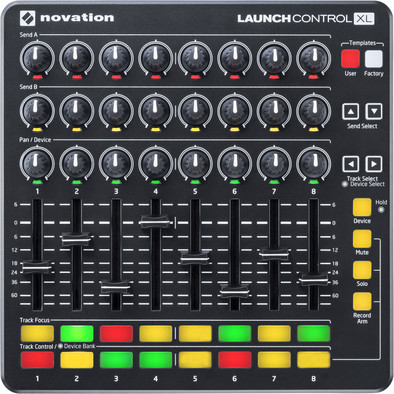
Never use your mouse again and control the Ableton Live via the Novation Launch Control XL. You have complete control over 8 sound tracks via the buttons and sliders on this MIDI controller. Transfer your focus from the computer to the music and produce your tracks hands-on, whether you're at home, in the studio, or live on stage. Are you an Ableton DJ? You can also use the Launch Control XL as an 8-channel mixing console to mix music. You can easily attribute software functions to the buttons and sliders as you see fit.
Included audio software | Ableton Live Lite, Launch Control XL MIDI Editor, Loopmaster 4GB samples | |
|---|---|---|
Programmable drum pads | ||
Hot cues | ||
Sampler | ||
Filters |
5 stars
5
4 stars
1
3 stars
0
2 stars
0
1 star
0
Knobs feel solid and spin nicely (not endless). Faders are great. Pads feel good. The bottom consists of a rubber slipmat, very nice! Ableton live lite is included, as are a number of Ableton live effects and a large sample pack. Works with all possible DAWs and DJ programs. Programmable per knob, fader and pad by means of midi-learn.
Anil B.
24 December 2016
Automatically translated from Dutch
Knobs feel solid and spin nicely (not endless). Faders are great. Pads feel good. The bottom consists of a rubber slipmat, very nice! Ableton live lite is included, as are a number of Ableton live effects and a large sample pack. Works with all possible DAWs and DJ programs. Programmable per knob, fader and pad by means of midi-learn.
Dirty BUR
24 December 2016
Automatically translated from Dutch
I bought the launch control because I was looking for buttons! And those are pretty hard to find: just buttons. No other fuss, just assignable buttons to control your DAW. The launch control was, as far as I've researched, one of the few devices that offers that: alone. but. buttons. :)
The device is plug & play. The rubber bottom ensures that the launch control does not slip and the rotary and push buttons feel sturdy. The lines on the buttons and faders also ensure that you can always quickly see at which level they are located.
Especially the 'device function', with which you can control the parameters of your instruments, is wonderful. Before that I used the Maschine Jam, but rotary knobs do the job a lot better than 'touch-sliders' (or what do you call those things ;) 1+1=3 in this case.
A definite plus is - and now I must try to describe it well - that when you have controlled a track/instrument with the launchcontrol and you switch to another track/instrument, the parameters of that new instrument don't suddenly shoot up or down because your buttons are in that position. For example: instrument 1, you set reverb to +60%. You switch to instrument 2, but that reverb is set to 0. If you then start turning the "reverb knob" of your launch control, the reverb does not suddenly shoot up (because the knob indicates that value), but remains quietly at 0 . Maybe that goes without saying, but I was pleasantly surprised!
The operation of tracks/instruments with the lauchcontrol is clear, but if you have more than 8 tracks or if you want to control different parameters within an instrument (e.g. macro controls, audio effects), then you have to look on the screen to see which parameters you want to use. serves. You can't tell from the launch control. This ensures that in those cases you regularly have to look at your screen to see what you are doing. On the other hand, if you are only concerned with the 'sends', 'panning', basic device controls and the faders, you can just go ahead and lose yourself in the buttons :)
Another possibility, but which I have not yet delved into, is the creation of user templates via the Novation Lauch Control XL editor: software to assign MIDI functions to all buttons. If you get stuck on the factory templates, you can always satisfy yourself there ;)
All in all I am very happy with it, both in terms of functionality and the construction of the lauchcontrol. Definitely recommended if you're looking for straightforward operation.
Fred Jonker
17 November 2018
Automatically translated from Dutch
Product number | 494119 | |
|---|---|---|
Manufacturer code | RNO LAUNCH-CONTROL-XL-B | |
Brand | Novation | |
Warranty | 2 years | |
Processing of your defect | Via Coolblue | |
Old product returned for free |
Programmable drum pads | ||
|---|---|---|
Programmable rotary controls | ||
Number of rotary knobs | 24 | |
Programmable push buttons | ||
Number of buttons | 16 | |
Programmable faders | ||
Number of faders | 8 |
Step sequencer |
|---|
Audio software included | |
|---|---|
Included audio software | Ableton Live Lite, Launch Control XL MIDI Editor, Loopmaster 4GB samples |
USB port | |
|---|---|
Number of USB ports (back) | 0 |
Number of USB ports (side) | 1 |
USB version | USB 2.0 |
Number of USB ports (front) | 0 |
Number of USB 2.0 connectors | 1 |
MIDI input | ||
|---|---|---|
MIDI output | ||
MIDI throughput |
Power source | |
|---|---|
Power supply type | Via a different product |
Depth | 18,5 cm |
|---|---|
Height | 1,6 cm |
Width | 18,5 cm |
Material | Plastic |