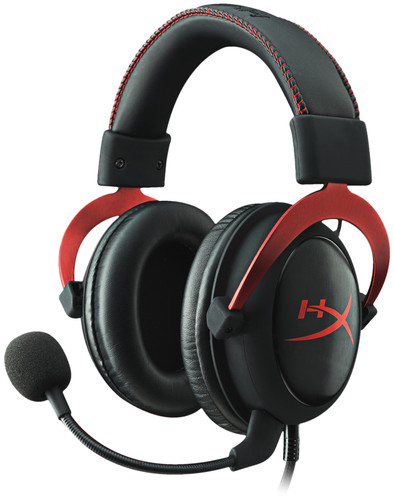
HyperX Cloud II Red

Never available again
View alternatives in the sidebar
View alternatives in the sidebar
Product number | 567636 | |
|---|---|---|
Manufacturer code | 4P5M0AA | |
Brand | HyperX | |
Processing of your defect | Via Coolblue | |
Old product returned for free |
Computer platform | PC (Windows), PlayStation 4, PlayStation 5, Xbox One, Xbox Series S, Xbox Series X | |
|---|---|---|
Sound reproduction | Surround | |
Connection type | Wired |
Audio channels | 7.1 | |
|---|---|---|
Noise canceling | ||
Volume control speaker(s) | ||
Volume controls location | Cord | |
Speaker drivers | 53 mm |
Microphone noise suppression | ||
|---|---|---|
Microphone mute function | ||
How to mute | Via the button on the cord | |
Type of microphone | Removable |
Bluetooth | ||
|---|---|---|
USB port | ||
Type of USB port | Standard USB-A | |
Headphone jack | ||
Braided cable | ||
Cable length | 3 m |
Lighting peripherals |
|---|
Material | Metal | |
|---|---|---|
Ear cups design | Closed design | |
Ear cushion material | Leather (skai) | |
Filling ear cushions | Foam | |
Foldable | ||
Color | Black, Red | |
Weight | 320 g |
Computer platform | PC (Windows), PlayStation 4, PlayStation 5, Xbox One, Xbox Series S, Xbox Series X | |
|---|---|---|
Connection type | Wired | |
Sound reproduction | Surround | |
Microphone noise suppression | ||
Noise canceling |
According to our gaming headset expert
Your friends don't hear background noise thanks to the noise canceling microphone.
Thanks to the memory foam, the ear cushions completely shape to your head.
You can easily remove the microphone from the headset when you're not using it.
Surround sound is only available on PC.
Due to the wired connection, you're always tied to your controller or PC.
Game comfortably on any platform with the HyperX Cloud II Red. You connect this gaming headset via the 3.5mm audio cable. This means the headset is plug and play, so you can use it right away. With surround sound, you can hear all the game audio in 360 degrees around you. That way, you know exactly where your opponents are coming from. In addition, you can communicate online with friends without background noise thanks to the noise suppression in the microphone. This way, your message always comes across clearly. If you often play alone or don't need a microphone, you can easily remove the headset microphone. This keeps it out of your way and you can keep gaming undisturbed.
Note: the included volume control doesn't work when you connect the headset to your PlayStation via the controller.
5 stars
425
4 stars
175
3 stars
14
2 stars
0
1 star
0
Sound quality
User friendliness
Fit
Wearing comfort
Design
I've had this headset for a month or two now, so I've been able to use it enough for a good review.
The headset has very good sound, and there is even an option to turn on Surround Sound 7.1, but I personally find that to have a lower quality sound, tinier. A downside to the sound is that if you have your sound low, a soft noise comes through.
For the rest, the headset fits well due to the soft ear cushions (another pair of ear cushions is included), and you can wear it on your head for four hours in a row if necessary. Thanks to the adjustable headband, anyone can use this headset.
The headset also comes with a sound control, although it says on the product page that it is not included. This regulator is on the cord. With this you can adjust the volume of the headphones, adjust the volume of the microphone (I'll get to this in a moment), mute your microphone and activate Surround Sound 7.1.
The microphone has a good quality, and you can remove it if you don't need a microphone for a while. Because there is a foam microphone cap at the end of the microphone, other people will not experience any noise when you talk.
Finally, I want to say a few more things:
In short, the Kingston HyperX Cloud II Red is a good headset for a good price that you can use for a long time.
Sietse Rijpstra
9 July 2015
Automatically translated from Nederlands
Sometimes you get that: suddenly it's time for something new and in my case it meant that there had to be a gaming headset with 7.1 surround sound quality. That turned out to be not so easy, because the range of headsets is huge. That's why I decided to make some demands: the new headset had to have a cord, be suitable for both PC and the PlayStation 4, at least offer decent 7.1 sound on the PC and not cost more than 100 euros. That made the offer a bit clearer. After reading quite a few (sometimes conflicting) reviews, I finally opted for the HyperX Cloud II from Kingston, which is available in the colors red and gray (Gunmetal).
When unpacking, I immediately noticed what I had already read: the packaging is very well cared for. A nice, sturdy, cardboard box, containing all parts of the headset neatly protected by foam. In addition to the headset, the box also contains an adapter plug to plug the Cloud II into the plane, a bag to carry everything and an extra set of foam ear cups. On the outside of the box are the logos of a number of “professional gaming organizations” that have made the Cloud II their official headset. That promised something!
The quality radiates from the headphones. Not cheap plastic, but brushed aluminum and sturdy plastic. Faux leather ear cups are fitted as standard, which I personally find get sweaty quite quickly, so I swapped them out with the other pair after a short while. That was fairly easy. On the headphones you will find a rubber cap, behind which the connector of the separately supplied microphone is located. After removing the cap, the microphone easily clicks into place. The headset has a fixed cord with a 3.5 mm mini-jack plug. The supplied extension cable makes it possible to connect the headset via USB. The extension cable contains a remote control with a built-in sound card, which provides 7.1 virtual surround sound. The remote control has buttons to adjust the volume of the microphone and speakers and a button to activate/deactivate the 7.1 display. There is a clip on the back so that you can attach the box to something. The cords are woven and look nice and sturdy.
To start, I connected the Cloud II to my PC via USB. The sound turned out to be very good: the 7.1 virtual surround sound is more than convincing. Some reviews have claimed that activating it only increases the volume, but there really is a spatial effect. In first person shooters this helps to determine where your opponents are. The microphone does its job well, partly thanks to the noise canceling.
For the next test, I connected the device to my MacBook via USB. Here too, the sound quality was excellent and the 7.1 worked properly. For this review, I thought it would be fun to compare the Cloud II with my Sennheiser HD 600, a high-end headset that costs more than 3 times as much as the Cloud II. Using a splitter, I connected both headphones via the mini-jack, so that I could do a direct comparison when playing music. The difference in quality turned out to be much less than the large price difference would suggest. With slightly more prominent bass and highs, the sound of the Cloud II is less balanced than that of the HD 600, but all details in the music can be heard well. The sound is really captivating. The combination of the Cloud II and my mobile phone produced the same result.
Now it was the PS4's turn. The Cloud II can be connected to a wireless controller with the mini-jack and that worked properly: the headphones and microphone were recognized immediately. The sound from the console played on the Cloud II (in stereo) after I designated it as the output device. On the PS4, 7.1 virtual surround sound would not be supported, but of course I had to hear that with my own eyes z… er, with my own ears. So just plug the extension cable into the USB port. The illuminated HyperX logo on the remote came on and much to my surprise I was able to turn 7.1 on and off. The Cloud II therefore does even more than is promised. The only catch is that you can't use the volume buttons on the remote. If you do try that, the button for 7.1 will no longer work. This may be the reason that surround sound is not officially supported for the PS4.
Conclusion: The HyperX Cloud II is a beautifully designed and well-made headset that delivers such great sound quality for its price range that it can be used for both gaming and listening to music. The 7.1 virtual surround sound really adds to the gaming experience. The concept of a sound card in the cable means that no drivers need to be installed, which means that the headset can be used in combination with many types of devices. If you're looking for a good gaming headset for a reasonable amount, you won't go wrong with this.
Bart Hamer
31 August 2017
Automatically translated from Nederlands
Always had Turtle Beach, flirted with Razer, and then I came across this on a website. Unexpected and wildly enthusiastic reviews. Now I find it difficult to blindly order things like this on the net, but I took a risk anyway.
Extremely flexible in ordering, paying and receiving. So I immediately connected to my father's expensive stereo. wow. That in a word. What a difference, with the somewhat shrill sound I was used to from the PX22. And they were immediately comfortable.
Immediately compared with my father's audio headset. (Senheiser HD.580). It was better, but it really wasn't much and the Senheiser is 3 times as expensive.
But, then gaming, Xbox one, call of duty. WoW again. Really just WoW.... Due to the good quality, the basses are deeper. Details much more audible. You simply hear your opponents better and earlier. Microphone is just good, not top but above average.
I am very happy with this headset and can recommend it to anyone. Also fits well, seals off the outside world better. Best buy I've made in ages.
I don't have surround sound yet. tested. Use it directly on the Xbox one (adapter required).
havar
23 May 2015
Automatically translated from Nederlands