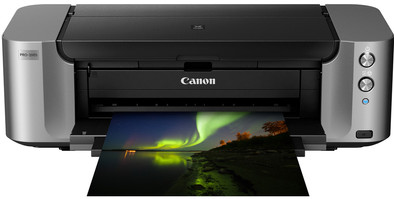
Canon PIXMA PRO-100s
Never available again
View alternatives in the sidebar
View alternatives in the sidebar
Print technology | Inkjet | |
|---|---|---|
Printer type | Printing only | |
Automatic duplex printing | ||
Color printer | ||
Maximum print size | A3+ | |
Photo paper drawer | ||
Built-in WiFi |
According to our printer expert
If you're looking for a printer especially aimed at printing photographs, then the Canon PIXMA PRO-100s is an excellent choice. The 8 color system prints lifelike colors on paper formats from 10 x 15cm to A3+. You'll always be able to find the right size for your photographs. The PIXMA PRO-100s can be shared with your network using your router or WiFi. Effortlessly send print jobs from your camera, smartphone, or tablet. A useful additional feature is the CD tray, which allows you to print on your CDs, DVDs, or Blu-ray discs.
5 stars
5
4 stars
5
3 stars
1
2 stars
0
1 star
0
After many, many hours (in total 1.5 days) we finally managed to produce a good print with the Pixma Pro 100.
For us as an advertising agency it is important that the print that comes out of the printer is as close as possible to the final print result. Unfortunately, that is not possible with any ICC profile from Canon! All ICC profiles are based on RGB color mode (display) and our workflow is based on CMYK color mode (print). Whatever Canon ICC profile I used (I also downloaded all kinds of extra profiles) the prints were just really bad! If I make a cyan patch I also want to see a cyan patch in the print and no purple or teal. grrr. I was really close to despair and was about to toss the printer in the trash.
I can't imagine that we are the only advertising agency in the world that has encountered this. Very strange that the Canon helpdesk also had no answer to this and puts the blame on Adobe (Indesign program). I expected more professionalism from Canon, because such a 20 kg A3+ printer is not really made for home use.
Attached is a photo of the entire search for the right print output and screen shot of our PrintFab settings.
In the end we bought software (PrintFab) through a German company (€119 extra) with which we could make a printer driver for the Pixma Pro 100 ourselves. All kinds of color adjustments can also be made with this software. For us it was sufficient to set the right paper in the PrintFab settings and especially the color mode "CMYK proof" and color space "Iso coated V2". Now the printer gives the result we expect from it. The cyan area is now also really cyan Phew, finally.
All in all, it cost us almost an entire set of ink cartridges. We could have saved ourselves that with a better answer from Canon.
Jeroen van Dijk
19 September 2017
Automatically translated from Dutch
Totally satisfied
Amr Alkhouri Fallouh
12 September 2016
Automatically translated from Dutch
Totally a top product! It does use 1/5 of your ink when installing and that's not exactly cheap so that hurts a bit. Incidentally, I have not yet found out how the printer downgrades the sharpness/quality of my photo/so, in Photoshop it is very sharp and in the software it is not and it passes that on to the printer. The correct paper has yet to be delivered and then I'll see how it works.
Ranzijn
23 October 2016
Automatically translated from Dutch
Coolblue takes care of everything, from taking out an insurance to repairs
For almost all accidents
More coverage in case of damage than your standard warranty
No deductible
First, add your printer to your shopping cart. On the next page, choose the Protection Plan below. You always have a 30-day return window and pay no deductible in case of damage.
3-year Protection Plan
75,-
one-time5-year Protection Plan
166,-
one-time
Product number | 617321 | |
|---|---|---|
Manufacturer code | 9984B009 | |
Brand | Canon | |
Processing of your defect | Carry-in warranty | |
Old product returned for free |
Width | 68,9 cm | |
|---|---|---|
Depth | 38,5 cm | |
Height | 21,5 cm | |
Color | Black, Gray | |
Weight | 19,7 kg |
Printer type | Printing only | |
|---|---|---|
Photo printer | ||
Portable (mobile use) |
Print technology | Inkjet | |
|---|---|---|
Number of cartridges/toner cartridges | 8 | |
Color printer | ||
Print speed black (ISO) | 0,6 ppm | |
Print speed color (ISO) | 0,6 ppm | |
First black page ready after | 51 seconds | |
Maximum print resolution height | 2400 dpi | |
Maximum print resolution width | 4800 dpi | |
Maximum print size | A3+ | |
Automatic duplex printing | ||
Borderless printing |
Scan functionality |
|---|
Copying functionality |
|---|
Fax functionality |
|---|
Built-in screen |
|---|
Printer cable included |
|---|
Compatible with operating system | Windows, iOS, macOS | |
|---|---|---|
Apple AirPrint | ||
Email print | ||
WPS (Wireless Protected Setup) | ||
Number of Ethernet ports | 1 | |
NFC | ||
Built-in WiFi | ||
Bluetooth | ||
WiFi direct | ||
USB port |
Manual input tray | ||
|---|---|---|
Photo paper drawer | ||
Output capacity output drawer | 100 | |
Maximum print size standard paper tray | A3, A3+, A4 | |
Input capacity standard paper tray | 150 | |
Number of standard paper trays | 1 |
Memory card reader |
|---|