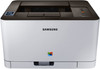
Samsung Xpress SL-C430W
Never available again
View alternatives in the sidebar
Print technology | Laser | |
|---|---|---|
Printer type | Printing only | |
Automatic duplex printing | ||
Color printer | ||
Maximum print size | A4 | |
Photo paper drawer |
According to our printer expert
The Samsung Xpress SL-C430W is a compact WiFi printer. With a speed of 18 pages per minute, this printer is suitable for at home or in a small office. Share the printer with others in your home or your colleagues via the ethernet or WiFi and everyone will be able to send jobs to the printer from their laptop, PC, tablet, or smartphone. Since this printer works with Google Cloud Print, you can connect with it, even if you're not home. Send your jobs remotely to the printer and they'll be ready and waiting when you get home.
5 stars
61
4 stars
81
3 stars
7
2 stars
0
1 star
0
Installation ease
Options
Print quality
If you are looking for a relatively cheap, simple small color laser printer, then this is a must. Color photos, even on plain paper, print quite well. The color reproduction matches very well with my color calibrated monitor. Only on even surfaces, such as a clear blue sky, you can see alternating light and dark bands. But then you have to look closely. According to the manual, this printer could handle 200 grams of photo paper in A4 format, but after several attempts, that turns out not to be the case. 160 grams is fine.
A separate Eco Driver is included, which is activated each time after a print job. This allows you to make settings regarding savings on toner, double-sided printing and you can also select whether you want to omit images or text in a document. The extra Eco Driver window is a bit annoying if you want to print something quickly, but it does make you aware to use paper and toner more economically. For temporary printing, the print quality at 25% is still very acceptable. An estimate of the savings is also displayed in the Eco Driver window.
Furthermore, a Printer Diagnostics program is included, but it is necessary to agree to send the data to Samsung. Without approval, you can therefore not first see what the problem is before you decide to send the data.
Due to a multitude of not all matched software, it is quite a search for specific settings and information.
The contents of the supplied color toner cartridges, based on what I have now printed (about 20 photo prints and about 20 text pages) are just enough for about 250 prints. The black lasts a little longer.
Willem
29 October 2015
Automatically translated from Dutch
Been using it for a month now and still like it. Print jobs wirelessly from the PC as well as the iPad, iPhone and Android devices work flawlessly. A breath of fresh air from what we used before. Too bad that no network cable is included. A USB cable though. User manual is short and concise and self-explanatory. Prints are of good quality. Unless you really want photo quality, it will remain behind, then it is better to buy an inkjet printer. We use it for small business, black and white printing is fast, color printing a bit slower, but acceptable. Starts up fairly quickly, does not make a lot of noise, is larger in size than the image makes it seem on the internet, but then you have to read the specs carefully. Recommended, offer everything for the future, Google print, AirPrint, nfc printing and possibly via WiFi.
G Van de Vijfeijke
15 September 2015
Automatically translated from Dutch
good printer. prints quickly and beautifully. Installation was easy in my opinion. The printer also prints well. Definitely for the price
Bjorn Venema
8 August 2016
Automatically translated from Dutch
Coolblue takes care of everything, from taking out an insurance to repairs
For almost all accidents
More coverage in case of damage than your standard warranty
No deductible
First, add your printer to your shopping cart. On the next page, choose the Protection Plan below. You always have a 30-day return window and pay no deductible in case of damage.
3-year Protection Plan
22,99
one-time5-year Protection Plan
49,99
one-timeProduct number | 633570 | |
|---|---|---|
Manufacturer code | SS230C#EEE | |
Brand | Samsung | |
Processing of your defect | Carry-in warranty | |
Old product returned for free |
Printer size | Medium | |
|---|---|---|
Width | 38,2 cm | |
Depth | 30,9 cm | |
Height | 21,1 cm | |
Color | Gray | |
Weight | 9,96 kg |
Printer type | Printing only | |
|---|---|---|
Photo printer | ||
Portable (mobile use) |
Toner cartridge line | Samsung 404 | |
|---|---|---|
Print technology | Laser | |
Number of cartridges/toner cartridges | 4 | |
Color printer | ||
Print speed black (ISO) | 18 ppm | |
Print speed color (ISO) | 4 ppm | |
First black page ready after | 14 seconds | |
Speed class | Standard | |
Maximum print resolution height | 600 dpi | |
Maximum print resolution width | 2400 dpi | |
Maximum print size | A4 | |
Automatic duplex printing | ||
Borderless printing |
Scan functionality | ||
|---|---|---|
OCR |
Copying functionality |
|---|
Fax functionality |
|---|
Built-in screen |
|---|
Compatible with operating system | Linux, Windows, macOS | |
|---|---|---|
Connection type | Wired | |
Apple AirPrint | ||
Email print | ||
WPS (Wireless Protected Setup) | ||
Female standard USB-A port version | 2.0 | |
Number of Ethernet ports | 1 | |
Bluetooth | ||
USB port |
Manual input tray | ||
|---|---|---|
Photo paper drawer | ||
Output capacity output drawer | 100 | |
Maximum print size standard paper tray | A4 | |
Input capacity standard paper tray | 150 | |
Number of standard paper trays | 1 |
Memory card reader |
|---|