Never available again
View alternatives in the sidebar
View alternatives in the sidebar
According to our projector expert
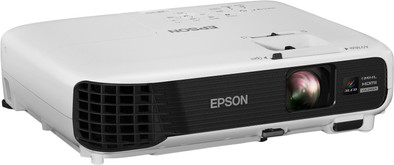
The Epson EB-U04's a projector you can use in your living room as well as in a presentation room, work area, or classroom. The 1920x1200 pixels WUXGA resolution ensures a sharp projection, even in the maximum 11-meter image size. You don't have to darken the room to get a clear image since the powerful lamp has a light output of 3,000 ANSI lumens. Do you have photos, videos, or a presentation on your smartphone or tablet? Connect your mobile device via an HDMI MHL connector and check out your content directly on the big screen. Thanks to the integrated media player, you can display images from USB storage.
5 stars
14
4 stars
13
3 stars
1
2 stars
0
1 star
0
I've had this Epson EB-U04 beamer at home for a week now and have watched for quite a few hours. I use the beamer with a manually retractable epson screen. Until recently I watched movies and series on a 50" LCD TV and in the past I had a 720P beamer from another brand. It is still impressive to be able to watch an image of easily 100+ inches. At a distance of 2.5 meters I already got a very large image, so fortunately the beamer does not have to be at a very great distance.
The beamer has a high resolution of 1920x1200 (this is even slightly higher than 1080P) because you have more vertical pixels. This makes the beamer very suitable for computer use and presentations. Unfortunately, with films and series you have extra black bars at the bottom and top because of the extra 120 pixels that are not used. The high brightness also helps with 3000 lumens. During the day without curtains, the image was even clear enough in normal mode. The eco mode was just a few lumens short. Watching series and movies is no longer pleasant during the day anyway, because you have to darken the room a bit for the contrast. But this is logical and applies to all beamers. So if you want to enjoy optimally during the day, make sure you have a good darkening.
According to the specifications, the lamp should last a very long time with 5000 hours in normal mode and even 10,000 hours in eco mode. With my previous beamer this was only half so that is definitely a big plus. According to the Epson website, a replacement lamp (ELPLP88) also costs less than 90 euros, which is therefore not expensive. If you would watch 3 hours a day in eco mode, the beamer will still last more than 9 years, which makes the beamer even suitable for use as all daily TV. A WiFi dongle is also available for the beamer if you want to stream wirelessly from a laptop/pc/mac. However, I just use the beamer via an HDMI cable.
The contrast of the beamer is a bit disappointing in the evening, I used an ND filter from a camera to lower the brightness a bit, so that the black also became a bit darker. This made watching dark scenes even more pleasant. The contrast therefore does not match a good LCD TV.
Another downside is the loudness of the fan on normal mode. It is then really audible in quiet passages. In the eco mode, the beamer is pleasantly quiet and you hardly hear it.
All in all, a good projector for presentations due to its high brightness and resolution. The beamer is also suitable for watching movies and series, but I can imagine that there are better alternatives with better contrast and which are quieter in normal mode.
Satch
13 March 2016
Automatically translated from Dutch
I got to know this beamer at the office. I always use it when giving presentations and at the Friday afternoon snack for the Playstation. Because of the good experiences, and because I like to watch movies, I regularly take it home. Then it is very handy that a carrying bag is included.
Connecting and setting up the projector is very easy. If it is perpendicular to the wall, you can adjust the image so that it is straight. So you don't have to run with the beamer.
If you want a beamer that you want to use for business presentations as well as at home for movies and gaming, then this is the beamer you should have in my opinion.
DrDoris
26 May 2016
Automatically translated from Dutch
Okay... WOW! I actually had no idea what to expect from a beamer and a screen of about 80 inches. Set up and setup is really easy. I could easily assemble the screen that I have with 4 legs and hang the screen on it. The distance between the beamer and the screen took a while to find, what the perfect distance would be, and how high the beamer should be. Thanks to an extendable leg at the bottom of the projector, you can easily raise it a little higher, without having to put anything underneath to get it higher. Unfortunately I haven't managed to get my whole screen "filling the screen" yet. But it comes close :)
When I first turned on the beamer, I personally expected a blurry image. But it was just the opposite, what a super clear, tight image! I don't have a negative word to say about the image quality, it is just perfect beyond expectations! The beamer comes in a handy kind of laptop bag. So you can easily take it with you wherever you go. I had it in the bedroom myself in the beginning, to enjoy Netflix in bed at night :) Because of the different types of connections you can really do everything with it. For example, connect your Chromecast to it, insert a USB stick to view your photos, you name it. After a few days I moved it to my Game room, to see what it would be like to play the PlayStation on it. I can say 1 thing; I don't want to play on my "small" TV anymore after experiencing this. I am a real movie and game lover and therefore only want to watch with excellent quality images. That was always fine on the TV, but now that I have the beamer, the TV itself is almost no longer on. I connect everything to the beamer, in order to view on the largest and most beautiful screen possible. I use it both during the day and in the evening, and so far have not experienced a negative effect due to, for example, the sun, or that it is too bright in the room.
The only thing I can give as a "disadvantage" of the beamer is the price, it is quite on the expensive side. But...... For this money I don't think you can get a TV with such a big screen, so many possibilities, and that is easy to carry. And it makes a slight buzzing sound when turned on. Not disturbing, but you can hear it, but I have to say that I only noticed that in the beginning, now I don't even notice it anymore :)
Dtccindy
13 March 2016
Automatically translated from Dutch
The Epson EB-U04 was rated best by independent consumer website Kieskeurig.

Product number | 653865 | |
|---|---|---|
Manufacturer code | V11H763040 | |
Brand | Epson | |
Processing of your defect | Carry-in warranty | |
Old product returned for free |
Brightness | 3000 lm | |
|---|---|---|
Contrast ratio | 15000 | |
Throw ratio | 1,38 - 1,68 m |
Input lag | 40 ms | |
|---|---|---|
Minimum image size (diagonal) | 30 inches | |
Maximum image size (diagonal) | 300 inches | |
Projector technology | LCD | |
3D |
Zoom function | ||
|---|---|---|
Maximum projection distance | 10,98 m | |
Keystone correction | ||
Keystone correction | Horizontal, Vertical | |
Vertical keystone degrees | 30 ° | |
Horizontal keystone degrees | 30 ° | |
Lens shift | None |
Expected lifespan lamp (normal use) | 10000 hours | |
|---|---|---|
Replaceable lamp |
Maximum noise level | 37 dB | |
|---|---|---|
Noise level (saving mode) | 28 dB |
Media player | ||
|---|---|---|
Memory card reader |
Built-in WiFi |
|---|
HDMI connector | ||
|---|---|---|
USB port | ||
Number of USB ports | 2 | |
VGA connector | ||
Mobile HD Link (MHL) | ||
Digital optical connector | ||
Screen trigger | ||
Kensington lock |
Weight | 2,6 kg | |
|---|---|---|
Height | 7,7 cm | |
Width | 29,7 cm | |
Depth | 24,4 cm | |
Color | White |