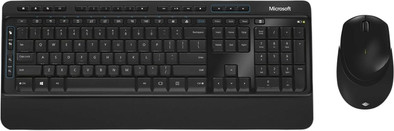
Microsoft Wireless Desktop 3050 Keyboard and Mouse QWERTY
Never available again
View alternatives in the sidebar
View alternatives in the sidebar
According to our keyboard and mouse set expert
The Microsoft Wireless Desktop 3050 is a wireless keyboard and mouse combination for your computer at home or in the office. They keyboard features a soft wrist rest, allowing you to type long reports and emails comfortably. Thanks to AES encryption, you can encrypt your keystrokes to protect your personal information, preventing your colleagues from snooping in your files. Simply plug the included dongle into your laptop or computer to get started right away.
Keyboard layout | QWERTY | |
|---|---|---|
Silent mouse | ||
Connection type | Wireless | |
Bluetooth | ||
Adjustable DPI | ||
Backlit keyboard | ||
Color | Black |
5 stars
41
4 stars
35
3 stars
11
2 stars
2
1 star
0
Connection options
Layout
Design
Connect and work. Keyboard and mouse work fine, feels good and solid. Function keys are a bit difficult to find. You quickly unintentionally press buttons on the side of the mouse. Think I'll just turn that off.
R.C. van Viegen
6 November 2019
Automatically translated from Dutch
The keyboard and mouse are very solid. The keyboard stays put on a smooth surface. The keys are very pleasant to press. The mouse is large and very ergonomic. I disabled the buttons on the side of the mouse, because you can easily press them unintentionally. In my opinion, the combination has a modern and beautiful design. The mouse and keyboard are easy to install by plugging in a USB stick that fits into the mouse. The additional software is also easy to install but is not required. A big disadvantage is that the mouse has a maximum range of 50cm, which is rather limited. This is not a problem for me, but if your PC is under the desk, this can already cause problems!
Joost
10 February 2020
Automatically translated from Dutch
If it does it's a great product. But we have 3 sets on the case and with all 3 the binding often falls away. Because of this I have to plug the USB connector in and out of the USB port. This is annoying
Mark
4 December 2019
Automatically translated from Dutch
Product number | 662662 | |
|---|---|---|
Manufacturer code | PP3-00023 | |
Brand | Microsoft | |
Warranty | 2 years | |
Processing of your defect | Via Coolblue | |
Old product returned for free |
Input | Optical | |
|---|---|---|
Number of buttons | 2 | |
Ergonomic design | ||
Left or right-handed | Left-handed, Right-handed | |
Adjustable DPI | ||
Mouse controls | Buttons, Scroll wheel | |
Suitable for gaming | ||
Programmable buttons | ||
Silent mouse | ||
Horizontal scrolling | ||
Mouse surface | Matte surface | |
Lighting peripherals |
Keyboard layout | QWERTY | |
|---|---|---|
Geographic keyboard layout | US layout | |
Physical keyboard layout | ANSI | |
Multimedia shortcuts | ||
Backlit keyboard | ||
Flat keys | ||
Mechanical keyboard | ||
Programmable keys | ||
Spill-resistant | ||
Wrist rest |
Connection type | Wireless | |
|---|---|---|
Nano receiver | ||
Bluetooth |
Power supply type | Rechargeable battery | |
|---|---|---|
Rechargeable battery |
Keyboard composition | Keyboard, Mouse | |
|---|---|---|
Height | 5 cm | |
Width | 55,6 cm | |
Depth | 21 cm | |
Color | Black | |
Weight | 1298 g |
