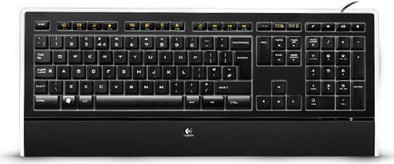
Received my logitech K740 iluminated keyboard today.
The first thing I noticed when I plugged it in was the pleasant look of the backlit keys and that was exactly the reason why I bought the keyboard.
I am very happy with it, but can't help but add some comments here.
First off, I really like the keystrokes to work with, they're quiet and the backlighting only shows the characters on the keys, while the rest of the keyboard remains pretty much dark, a very nice contrast.
However, I find the legs that you can fold out to tilt the keyboard a bit vulnerable, but since the keystroke is very light, you don't really run the risk of breaking them by "ramming" the keys.
I just don't want to think about what happens to the legs if something heavy accidentally falls on the keyboard, but of course I'm not going to try that.
The keys are slightly larger than on a standard keyboard, which takes some getting used to in the beginning, as well as the location of the "insert" key, which has been moved to a completely illogical place in my opinion, while the "delete" key, on the other hand, is larger than normally performed.
What I do find a bit arrogant of logitech is to determine for the consumer which function keys are assigned to which application, I would have preferred standard function keys, because I don't want to be told by a manufacturer which program I should use for example to listen to music or to search for something on the internet.
In addition, I also find it a pity that the indication of the function keys F1, F2 etc. is on the side of the keys and because of the orange icons are NOT illuminated.
My proposal to Logitech is therefore to omit those orange icons on the function keys from now on, but if it has to be done after all, I would like to propose to put a miniature LCD screen on those keys so that the consumer can use software to set which icon to use together with which want to assign a function to a key.
The indicator lights for, for example, the numpad, the capslock key, etc. are also in a rather illogical place in my opinion, namely at the bottom right of the keyboard.
Now I don't use the numpad much myself, but I can imagine that someone who does use it a lot then shields the lights by hand and that can be quite annoying if you have to work quickly and accidentally press the numlock key press and then don't understand why your cursor suddenly jumps across the screen like a fool.
In addition, I also miss a separate button for my computer's sleep mode that I did have on my late HP keyboard.
But luckily that can be solved with shutdown monster (freeware)
In that program you only have to enter a hotkey, for example CTRL+ALT+F12 for hibernate and then your computer will go into sleep mode with that hotkey (if activated in the settings)
So far my review about the logitech K470m iluminated.
I will definitely NOT return it, because the primary reason I bought it (the backlit keys) exceed my expectations.
This is recommended for people who like to work in dim light and who do not want those extra functions on the F keys.
Then a little footnote for coolblue:
I would like it if I could also give "no opinion" in addition to the choices for whether or not to recommend it, because now I am forced to choose "not recommended" while I think the product is in between.