Wacom Bamboo Folio Large
Never available again
View alternatives in the sidebar
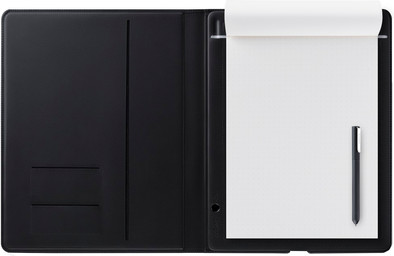
With the Wacom Bamboo Folio Large, you can take notes and draw with pen and paper, and then convert this to digital files. Save your notes in various file formats, including JPG and PDF. You can synchronize, edit, and save them on a smartphone or tablet that you connect with via Bluetooth. You can also export files to the cloud to store them. The ergonomic pen gives you a good grip to draw clean lines. Using the pressure sensitivity of the pen, you can determine the thickness of the lines and letters that you draw. When you don't use the pen, turn the top half of the pen so that the tip is protected against damage. The Bamboo Folio Large is similar to an A4.
Compatible with operating system | Android, Windows, iOS, macOS | |
|---|---|---|
Multi-touch | ||
Connection type | Wired | |
Width | 267 mm | |
Depth | 19 mm |
5 stars
5
4 stars
4
3 stars
0
2 stars
1
1 star
0
I can now write notes and/or explanations while continuing to look at a class or group of people while these notes and/or explanations are visible to the others. With the live option, this even happens immediately.
EriC vd Ven
14 February 2017
Automatically translated from Dutch
Wacom is once again living up to its name as an innovative company that wants to bring creative and high-quality products to the market that are also user-friendly. Such a technical miracle for such a low price is a miracle in itself.
Rudy Blomme
24 November 2016
Automatically translated from Dutch
I mainly use it to take notes. They are immediately available digitally so I can't lose them anymore, I can also easily share them without having to scan/copy. Since it can only be used with the Bamboo pen (tested it with a regular bik and got no response) I'll have to look for refills, hopefully I'll find them quick and not too pricey.
The Folio isn't cheap but I suspect I'll be able to use it almost every day. Typing notes on the laptop has its advantages of course and I still type faster than I can write, but I miss the freedom of writing on paper. For me this is still faster if I quickly want to add a diagram or figure.
The folder may be a bit bulky, it cannot be compared with a regular notepad. But that is also not normal and I am happy to take it, the benefits that I get out of it weigh more for me.
I haven't tried the ink to text feature because I don't think it's necessary, so I can't comment on that.
Marian
25 November 2016
Automatically translated from Dutch
Product number | 735984 | |
|---|---|---|
Manufacturer code | CDS-810G | |
Brand | Wacom | |
Warranty | 2 years | |
Processing of your defect | Carry-in warranty | |
Old product returned for free |
Drawing tablet has integrated screen | ||
|---|---|---|
Height of active drawing area | 297 mm | |
Width of active drawing area | 210 mm | |
Multi-touch | ||
Left or right-handed | Left-handed, Right-handed | |
Number of buttons | 0 | |
Programmable buttons | ||
Tilt sensitive | ||
Compatible with operating system | Android, Windows, iOS, macOS |
Connection type | Wired | |
|---|---|---|
Connector type | USB |
Weight | 810 g | |
|---|---|---|
Width | 267 mm | |
Depth | 19 mm | |
Height | 338 mm | |
Material | Plastic | |
Finish | Matte and glossy |
Power source | ||
|---|---|---|
Power supply type | Via a different product | |
Cable length | 1 m |