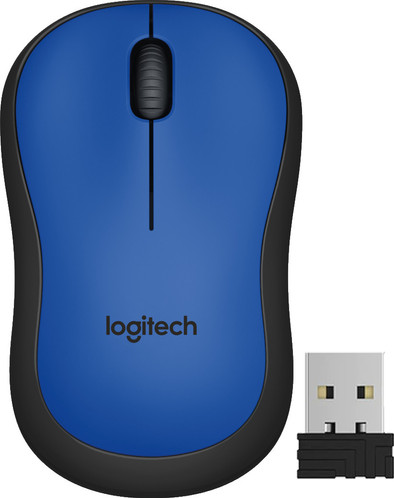
Logitech M220 Silent Wireless Mouse Blue
Never available again
View alternatives in the sidebar
View alternatives in the sidebar
Connection type | Wireless | |
|---|---|---|
Bluetooth | ||
Mouse model | Standard | |
Ergonomic design | ||
Left or right-handed | Left-handed, Right-handed | |
Suitable for gaming | ||
Silent mouse | ||
Depth | 9,9 cm |
According to our mouse expert
With the Logitech M220 Silent Wireless Mouse, you'll never be bothered by annoying click noises again. This mouse has silent buttons with rubber switches. This reduces the sound and makes a click 90% less noisy than standard mouses while the familiar click feeling is preserved. Connect the USB nano receiver to your laptop or PC and you'll instantly connect to the mouse wirelessly. Changing batteries is a thing of the past, because the mouse can last up to 18 months on 1 charge with the automatic sleep mode. The symmetrical shape of the mouse means that it can be used both left-handed and right-handed.
5 stars
245
4 stars
133
3 stars
11
2 stars
2
1 star
0
Connection options
Ergonomics
Accuracy
Size
Design
I use this mouse for several hours at a time every day. I use it for the laptop and work a lot with word, so the silent scrolling and clicking is very nice for myself and my environment.
Dennis van der Veen
6 November 2016
Automatically translated from Dutch
Incompatibility with logitech's unified receiver should have been listed on the site, then I would have chosen a different, compatible type.
Hans Stofmeel
9 March 2018
Automatically translated from Dutch
My 2nd Logitech wireless mouse. Plug in right away - no drivers etc to install. I have 2 Lenovo laptops for work. Personally, I use a MacBook Pro and a Surface Pro 3 - this mouse works flawlessly on all laptops. It is also lighter than the previous one.
My 'Cons' The fact that this mouse is lighter than the previous one makes it feel 'cheaper'. This feeling is enhanced because the previous mouse was less slippery so felt nice in the hand. This one doesn't feel that way. No serious objections to this mouse, but something that stands out to me compared to my previous Logitech mouse.
Ketan Tailor
24 May 2017
Automatically translated from Dutch
How large is a mouse exactly? It's often difficult to see on a photo. That's why we thought of the thumb rule below.
Choose a mouse that takes up more than half of the surface of the dimensions of your hand. You can find the dimensions of the mouse under the specifications.
Your hands are often 2 times longer from your wrist to the tip of your middle finger than that it's wide from your little finger to the knuckle of your thumb. The closer the length and width a mouse come to 60% of the length and width of your hands, the more likely it is that the mouse feels comfortable in your hand.

Product number | 736153 | |
|---|---|---|
Manufacturer code | 910-004879 | |
Brand | Logitech | |
Processing of your defect | Via Coolblue | |
Old product returned for free |
Mouse model | Standard | |
|---|---|---|
Input | Optical | |
Number of buttons | 2 | |
Ergonomic design | ||
Left or right-handed | Left-handed, Right-handed | |
Adjustable DPI | ||
Mouse controls | Buttons, Scroll wheel | |
Suitable for gaming | ||
Programmable buttons | ||
Lighting peripherals | ||
Silent mouse | ||
Horizontal scrolling | ||
Mouse surface | Any surface |
Connection type | Wireless | |
|---|---|---|
Nano receiver | ||
Frequency bands | 2.4GHz | |
Bluetooth |
Plug and Play | ||
|---|---|---|
Compatible with operating system | Windows, macOS |
Power supply type | Rechargeable battery | |
|---|---|---|
Rechargeable battery | ||
Battery level indicator |
Color | Blue | |
|---|---|---|
Mouse size | Small | |
Width | 6 cm | |
Height | 3,9 cm | |
Depth | 9,9 cm | |
Material | Plastic | |
Finish | Matte and glossy |
