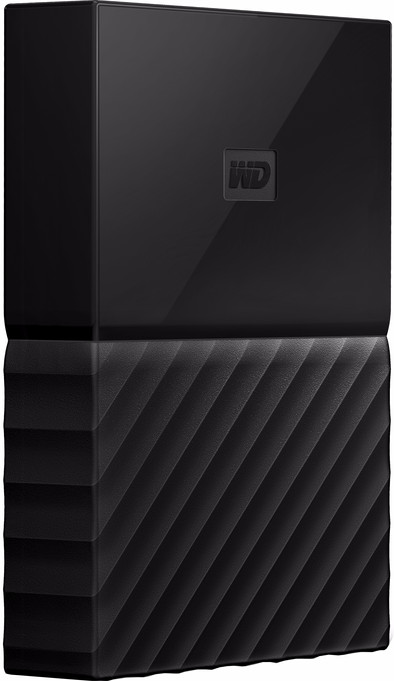
WD My Passport 2TB Black
Never available again
View alternatives in the sidebar
View alternatives in the sidebar
Total storage capacity | 2 TB | |
|---|---|---|
Hard drive type | 2.5 inches | |
Formatted for operating system | Windows | |
Type of USB port | Standard USB-A | |
Backup feature | ||
Color | Black |
According to our external hard drive HDD expert
Store all your music, photos, and projects on the WD My Passport 2TB Black. Connect it to your laptop and transfer all your files to the WD My Passport with USB 3.0. You can easily transfer a 2GB file in 10 seconds. Use USB to connect the Passport to your laptop or PC and get started straight away. Want to make backups? With the help of the WD SmartWare Pro software, this is done automatically. You can decide whether you want to have it done constantly in the background, or at fixed times. If you want to store your files securely, just use the WD Security Software to protect them with a password, so that no one can access your private files.
5 stars
22
4 stars
5
3 stars
1
2 stars
0
1 star
0
The hardware is fine, but the backup software installed on the disk is a crime. If you look at the files on the virgin drive, you will see WD Backup and WD Smartware. After registration, WD Smartware is gone! WD Backup does not recognize my other external drives, not even WD Elements. When starting up the computer, you have to wait an annoyingly long time for a pop-up screen in the bottom right corner, where little information appears. If you want to retrieve e-mail in the meantime, you will receive a message that there is no connection. You need to turn off that screen first. If the computer is turned off when a backup would start, no catch-up is made when turning it on. When I bought it, the backup software seemed attractive to me, but it was disappointing. I'm throwing that WD Backup off.
Gijs Nederlof
17 February 2018
Automatically translated from Dutch
WD icons among storage system manufacturers. Quality-design-reliability-price per GB
Vande Pitte Ronny
9 November 2017
Automatically translated from Dutch
Super slow if you use the backup software. Simply copying and using it as an external drive is considerably easier. No option to reset your password. You just lost all your data.
T. De Graaf
29 January 2018
Automatically translated from Dutch
Product number | 743875 | |
|---|---|---|
Manufacturer code | WDBS4B0020BBK-WESN | |
Brand | Western Digital | |
Processing of your defect | Carry-in warranty | |
Old product returned for free |
Total storage capacity | 2 TB | |
|---|---|---|
Cache memory | 8 MB | |
Hard drive type | 2.5 inches | |
Formatted for operating system | Windows |
Shockproof | ||
|---|---|---|
Dustproof | ||
On/off switch | ||
Backup feature | ||
Protected memory (USB) | ||
Protection type (USB) | Data encryption, Password | |
Data encryption | Software encryption | |
Recommended for use | Making a backup, Store photos and videos |
Width | 8,2 cm | |
|---|---|---|
Depth | 11 cm | |
Height | 2,2 cm | |
Weight | 250 g | |
Color | Black | |
Material | Plastic |
USB port | ||
|---|---|---|
Type of USB port | Standard USB-A | |
Thunderbolt connector |