Somfy Smart Home Starter Kit Connected Lighting
Never available again
View alternatives in the sidebar
View alternatives in the sidebar
According to our smart home hub expert
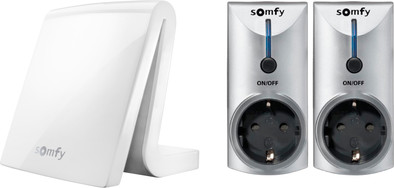
With the Somfy Smart Home Starter Kit Connected Lighting, you'll have everything you need to control your home lighting remotely. The kit consists of a Somfy TaHoma box and 2 smart sockets. Download the free app on your smartphone and/or tablet (iOS and Android), and turn your lamps on and off from anywhere. If you really don't want to have anything left to do, you can set up different scenarios. These will turn your lighting on and off automatically. The TaHoma box doesn't just turn your lighting on and off, it allows you to control all the connected devices remotely as well. These include shutters, sun-blinds, curtains, and your garage door. Pair the box with your modem or router, and the installation is completed.
5 stars
2
4 stars
1
3 stars
0
2 stars
0
1 star
0
Everything "hardware" looks decent, but the software could have a somewhat floaty look & feel.
Patrick
24 April 2017
Automatically translated from Dutch
Everything is very easy to operate and program. No hiccups in controlling components, great.
Peter Muijs
21 May 2017
Automatically translated from Dutch
Base unit is fine, and range is good and reliable. Given the price, started simple.
Frank Biegstraaten
12 June 2017
Automatically translated from Dutch
Product number | 759275 | |
|---|---|---|
Manufacturer code | 2401459 | |
Brand | Somfy | |
Processing of your defect | Carry-in warranty | |
Old product returned for free |
Color | White |
|---|---|
Material | Plastic |
Power supply type | Power grid |
|---|
Controls via app | ||
|---|---|---|
Compatible with smartphone / apps | ||
Controlled via Apple app | ||
Controlled via Android app | ||
Controlled via Windows app | ||
Linkable to home automation |
Frequencies | 433, 868 | |
|---|---|---|
Number of frequency channels | 1 | |
Protocol | IO, RTS |
Guaranteed support with updates | 60 months after release date | |
|---|---|---|
Year introduced | 2015 | |
Introduction month | June |