Never available again
View alternatives in the sidebar
View alternatives in the sidebar
According to our MIDI controller expert
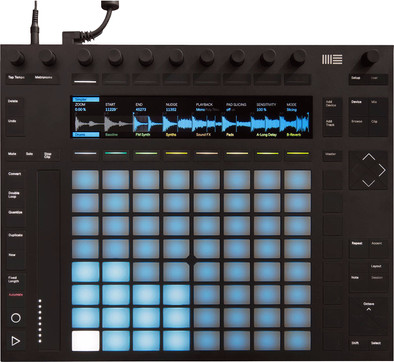
With the Ableton Push 2, you can control Ableton Live in the studio or on stage. The MIDI controller integrates perfectly with Ableton, enabling you to control all instruments, samplers, and effects with the push buttons and dials. Program all your rhythms and melodies with Ableton's sequencer and the touch-sensitive RGB pads. This makes the MIDI controller ideal for hammering out and arranging your musical ideas. Read the sound waves of your samples from the color screen, so you can set the correct starting point and pitch in an instant. Adjusting the sound of an Ableton software synthesizer? You can see exactly which parameter you're adjusting, and to what extent.
Included audio software | Ableton Live Intro | |
|---|---|---|
Programmable drum pads | ||
Hot cues | ||
Sampler | ||
Filters |
5 stars
10
4 stars
2
3 stars
0
2 stars
0
1 star
0
disclaimer: I also own the maschine mk3 and the maschine jam. I also have 7 midi controllers.. and I also work with cubase 9.5 pro, reason 10.
why first the disclaimer: ableton is not the center of the studio, that's cubase.
I bought the push 2 as an "instrument". each ecosystem brings its own working method and different results. the screen is of high quality (as is that of the machine by the way), and with the buttons and encoders it is quite easy to navigate through "devices" (instruments and effects), all parameters neatly accessible, clearly arranged. in a number of cases a nice visual feedback, but for some devices, where that would also be nice, this has not been implemented. I'm talking about the ableton devices themselves. the autofilter or reverb provide no visual feedback. with some devices that e.g. using filter envelopes have no visual feedback. you have to mix on the ear, that's true, but sometimes it is useful.
also eq8 device shows visual feedback, but not the difference between input and output signal. Shame. good here too, you use eq with your ears, but sometimes you immediately see where something is missing. so you will see that; the frequency spectrum as the sound plays, so it is sufficient.
ableton can get more out of the push 2's screen than it does now.
the 64 pads are quite good, good layout settings (the 64 pads can be set in multiple layouts). velocity sensitivity is good for 64 pads. they also have aftertouch. (the mk3 maschine has much better pads, even if only 16, but hey, I'm sorry... the maschine can't record aftertouch, big drawback.)
the mk3 machine has several handy buttons for workflow acceleration, sometimes accessible with the shift button, but it is clearer, faster. on push 2 it certainly works, but is more focused on playing in, than keeping an overview after playing in, although push 2 certainly has possibilities to edit clips, edit notes after playing in Ableton's stubborn way. works fine after getting used to it. perhaps this is also a very personal opinion and there will be people who prefer the push 2 for post-processing of clips.
no midi connectors is a loss, a sound interface as well (the maschine mk3 does have these 2 and makes it usable to take it with your laptop, without other stuff...).
working with samples works very well. I use my own samples (self-programmed synths, recordings via a field recorder, etc. etc.), and the so-called "simpler", 1 of the 2 samplers (in live 10 suite that is), has very extensive possibilities, easy to make your samples sound different already within "simpler". slicing beats is a no-brainer, and you can slice up to 64 pads, which is very nice.
the drum kits are not all equally good, but usable. However, the implementation via the so-called drum rack has been expanded. there is a lot to set up.
i compare push 2 and ableton live too much with maschine, they are both equally good in my opinion, but for me maschine is still the "boss". it is that I have a number of options via ableton that are not in maschine. and even though they are sometimes small, sometimes big differences, they make the… difference…
for someone who does not have a machine, and wants a total solution in one controller, the ableton push 2 is definitely recommended, although the software that is included is too little, to get all the power from the program.
the software is buggy.... that is with all DAWs, but the release notes from ableton are very extreme, meaning; she always has to solve many problems. nevertheless ableton works just fine, it is a very widely used DAW and can give you everything you want.
Are you in doubt between Maschine or Ableton? maschine mk3 does come with the complete software and a sound library that is unsurpassed. Again, if you want more from Native Instruments, you have to upgrade. at sales, about once or twice a year, the upgrade is half price. I also own complete 11 ultimate (version 12 is not interesting enough), and that gives immense possibilities for maschine. and then you come to the same price as ableton live 10 suite.
the choice is very personal, the maschine mk3 is actually only complete with the maschine jam, although you can also do without it, it works very well. contradictory. It's because I have the jam, and I'm so used to it.
it is what you want, want to achieve. in maschine 2.x software there are some limitations that ableton, even in live intro, doesn't have (but intro itself has some limitations...), but there are plenty of workarounds, which are not difficult or cumbersome, to achieve what you want.
so never listen to: you have to have the push 2, or you have to have the maschine mk3. it's too personal. trying it out is the only option.
they have both, well... then you're always good...
the push 2 including ableton live 10 standard or suite will provide years of enjoyment.
it would be the only controller you'll need as you can play well on it too. you don't necessarily need a keyboard. apart from a sound interface, you have everything within reach with 1 controller. that is the big advantage of the push 2. handy when you don't have much space or want everything in one.
I gave the sound quality a 5, but the push 2 produces no sound, the software does, and the software is strong enough to get good quality mixes. but that's what every DAW does... still there seem to be differences, but that's probably not something you'll really notice.
arjan
30 November 2018
Automatically translated from Dutch
If you work with Ableton, this is really an absolute must. You work so much smoother with this controller. It is definitely worth the investment. And on ableton.com you will find plenty of tutorials about the possibilities with this controller. No doubt, just do it!
The buttons are so sensitive and you can adjust that too. The on-screen graphics for effects, midi, etc. are really nice. That the colors on the grid change with the chosen color of your track, track is really a serious leap forward. With Push 2, the layout of the buttons has also been improved. I'm from Push 1 and I wouldn't want to go back anyway. Once you've worked with this one, you're so used to it and you won't want anything else. Highly recommended for the hobby or semi-pro producer. In combination with an (effects) controller (such as the APC40mkII) this simply works superbly! And if you ever want to sell it for an upgrade, such controllers also retain their value.
What I do recommend is to provide a dust cover or case.
And nothing but praise for Coolblue. Top webshop. I ordered a second-choice device and I have to say that I had to agonize to see why it was second-choice: delivered very decently! The box had been opened and the software had already been registered by someone else, but that has been neatly resolved. The unit itself looked brand new. Very good purchase. I have already ordered many things through Coolblue and I can only recommend it! Also the contact and the service, nothing to complain about 10/10
Steven VE
14 March 2019
Automatically translated from Dutch
After having worked with Ableton Live for quite some time, we finally decided to purchase the Push 2. So I should have done that much earlier.
To be fair, the first few hours you will probably puzzle over where everything is. Fortunately, Ableton has posted a ton of tutorial videos on YouTube that walk you through the possibilities. After that, you'll be amazed at how fast you move through the software with Push – even if you already had quite a grasp of Live.
The great thing is that Push invites you to play with this. While you'll be more targeted with just a mouse and keyboard, with Push it's incredibly easy to experiment – from new patterns on the pads to a big sweep on one of the encoders to see what the effect is. Push really makes Live more fun.
By the way, after an upgrade to Ableton Live 10 you will see the necessary improvements, with more possibilities and extensive visualizations on the screen of the Push.
Victor
17 July 2018
Automatically translated from Dutch
Product number | 772937 | |
|---|---|---|
Manufacturer code | 87565 | |
Brand | Ableton | |
Processing of your defect | Carry-in warranty | |
Old product returned for free |
Programmable drum pads | ||
|---|---|---|
Number of drum pads | 64 | |
Velocity-sensitive drum pads | ||
Backlit drum pads | ||
Programmable rotary controls | ||
Number of rotary knobs | 8 | |
Programmable push buttons | ||
Number of buttons | 64 | |
Programmable faders |
Step sequencer | |
|---|---|
Number of steps sequencer | 128 |
Parameter lock |
Audio software included | |
|---|---|
Included audio software | Ableton Live Intro |
USB port |
|---|
MIDI input | ||
|---|---|---|
MIDI output | ||
MIDI throughput |
Power source | |
|---|---|
Power supply type | Power grid |
Depth | 30,4 cm |
|---|---|
Height | 4,2 cm |
Width | 37,8 cm |
Material | Metal, Plastic |