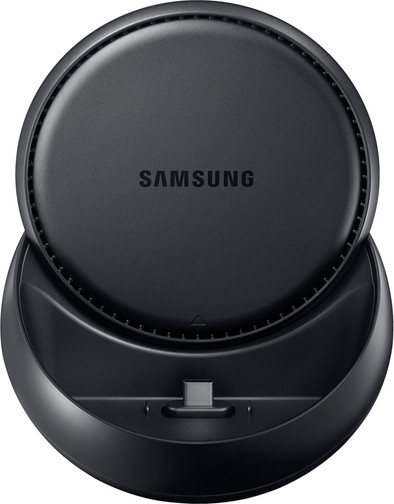
A smartphone is compact and easy to carry, so it also gives you access to all media when you're on the go. Yet you might prefer to sit at a larger screen at home for more of an overview and to watch movies more comfortably. With the DeX Docking Station, you can easily convert your Samsung Galaxy S8 (Plus),S9 (Plus), or Galaxy Note 8, 9, 10 into a computer. Via the HDMI, internet, USB-C and 2 USB-A outputs, you can connect DeX to all necessary equipment and power supplies. Don't forget to connect your mouse and keyboard! Put your device in DeX and the integrated software does the rest.
Reviews
Rating
5 stars
12
4 stars
12
3 stars
2
2 stars
0
1 star
0
Customer images
Most helpful reviews
Review is 8,7 out of 10.
8,7/10 ()
Full Desktop eXperience!
Full screen apps
Full desktop environment
Works perfectly with Office 365
Not all covers fit
Can the Samsung Galaxy DeX replace a computer?
This review was written on a DeX in combination with the following items:
Samsung Galaxy Note 8
Philips 223V display
Logitech K830 keyboard
Logitech MX Master M2 mouse
Why?
Actually, I was looking for a new phone to replace an old one. CoolBlue had a great promotion that you get a DeX temporarily free with the purchase of a Samsung Galaxy Note 8. Nice to have because I am a tech enthusiast. Gadgets are always fun and I also like to try everything for my work (functional manager).
Installation
The DeX installs very easily. The box contains the dock and a standard Samsung USB-C fast charger to power the dock. The dock itself contains 2 standard USB ports, 1 ethernet port, 1 HDMI port and a USB-c port (for power supply).
I use a network cable to provide the whole thing with internet. Just because it's possible. I connect the Philips display with the HDMI cable. I plug the Logitech receiver into the USB port and everything works immediately, without any installation or intervention from me. This is already fantastic!
First acquaintance
With the phone I had bought a Samsung Protective Case, a rubbery case that closes around the phone. This one doesn't seem to fit in the dock, something I need to test further. For now the phone without a cover in the docking and this works perfectly. The DeX environment starts up immediately and looks very slick.
I have been working on a Lumia 950XL with Continuum. Compared to Continuum, DeX does work, looks mature and feels like a full-fledged operating system. Apps must be suitable for DeX to be used full-screen. The non-optimized apps (remarkably, Facebook is that, for example) are displayed in a window, which works quite well, by the way. Not really a point of criticism, you just don't have a full-screen option.
While typing this document in Office 365, which is optimized for DeX, I would almost like to say YES to the question of whether DeX can replace a computer. Let's do some more testing first.
[*] Can you play in a DeX environment?
The Note 8 has the most powerful hardware of all smartphones right now. If you couldn't play decent games on this phone, DeX would be much less useful.
Games, just like regular apps, must also be DeX-compatible to be able to play them in full-screen. These are also the most common games. Games like Candy Crush and all its derivatives, The Simpsons and to my surprise even Kingdom of Hearts. Playing with a keyboard and a mouse is a special experience and this also works properly.
The games that are not optimized for DeX, for example Super Mario Run, also do well and play smoothly like on the phone, but then do not run in full-screen. Not that it bothers you, quite the contrary. You can then play the game and, for example, surf the internet side by side. Handy for looking up on YouTube how to perform a certain level while the game is running next to it.
[*] Business use
It is precisely with Office 365 that DeX should also lend itself to business use. As indicated in the introduction, I am writing this review in Word with DeX. But can you do more with it? To test that, I install Citrix Receiver and try to log in to my employer's environment.
Big smile, it is possible to start up a Citrix workplace environment! Tested with Chrome and it works just like on a 'normal' computer. Sound plays nicely and there is no delay, even on 4G. A remote desktop session to my computer also works flawlessly. This makes me happy!
[*] Cons
There are a few drawbacks. Let me start with the hardware.
To connect a device such as a Galaxy Note 8, you do not need a thick cover like the Protective Case from -nota bene- Samsung itself. I cannot properly press the device and the cover to the USB-C connection, so that DeX is not detected. According to a number of YouTubers, thin covers such as the Smart View cover do work.
You can only connect the dock to a monitor via HDMI. It would have been -in my opinion- better to use DisplayPort (DP) because of the higher bandwidth (network and audio via DP), or an extra USB-C connection. HDMI is more integrated and more common than DP.
There is no audio out jack. Sound is played on the mono speakers of the phone itself. I have not been able to test whether sound can be played via HDMI, my monitor does not support this. What does work is to connect the phone via Bluetooth to an audio set, in my case a Bose SoundTouch 20 system.
The standard Samsung keyboard has a very nasty shortcut, namely SHIFT + Spacebar. This allows you to swap between keyboard layouts. This is really annoying because it seems that when you release shift, the system secretly continues to hold it down for a fraction of a second. If you press immediately after the space bar, you will get a pop-up in the screen that you have chosen a different language and layout, even if you only have 1 language installed.
[*] Conclusion
DeX works very well and taking into account a few drawbacks you can easily get rid of the desktop. DeX is fine for activities such as browsing, word processing, watching movies and gaming. In addition, the operating system of DeX feels like a fully-fledged environment that is 'finished'. Whether you have to spend 150 euros for this is difficult to assess. If you come across it cheaper as a second chance, it's a no-brainer: YES! I just can't test whether you necessarily need a Samsung phone to use this.
Review by:
Paul Rutten
Date:
14 December 2017
Translation:
Automatically translated from Dutch
Review is 8,7 out of 10.
8,7/10 ()
Highly recommended, with cover in need of adjustment...
Does what is promised
Your phone becomes a PC
No software required
No connection cables
Product does what it promises. However, it is a pity that the connection of the phone to the charger is not really thought through. In my case I use an S8+ with a clearview cover. This does not fit in the cover on the docking. This must first be pressed out of the cover. This considerably shortens the life of the cover. You are missing an adapter/extension cable USB-C.
Review by:
John van Bruchem
Date:
26 April 2017
Translation:
Automatically translated from Dutch
Review is 8,7 out of 10.
8,7/10 ()
Full Desktop eXperience!
Full screen DeX apps
Full desktop environment
Compatible with many hardware
Not all covers fit
Can the Samsung Galaxy DeX replace a computer?
This review was written on a DeX in combination with the following items:
Samsung Galaxy Note 8
Philips 223V display
Logitech K830 keyboard
Logitech MX Master M2 mouse
[*] Why?
Actually, I was looking for a new phone to replace an old one. CoolBlue had a great promotion that you get a DeX temporarily free with the purchase of a Samsung Galaxy Note 8. Nice to have because I am a tech enthusiast. Gadgets are always fun and I also like to try everything for my work (functional manager).
[*] Installation
The DeX installs very easily. The box contains the dock and a standard Samsung USB-C fast charger to power the dock. The dock itself contains 2 standard USB ports, 1 ethernet port, 1 HDMI port and a USB-c port (for power supply).
I use a network cable to provide the whole thing with internet. Just because it's possible. I connect the Philips display with the HDMI cable. I plug the Logitech receiver into the USB port and everything works immediately, without any installation or intervention from me. This is already fantastic!
[*] First acquaintance
With the phone I had bought a Samsung Protective Case, a rubbery case that closes around the phone. This one doesn't seem to fit in the dock, something I need to test further. For now the phone without a cover in the docking and this works perfectly. The DeX environment starts up immediately and looks very slick.
I have been working on a Lumia 950XL with Continuum. Compared to Continuum, DeX does work, looks mature and feels like a full-fledged operating system. Apps must be suitable for DeX to be used full-screen. The non-optimized apps (remarkably, Facebook is that, for example) are displayed in a window, which works quite well, by the way. Not really a point of criticism, you just don't have a full-screen option.
While typing this document in Office 365, which is optimized for DeX, I would almost like to say YES to the question of whether DeX can replace a computer. Let's do some more testing first.
[*] Can you play in a DeX environment?
The Note 8 has the most powerful hardware of all smartphones right now. If you couldn't play decent games on this phone, DeX would be much less useful.
Games, just like regular apps, must also be DeX-compatible to be able to play them in full-screen. These are also the most common games. Games like Candy Crush and all its derivatives, The Simpsons and to my surprise even Kingdom of Hearts. Playing with a keyboard and a mouse is a special experience and this also works properly.
The games that are not optimized for DeX, for example Super Mario Run, also do well and play smoothly like on the phone, but then do not run in full-screen. Not that it bothers you, quite the contrary. You can then play the game and, for example, surf the internet side by side. Handy for looking up on YouTube how to perform a certain level while the game is running next to it.
[*] Business use
It is precisely with Office 365 that DeX should also lend itself to business use. As indicated in the introduction, I am writing this review in Word with DeX. But can you do more with it? To test that, I install Citrix Receiver and try to log in to my employer's environment.
Big smile, it is possible to start up a Citrix workplace environment! Tested with Chrome and it works just like on a 'normal' computer. Sound plays nicely and there is no delay, even on 4G. A remote desktop session to my computer also works flawlessly. This makes me happy!
[*] Cons
There are a few drawbacks. Let me start with the hardware.
To connect a device such as a Galaxy Note 8, you do not need a thick cover like the Protective Case from -nota bene- Samsung itself. I cannot properly press the device and the cover to the USB-C connection, so that DeX is not detected. According to a number of YouTubers, thin covers such as the Smart View cover do work.
You can only connect the dock to a monitor via HDMI. It would have been -in my opinion- better to use DisplayPort (DP) because of the higher bandwidth (network and audio via DP), or an extra USB-C connection. HDMI is more integrated and more common than DP.
There is no audio out jack. Sound is played on the mono speakers of the phone itself. I have not been able to test whether sound can be played via HDMI, my monitor does not support this. What does work is to connect the phone via Bluetooth to an audio set, in my case a Bose SoundTouch 20 system.
The standard Samsung keyboard has a very nasty shortcut, namely SHIFT + Spacebar. This allows you to swap between keyboard layouts. This is really annoying because it seems that when you release shift, the system secretly continues to hold it down for a fraction of a second. If you press immediately after the space bar, you will get a pop-up in the screen that you have chosen a different language and layout, even if you only have 1 language installed.
[*] Conclusion
DeX works very well and taking into account a few drawbacks you can easily get rid of the desktop. DeX is fine for activities such as browsing, word processing, watching movies and gaming. In addition, the operating system of DeX feels like a fully-fledged environment that is 'finished'. Whether you have to spend 150 euros for this is difficult to assess. If you come across it cheaper as a second chance, it's a no-brainer: YES! I just can't test whether you necessarily need a Samsung phone to use this.