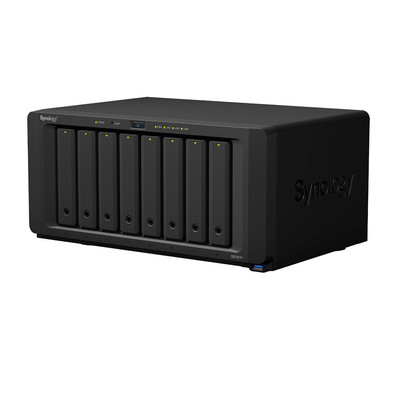
Synology DS1817+ 8GB
Never available again
View alternatives in the sidebar
View alternatives in the sidebar
According to our NAS expert
With the Synology DS1817+, you'll have a NAS at your home or office that can handle multiple demanding network tasks at the same time. The 4-Core 2.4GHz processor and the 8GB of RAM are more than enough to simultaneously stream 4K videos, store extensive photo libraries, and create various backups. You also have room for expansion, because you can install up to 8 internal hard drives in RAID array. On top of that, you can use the Synology DSM software to manage the performance of your NAS, update the firmware, manage your media collection, and install all kinds of extra apps such as Plex to stream media. Make your NAS the center of your network storage by connecting it to consoles, smart TVs, laptops, or desktops using 4 Gigabit network ports. Share files through from your USB flash drive or external hard drive in your network via one of the 3 USB 3.0 ports.
Number of hard drive slots | 8 | |
|---|---|---|
Suitable for hard drive size | 3.5 inches | |
Internal RAM | 8 GB | |
Processor cores | Quad-Core (4) | |
Built-in hard drive | ||
Total storage capacity | 96 TB |
5 stars
9
4 stars
1
3 stars
0
2 stars
0
1 star
0
Installation
Energy consumption
Speed
Software
Sound production
My experience with the synology nas devices is quite extensive. I have placed or installed almost all versions at companies and private individuals and I have had experience with this brand since 2001. It is good to know that in many cases these very solid and reliable machines provide very different tasks and functions for many years. These machines cannot simply be seen as a storage product, because that does not do justice to these very well equipped machines. Especially the plus and higher series models can often provide a complete working environment with the available software on these machines. It is going too far to indicate what can run or be performed with the modern nas systems. Not to mention what can be found on the internet outside of the synology choices. However, storage will often be seen as the main task in households and small businesses. And of course the modern nasses do that wonderfully. I myself have also come to discover through trial and error that you have to do your very best to let things go wrong. Of course we assume normal actions, such as the OS does not start, then only the power of this system becomes apparent in some cases, the user himself appeared to have just placed an older version on the NAS and this made the system appear to be defective. The solution was simply to pick up the correct version and put it on, the NAS was back in full glory within a short time of course without loss of data. Or the failure of a disk, find out which one is broken, remove the old one, put in the new one and switch on recovery and pretty soon you can get the data you needed again. Of course, the NAS will run for many hours or if you use a lot of disk space, you will sometimes have a somewhat slower NAS for up to a few weeks. But it all works very neatly and well. Switching from one model to another can often be done without loss of data. I started with a 1 disk nas and gradually went to 2, 4, 5, 8, 12 up to 36 disk nas systems. where I put the old drives in the exact same order and didn't really have to do anything but install the OS and poof there was my data again. Of course it does matter which raid choices you make and/or what your plans are. If you start with raid 5, you can't immediately go to raid 6 or 10 during the transfer, that requires planning and thinking carefully about what you want. By the way, it is not the case that other nas systems are less, but I have gained a lot of confidence in the synology systems and could often not achieve with the other brands what I could with the synology machines. That is why I would also like to emphasize that even if a model is older, it does not mean that it will be less reliable. All the nas systems that I have sold to others after years of pleasure all still run flawlessly with the people who took over these machines. Of course you can never prevent that something eventually breaks. For example, the CS406 from 2006 worked perfectly until July 2016. The network port gave out and after some searching it turned out to be no longer possible to repair this at a reasonable price. So the owner decided that a newer DS514+ could take over the job. Almost 10 years of work have been done without murmuring or technical problems.
For home use you can use music and movie streaming, but of course also access your photo collection via the NAS or display it in a web environment. Which of course can also be made accessible from the internet. And of course you can take care of all backups from your other devices to the NAS if you want to. Whether running your own email, web, database server, the possibilities are virtually endless. Finally, I would also like to mention that when choosing a NAS you should take into account that if you are going to place multiple disks in your NAS, you should take into account that this will create more noise because the disks make noise and of course the cooling of the will of course also make more noise. Especially the rack station and larger xs models are not really meant to run in a living room ;). Still, I just have an RS2414+ running at home in the hobby room. Where I can only hear the thick nas wail when it gets very hot in the summer when it's above 26 degrees outside. I now need a reduced storage and will therefore make the switch to the 1817+, partly because we can already place 12 Tb disks, so that I could place a thick 144 TB and with the expansion unit I could even control 288 Tb . These are of course gross numbers where you have to start from a much lower net number, especially if you are going to use the higher raid forms, where you choose to choose more security over more space available.
Ron
26 March 2018
Automatically translated from Dutch
I bought this Synology DS1817+ 8Gb to replace a Synology DS1815+ which suddenly broke down. I ordered and chose Same Day Delivery, and the same night I was able to replace the faulty unit.
Migration went very smoothly, move the 8 harddisks from the old unit to the new one, and upon startup the request came up whether I wanted to migrate. The rest went mostly automatically.
All in all happy of the DS181x+ series, good software, good hardware, good way to recycle old harddisks. Pity the old one broke down, but it will be replaced under warranty.
Jos
14 December 2018
DSM is an easy operating system
Geert Roelofs
12 November 2018
Automatically translated from Dutch
Product number | 776960 | |
|---|---|---|
Manufacturer code | DS1817+ (8GB) | |
Brand | Synology | |
Processing of your defect | Carry-in warranty | |
Old product returned for free |
Built-in hard drive | ||
|---|---|---|
Number of hard drive slots | 8 | |
Suitable for hard drive size | 3.5 inches | |
Total storage capacity | 96 TB | |
RAID | JBOD, RAID 0, RAID 1, RAID 10, RAID 5, RAID 6, Synology Hybrid RAID | |
Internal RAM | 8 GB | |
Total number of RAM slots | 2 |
LACP Link aggregation | ||
|---|---|---|
Thunderbolt connector | ||
Bluetooth | ||
Number of Ethernet ports | 4 |
NAS functions | Backup server, Download server, FTP server, Media server, Photo server, Surveillance station, VPN server, Web server | |
|---|---|---|
NAS application center | ||
Plex support | ||
Type of Plex support | Full HD (1080p), HD Ready (720p), SD (480p) | |
Number of IP camera licenses included | 2 | |
DLNA | ||
UPnP AV support | ||
FTP server | ||
On/off switch | ||
Automatic switch on/off | ||
Kensington lock | ||
Apple Time Machine support | ||
Chromecast support | ||
Suitable for IFTTT | ||
Recommended for use | Making a backup, Media streaming, Store photos and videos |
Processor brand | Intel | |
|---|---|---|
Processor family | Xeon | |
Processor code name | Rangeley | |
Processor cores | Quad-Core (4) | |
Clock speed | 2,4 GHz |
Depth | 24,3 cm | |
|---|---|---|
Width | 34,3 cm | |
Height | 16,6 cm | |
Type NAS | Upright | |
Color | Black | |
Weight | 6 kg |