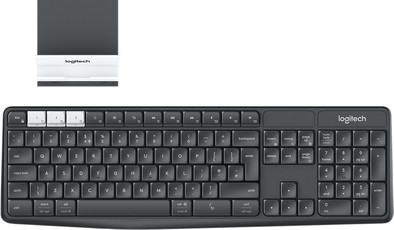
Logitech K375s Keyboard QWERTY
Never available again
View alternatives in the sidebar
View alternatives in the sidebar
According to our keyboard expert
With the Logitech K375s Keyboard, you can type a report on your computer and with 1 press the button, you can switch to a message on your phone or tablet. This way, you can use a standard keyboard to type when using a device with a small screen. Simply put your tablet or smartphone in the included stand and connect to the keyboard via bluetooth. The stands's design still allows you to use the home button of your phone or tablet. Thanks to the rubber, anti-slip construction, the screen will stay securely in place in the stand and you won't be bothered by a moving screen. The keyboard is wireless thanks to the USB receiver and ahs a 10-meter range.
Note: only tablets and smartphones up to 10.5mm thick fit in the stand.
Connection type | Wireless | |
|---|---|---|
Backlit keyboard | ||
Keyboard composition | Keyboard, Numpad | |
Bluetooth | ||
Geographic keyboard layout | US international layout | |
Ergonomic design | ||
Suitable for gaming | ||
Mechanical keyboard |
5 stars
17
4 stars
24
3 stars
10
2 stars
2
1 star
0
Installation ease
Ergonomics
User friendliness
I just like it because it can do more than on one device Getting used to the buttons, it is smaller than I had so often with fast work I am more often in caps. then press the shift button .. but that will take some getting used to
Sjaja
3 November 2019
Automatically translated from Dutch
Because regularly some keys do not work, the keyboard is not used.
Harry
30 March 2021
Automatically translated from Dutch
A very nice keyboard, but with some limitations.
The keyboard switches to standby after a short time. A keystroke is then sufficient to switch on the keyboard, but you have to wait with keys because otherwise approximately 2 keystrokes will be missed. For example, after watching a video on Youtube, the keyboard may go into standby. If you want to visit another website, it is therefore possible that you end up on ogle.nl and not on google.nl. Something to keep in mind, although a firmware update that extends the standby time, possibly double, would not be a loss. It's worth the extra energy.
Also, the software is not optimal. After installing Logitech's software, it is no longer possible to pause media such as iTunes, and to fast forward and rewind. This is why I no longer have the software installed.
Without the software, however, it is not possible to configure special hotkeys or the FN key must be used to access these special keys. SharpKey has provided some solution, but it doesn't work for all keys.
Michael
13 November 2017
Automatically translated from Dutch
Product number | 777797 | |
|---|---|---|
Manufacturer code | 920-008181 | |
Brand | Logitech | |
Processing of your defect | Via Coolblue | |
Old product returned for free |
Keyboard layout | QWERTY | |
|---|---|---|
Geographic keyboard layout | US international layout | |
Physical keyboard layout | ISO | |
Typing comfort | Mid-range | |
Backlit keyboard | ||
Spill-resistant | ||
Programmable keys | ||
Multimedia shortcuts | ||
Flat keys | ||
Suitable for gaming | ||
Mechanical keyboard |
Connection type | Wireless | |
|---|---|---|
Nano receiver | ||
Bluetooth | ||
Bluetooth version | 3.0 |
Power supply type | Rechargeable battery | |
|---|---|---|
Rechargeable battery |
Keyboard composition | Keyboard, Numpad | |
|---|---|---|
Ergonomic design | ||
Height | 1,4 cm | |
Width | 43,5 cm | |
Depth | 20 cm | |
Wrist rest | ||
Color | Black | |
Weight | 0,475 kg |