Sigma Pure GPS
Never available again
View alternatives in the sidebar
View alternatives in the sidebar
According to our bike computer expert
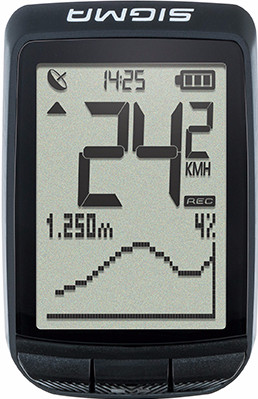
The Sigma Pure GPS provides you with the most important bike functions. The integrated GPS tells you exactly how fast you're biking and what the distance traveled is. In addition, the bike computer features an air pressure sensor that you can use to view your route's height profile. Thanks to the compass, you can see which direction you need to take. After your bike ride, view your data on your smartphone via the Sigma Link app and share with your friends. You can easily operate the bike computer using the 3 buttons, and you can read the data on the screen at a glance.
5 stars
9
4 stars
9
3 stars
2
2 stars
0
1 star
0
Introduction I cycle a lot, more than 50 km a week. I also like to use a good cycling computer. I've had several bike computers. Some gave birth less or broke after a year. For example, I had the Sigma BC 16.16 STS CAD with the great advantage of the cadence and the disadvantage of sensors and not having a GPS. This computer does have the latter. And that's one of the reasons I think it's a good computer that makes cycling more challenging. Don't feel like reading? This review can also be seen in a video I made for this: https://youtu.be/YR5CKT-DJqI
The features This computer has several functions. I hope to tell you more about the three buttons. The computer has three buttons: 'the left button', 'the middle button' and the 'right button'. On the screen of the computer you can see/use the distance, driving time, average speed, calories, temperature and the compass function by pressing 'the right button'. Most of these functions are known and I don't need to tell you much about them. In addition to the compass function, this is a function that you can set via the computer (which I will tell more about later). The compass indicates which direction the set location is. This way you know which direction to cycle in. This function works well, although it is never as clear as the navigation. Since the price of the computer is low, it makes sense that there is no navigation on it. And is this function an extra luxury that you sometimes use. With 'the right button' you can also reset the trip data (ie the time, speed, distance of the trip). And so start a new ride. The ride is automatically saved and you can look back! Then we come to 'the middle button'. We can easily describe this button: the start/stop button. You start or stop a ride with this. What I like compared to other computers is that you have to touch the button very lightly and it stops! (Or start) The 'left button' has a function that, in my opinion, you use less in the Netherlands: 'The altimeter function'. This is of course wonderful in countries with altimeters and in my opinion a unique feature that other computers don't have. I also hope to make some altimeters soon, where I will definitely use the function. At 'the altimeter function' you can see the current altitude and the gradient. That it works is certain, because when I drive up the dike I see a beautiful gradient! By describing what the buttons can do, I am done with the most important functions. That is why I now tell you something about the settings and other details.
Details and settings By long pressing 'the middle button' you open the menu. Here you can see the following menus: OFF (turn off computer), Activities (all trips), Statistics (number of trips, calories, kilometers etc.), Total (all total values) and Settings. I assume that the menus with the explanations speak for themselves. I will briefly explain settings because of a disadvantage. I find that the settings of the screen (which you see when you are driving) cannot be changed. So you can only see your speed that you are driving and another function that you can control with 'the right button'. The advantage is that you can quickly scroll through the functions. The disadvantage is that the height function is often useless in many rides and that you can only see one thing that makes you have to click more often. Furthermore, there are nothing special settings that I should mention. You also have the function: 'backlighting'. You turn it on by pressing 'the left button' and 'the right button' at the same time. Every time you press a button, the screen lights up green. The disadvantage of 'the backlight' is that if you want to use it you have to press a button and it doesn't do it 'just like that'. These I think are the most important details and 'setting comments' I wanted to share. That's why I'm going to tell you what I think is the best function. Upload and view the ride!
Uploading and viewing rides via computer Via the supplied cable and the downloadable software (see sigma site) you can connect the computer to the computer and you can upload, analyze, share and view all the rides. You can also adjust the settings of the computer, import and export things from the computer and set 'the compass function'. The software works well and has no areas for improvement in my opinion. In the photos you can see what I mean by analyzing. You can see through the automatic laps how the ride is built up: how do you ride the 1st 5km, the 2nd and so on. This is very nicely made. The new rides automatically appear in the dashboard, and you see short overviews. You can also update the firmware. This works moderately to poorly. Often the cycling computer does not work anymore and you really have to try it 10 times before it responds again. Also, I only had mediocre firmware that reacted badly. That is still an area for improvement: updating the firmware. You can also share the rides in the program. I share everything to Strava, because the cycling computer with the GPS function knows exactly how fast you are riding on which part. Strava automatically develops segments. So these are certain roads or pieces where you can set records and compare your results with other users of Strava. You can also share with: Training Peaks, Facebook and Twitter and 2Peak. You can also change the settings in the program at computer and then export or import from the cycling computer to the program. In the program you can activate the GPS function at routes and export it to the computer. Once you've done that, you can use that function. You can also install apps where you can do about the same. With Android you can upload rides with the SIMGA LINK app via NFC (often does not work well) or a cable. At Apple you really only have something to do with the SIGMA DATACENTER app, it has the same functions as I just told you on the computer.
Ease of use on the bike Of course, the computer must be usable. And yes, that's it! The computer is very user-friendly. I think the only bigger disadvantage is that you can't see multiple functions on the computer. Because the buttons work very well, this disadvantage is somewhat compensated. Of course you also want reliable measurements. I think this is one thing that could be improved. The GPS drops out every now and then under tall trees (and also under tunnels although this is no shame). The computer could also react just a little faster, which is sometimes very slow in receiving the GPS signal. Also the 'automatic pause' (ride is put on pause when you stop and switched on when you start driving again) function sometimes reacts sluggishly. Let there be no misunderstandings! It works fine, but it could be better.
Conclusion I want to say that the computer works well: highly recommended. Of course, as mentioned, there are disadvantages, but I don't think they outweigh the price. Advantages compared to other GPS computers are: -good software from sigma -mostly reliable measurements -ease of use -PRICE! These are points that other computers don't have in my opinion. As a disadvantage with this computer I would mention the backlight and the options that you can see at the same time.
Key lock Feel free to watch the video, photos or leave a comment. I hope I have taught you something about the computer and that you can make a decision. Finally, I would say if you want to buy the computer: buy it at Coolblue! The service is extremely good…. And for an overview of the odometer I refer to: http://www.sigmasport.com/nl/produkte/fahrrad-computer/gps/pure/pure-gps
Thank you for reading, Thijs.
Thijs Sonneveld
23 February 2018
Automatically translated from Dutch
Ease of use is fine and the provision of the correct information during the ride is exactly what is sufficient for me. Under a canopy, the speed fluctuates slightly due to lack of contact with satellites.
Wiene Loerts
11 April 2018
Automatically translated from Dutch
Well because it is a nice and small device for a reasonably low price
Sebas Van Held
12 May 2018
Automatically translated from Dutch
Product number | 788381 | |
|---|---|---|
Manufacturer code | 03200 | |
Brand | Sigma Sport | |
Warranty | 2 years | |
Processing of your defect | Carry-in warranty | |
Old product returned for free |
Height | 6,7 cm | |
|---|---|---|
Width | 4,2 cm | |
Depth | 1,2 cm | |
Weight | 0,037 kg | |
Color | Black | |
Backlit screen | ||
Screen reflection | Anti-glare | |
Water resistance | Waterproof |
Cadence sensor | No | |
|---|---|---|
Power sensor | No | |
Speed sensor | No | |
Altimeter | ||
Type of altimeter | Barometric | |
Thermometer | ||
Compass | ||
Compass type | Barometric |
Calorie counter | ||
|---|---|---|
Stopwatch | ||
Lap counter | ||
Training programs available |
Power supply type | Rechargeable battery | |
|---|---|---|
Maximum battery life | 15 hours |