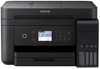
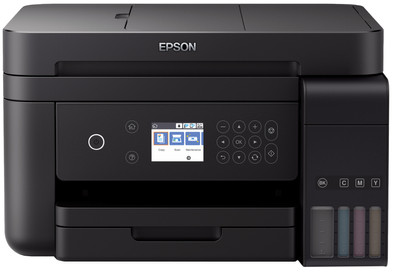
Epson EcoTank ET-3750
Never available again
View alternatives in the sidebar
According to our printer expert
The Epson EcoTank ET-3750 is an all-in-one inkjet printer for home offices and small businesses. Instead of ink cartridges, you use ink from the included ink bottles. That means you'll be printing more efficiently than with a standard inkjet printer. If you make 4 prints a day, the ink will last for 3 years. The 30-sheet automatic document feeder (ADF) that scans documents automatically is handy if you regularly want to save bills, invoices, or other printed texts digitally. You can also save files directly to the cloud, making your scans available on any computer. Include the printer in your company network using a network cable or connect the device to your laptop or tablet via WiFi.
Print technology | Inkjet | |
|---|---|---|
Printer type | All-in-one | |
Automatic document feeder (ADF) | ||
Color printer | ||
Maximum print size | A4 | |
Photo paper drawer | ||
Built-in WiFi | ||
Maximum scan size | A4 (21x29.7cm) |
5 stars
36
4 stars
34
3 stars
3
2 stars
0
1 star
1
Installation ease
Options
Print quality
Overall very satisfied with this printer, except for a few minus points.
Following the manual was difficult because several large sheets of paper were supplied with an abbreviated manual in various languages.
Still, installing the printer until installing the software was quite easy. What a relief to fill the tanks in such a convenient way. No more mess, and the ink isn't even that expensive, you don't have to buy cheap ink for that. After filling the 4 tanks, the printer needed more than 10 minutes to register this. This is very long, and is it really necessary to have to wait that long?
On my Mac, the installation did not go very smoothly. The printer was not immediately recognized, and so diverted to an installation website. So far very good, but when selecting the connection option, opted for the recommended option, wireless. Unfortunately, after a lot of searching, the printer turned out to be untraceable. After clicking OK no instructions on how to proceed now. Because I really wanted to test this printer, I finally opted for the USB connection. This worked right. Later manually via LCD screen can give the correct settings for the network. The screen does not immediately work logically, but after getting used to it it gets better.
When downloading the latest firmware, the printer seems to freeze. It has been flashing for at least half an hour; after about an hour that was over.
The printer isn't whisper quiet, but it doesn't really make a lot of noise either.
The printer is mainly used as a photo printer, but also occasionally for normal printing tasks. It's a shame, therefore, that there's no option to keep photo and plain paper in a separate drawer, something I can do in my cheaper Canon.
When printing photos, the printer initially indicated that the wrong type of paper was in the printer, but that was solved with the push of a button. With borderless printing, I still see a small border coming along the photos, so printing all the way to the edge does not work.
E Kort
24 November 2018
Automatically translated from Dutch
I would personally still buy it, but I am very sorry that the installation via WIFI was not successful, even after several attempts
Wim
16 June 2020
Automatically translated from Dutch
It is a compact printer, which fits perfectly in any office or in the house. He hardly stands out. The installation is very easy and you can easily do it yourself, after installation the printer worked immediately. The ink tanks are easy to fill with the supplied ink bottles. Haven't seen the ink level drop yet after making many prints. Used daily in our office, black and white prints and color prints. Very satisfied with print result. Get used to the fact that the screen is not a touchscreen, but you have to work with arrow keys and ok button. This is the only downside to this super deluxe device. Scanning also works fine with the scan application, test scan possible. in short, very satisfied. curious how long ink lasts, would be more economical, but I can't judge yet.
sapr
15 December 2018
Automatically translated from Dutch
Product number | 795007 | |
|---|---|---|
Manufacturer code | C11CG20401 | |
Brand | Epson | |
Processing of your defect | Via Coolblue | |
Old product returned for free |
Printer size | Small | |
|---|---|---|
Width | 37,5 cm | |
Depth | 34,7 cm | |
Height | 23,1 cm | |
Color | Black | |
Weight | 6,7 kg |
Printer type | All-in-one | |
|---|---|---|
Photo printer | ||
Portable (mobile use) | ||
Usage location | Home |
Cartridge line | Epson 102 | |
|---|---|---|
Print technology | Inkjet | |
Number of cartridges/toner cartridges | 4 | |
Color printer | ||
Print speed black (ISO) | 15 ppm | |
Print speed color (ISO) | 8 ppm | |
First black page ready after | 10 seconds | |
Speed class | Standard | |
Usage costs per page | 0,007 euro | |
Maximum print resolution height | 1200 dpi | |
Maximum print resolution width | 4800 dpi | |
Maximum print size | A4 | |
Borderless printing |
Scan functionality | ||
|---|---|---|
Maximum optical scan resolution width | 1200 dpi | |
Maximum optical scan resolution height | 2400 dpi | |
Scanner type | File scanner, Flatbed scanner | |
Maximum scan size | A4 (21x29.7cm) | |
Automatic document feeder (ADF) | ||
Maximum paper size ADF | A4 | |
Scan sizes | A4 | |
Scan speed (PPM) | 1 ppm | |
Color depth output | 24 bpp | |
Scan to | Dropbox, Email address, Evernote, FTP, Google Docs, Microsoft SharePoint Connector, PC (network), USB | |
ADF capacity | 30 | |
OCR |
Copying functionality |
|---|
Fax functionality |
|---|
Built-in screen | ||
|---|---|---|
Color screen | ||
Touchscreen |
Suitable for HP+ |
|---|
Compatible with operating system | Android, ChromeOS, Linux, Windows, Windows Phone, iOS, macOS | |
|---|---|---|
Connection type | Wired, Wireless | |
Apple AirPrint | ||
Email print | ||
WPS (Wireless Protected Setup) | ||
Female standard USB-A port version | 2.0 | |
Number of Ethernet ports | 1 | |
NFC | ||
Built-in WiFi | ||
Bluetooth | ||
WiFi direct | ||
USB port |
Manual input tray | ||
|---|---|---|
Photo paper drawer | ||
Output capacity output drawer | 30 | |
Maximum print size standard paper tray | A4 | |
Input capacity standard paper tray | 150 | |
Number of standard paper trays | 1 |
Memory card reader |
|---|