Epson EcoTank ET-7700
Never available again
View alternatives in the sidebar
View alternatives in the sidebar
According to our printer expert
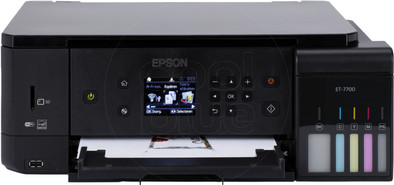
The Epson EcoTank ET-7700 is an all-in-one inkjet printer for hobby photographers and demanding home users. Thanks to the reservoir system, you use refillable ink from included bottles instead of ink cartridges. That makes the printer efficient, since you can print 3,400 photos on 10 by 15 centimeter photo paper. The extra photo-black ink ensures deeper black levels. You can also print your images without white borders, so the entire sheet of paper is neatly covered. Store photo paper in a separate tray to keep photo prints separate from text documents. Using the memory card slot, you can print images directly without turning on your computer. Thanks to WiFi, you can send your vacation photos to your printer straight from your phone.
Note: do you want to print a photo on photo paper? Place the back (with the logo) up in the printer.
Print technology | Inkjet | |
|---|---|---|
Printer type | All-in-one | |
Automatic document feeder (ADF) | ||
Color printer | ||
Maximum print size | A4 | |
Photo paper drawer | ||
Built-in WiFi | ||
Maximum scan size | A4 (21x29.7cm) |
5 stars
26
4 stars
17
3 stars
4
2 stars
1
1 star
0
Installation ease
Options
Print quality
Nothing but good things about the device so far (but very short in use) We print very little. The ink costs have so far been v.n.l. made with cleaning procedures. In my opinion Ecotank is therefore also an excellent choice for small consumers. But registering the device in connection with warranty does not seem to be settled even after telephone contact with Epson. They do not transfer cashback (other department in another country), but it is of course linked to registration. free Cover Plus as a promotion they are not about (?) My Epson created but that is really of no use to you. All completed but profile not complete etc. etc.
ben bos
17 December 2018
Automatically translated from Dutch
The printer disappoints me. A few weaknesses I knew, a few I should have realized better, a few were new. The reason I bought a new printer in the first place was because the old faithful PIXMA was no longer supported and I kept it up and running, but via Windows 10 and that knows what you have to do much better than you do yourself. Annoying. So: new printer. Looked at features and reviews and not a single eligible Canon came off flawless. Moreover, the Ecotank principle of the Epsons appealed to me, and the reviews, also on YouTube, were favourable.
The printer itself seems solidly built. But the appendices like the scanner cover (is not held open) and especially the input and output trays are extremely flimsy. These trays together form an ergonomic disaster: they are located right above each other and are difficult to reach. To be on the safe side, the folded control panel also keeps all those trays completely out of sight. Amazing for what I understand is the second generation Ecotank. The whole world of the trays is black and dark; you need to refill them (after you've temporarily retracted the out-tray!) with a flashlight. And that has to be done very often. Note that the photo paper tray can only hold twenty sheets. Please note: this is a photo printer, for people who print a lot! The paper feeder on the back of the printer is useless if it touches anything (and it usually does, also to keep that scanner cover up). In addition, only one piece of paper or the like can be used. in.
The installation was no fun. Installation via USB did not succeed even after hours of trying: the computer did not 'see' the printer. Finally bought an Ethernet cable on the advice of the local computer store, and yes! Even after more than an hour, because you have to know that where the manual says that you have to check whether the printer is turned off, you have to make sure that it is turned on. Failed to register the printer due to the extended warranty with Epson; I was not allowed to enter the purchase date. Their Help has yet to explain to me how to do that.
Printing (I almost forgot) does the printer well, although much slower than I expected from this generation. Text is laser quality. It also has its own printing program for photos outside Windows 10, and you can actually set your print format (eg borderless or not), albeit photo by photo. Just like the old days with the PIXMA. Tribute! Scanning is also good; the scanner hardly needs to warm up, unlike the PIXMA. (So I wouldn't have had to buy that separate new scanner half a year ago...)
The conclusion. It is a reasonably good printer that largely frees you from all the hassle and nerves, not to mention the costs of regularly replacing cartridges. At a certain point you will also have those extra costs (500 Euro!) out, especially because you will receive two sets of ink bottles. But the reliability and especially user-friendliness leave a lot to be desired. The hassle with those trays is truly unforgivable. So not sure if this was such a good purchase.
Cees Wildervanck
28 November 2019
Automatically translated from Dutch
The Epson ecotank printer is very easy to use. Clear instructions for use & I as a “layman” had installed it in no time. Refilling the ink tanks is also easy to do. You can also keep a close eye on the ink level this way.
When I wanted to start printing, it initially gave an error message every time. That took a while, couldn't figure out what I was doing wrong. The output drawer had to be opened.... I opened output drawer 1 or 2 each time, but there's one more above that needed to be opened. Then the "problem" was solved.
The printer prints quickly and clearly, beautiful prints. I have not tried photos yet, but the regular full Color prints were of very good quality.
Desiree Erdhuizen
10 November 2017
Automatically translated from Dutch
Product number | 795010 | |
|---|---|---|
Manufacturer code | C11CG15401 | |
Brand | Epson | |
Warranty | 2 years | |
Processing of your defect | Carry-in warranty | |
Old product returned for free |
Printer size | Medium | |
|---|---|---|
Width | 39 cm | |
Depth | 34,1 cm | |
Height | 13,8 cm | |
Color | Black | |
Weight | 6,7 kg |
Printer type | All-in-one | |
|---|---|---|
Photo printer | ||
Portable (mobile use) | ||
Usage location | Home |
Cartridge line | Epson 106 | |
|---|---|---|
Print technology | Inkjet | |
Number of cartridges/toner cartridges | 5 | |
Color printer | ||
Print speed black (ISO) | 13 ppm | |
Print speed color (ISO) | 10 ppm | |
First black page ready after | 10 seconds | |
Usage costs per page | 0,029 euro | |
Maximum print resolution height | 1440 dpi | |
Maximum print resolution width | 5760 dpi | |
Maximum print size | A4 | |
Borderless printing |
Scan functionality | ||
|---|---|---|
Maximum optical scan resolution width | 1200 dpi | |
Maximum optical scan resolution height | 2400 dpi | |
Scanner type | Flatbed scanner | |
Maximum scan size | A4 (21x29.7cm) | |
Automatic document feeder (ADF) | ||
Scan sizes | A4 | |
Scan speed (PPM) | 1 ppm | |
Color depth output | 24 bpp | |
Scan to | Dropbox, Email address, Evernote, FTP, Google Docs, Microsoft SharePoint Connector, PC (network), SD card, USB | |
OCR |
Copying functionality |
|---|
Fax functionality |
|---|
Built-in screen | ||
|---|---|---|
Color screen | ||
Touchscreen |
Suitable for HP+ |
|---|
Compatible with operating system | Android, ChromeOS, Linux, Windows, Windows Phone, iOS, macOS | |
|---|---|---|
Connection type | Wired, Wireless | |
Apple AirPrint | ||
Email print | ||
WPS (Wireless Protected Setup) | ||
Female standard USB-A port version | 2.0 | |
Number of Ethernet ports | 1 | |
NFC | ||
Built-in WiFi | ||
Bluetooth | ||
WiFi direct | ||
USB port |
Manual input tray | ||
|---|---|---|
Photo paper drawer | ||
Output capacity output drawer | 30 | |
Input capacity photo paper tray | 20 | |
Maximum print size standard paper tray | A4 | |
Input capacity standard paper tray | 100 | |
Maximum print size photo paper tray | 10x15, 13x18, 20x25, A4, A5, B5 | |
Number of standard paper trays | 1 |
Memory card | SD, SDHC, SDXC | |
|---|---|---|
Memory card reader |
