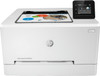
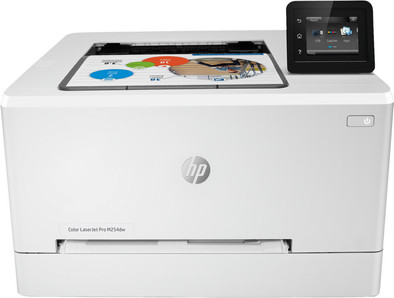
HP Color LaserJet Pro M254dw
Never available again
View alternatives in the sidebar
View alternatives in the sidebar
Print technology | Laser | |
|---|---|---|
Printer type | Printing only | |
Automatic duplex printing | ||
Color printer | ||
Maximum print size | A4 | |
Photo paper drawer |
According to our printer expert
HP Color LaserJet Pro M254dw is a color laser printer for medium-sized offices. The printer makes duplex prints, saving you paper. Insert a USB flash drive into the USB port on the front of the printer and you can immediately print without a PC. Choose the desired files quickly and easily via the 6.8-centimeter color touchscreen. Connect wireless devices such as smartphones and laptops via WiFi to your printer or include it in your company network via a network cable. The 256MB RAM loads jobs quickly and your first print will be ready after about 10 seconds. The energy-saving HP Auto-On/Auto-Off mode automatically turns on your printer when you send a job.
5 stars
48
4 stars
23
3 stars
3
2 stars
0
1 star
1
Installation ease
Options
Print quality
Tip: don't try to install that HP stuff on MacOS, just set it up on your WiFi network and in the system preferences you can immediately connect the printer. Second tip: the printer registers on the Internet so that you can print via email. But is also immediately open to everyone with login name 'admin' and empty password!!! So go to the printer in your browser (there is a button in the system preferences) and set a password right away!
Dirk Groten
9 January 2018
Automatically translated from Dutch
It is a very well equipped printer that does its job well. Duplex printing is done quickly and the printer is also accessible from elsewhere (including WiFi, e-print). It works flawlessly with iPad and iPhone.
Alfons Nauts
12 September 2018
Automatically translated from Dutch
I switched from an inkjet printer to a laser printer because I don't have to print often. Sounds contradictory in terms of price? The ink cartridge head of an inkjet printer dries out if it stands still for a longer period of time, for example, so that it turns black, brown and so you have to do several cleaning cycles before it prints normally again. This is a thing of the past with this laserjet. I think this is probably the last printer I ever have to buy. However, a problem with this printer: would not AUTOMATICALLY print double-sided (on windows 10) ! Solution: if you have Windows 10, do not use the installation software from HP (included CD or download from HP), but proceed as follows:
Walter
18 April 2019
Automatically translated from Dutch
Product number | 798441 | |
|---|---|---|
Manufacturer code | T6B60A#B19 | |
Brand | HP | |
Processing of your defect | Carry-in warranty | |
Old product returned for free |
Printer size | Medium | |
|---|---|---|
Width | 39,2 cm | |
Depth | 43,5 cm | |
Height | 24,75 cm | |
Color | White | |
Weight | 13,8 kg |
Printer type | Printing only | |
|---|---|---|
Photo printer | ||
Portable (mobile use) | ||
Recommended for use printers | Business printing |
Toner cartridge line | HP 203 | |
|---|---|---|
Print technology | Laser | |
Number of cartridges/toner cartridges | 4 | |
Color printer | ||
Print speed black (ISO) | 21 ppm | |
Print speed color (ISO) | 21 ppm | |
First black page ready after | 10,3 seconds | |
Speed class | Good | |
Maximum print resolution height | 600 dpi | |
Maximum print resolution width | 600 dpi | |
Maximum print size | A4 | |
Automatic duplex printing | ||
Borderless printing | ||
Maximum print size duplex printing | A4 |
Scan functionality | ||
|---|---|---|
OCR |
Copying functionality |
|---|
Fax functionality |
|---|
Built-in screen | ||
|---|---|---|
Color screen | ||
Touchscreen |
Compatible with operating system | Android, Windows, iOS, macOS | |
|---|---|---|
Connection type | Wired | |
Apple AirPrint | ||
Email print | ||
WPS (Wireless Protected Setup) | ||
Female standard USB-A port version | 2.0 | |
Number of Ethernet ports | 1 | |
USB port |
Manual input tray | ||
|---|---|---|
Photo paper drawer | ||
Output capacity output drawer | 100 | |
Maximum print size standard paper tray | A4 | |
Input capacity standard paper tray | 250 | |
Number of standard paper trays | 1 |
Memory card reader |
|---|
If you purchase the HP Color LaserJet Pro M254dw, you'll receive a 3-year warranty from HP after registration. With this, you can extend the commercial warranty to 3 years. Is something wrong with the printer? HP will solve it for you. Go to the promotional Terms and Conditions (PDF) for more information.
Coolblue takes care of everything, from taking out an insurance to repairs
For almost all accidents
More coverage in case of damage than your standard warranty
No deductible
First, add your printer to your shopping cart. On the next page, choose the Protection Plan below. You always have a 30-day return window and pay no deductible in case of damage.
3-year Protection Plan
25,99
one-time5-year Protection Plan
52,-
one-time