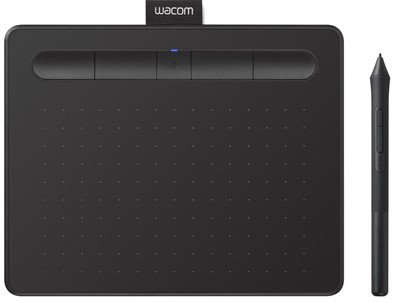
Wacom Intuos S Bluetooth Black
Never available again
View alternatives in the sidebar
Choose your drawing tablet:
15.2 cm
|
Yes
Choose your drawing tablet
Width of active drawing area
Bluetooth
View alternatives in the sidebar
Choose your drawing tablet:
15.2 cm
|
Yes
Width of active drawing area
Bluetooth
According to our drawing tablet expert
Draw the most beautiful designs with the Wacom Intuos S Bluetooth, which makes it seem like you're drawing on paper. Unlike its predecessor, you can use this Intuos with a USB cable and wirelessly via Bluetooth. Thanks to the compact size of 20x16cm, you can easily take this Intuos with you to school or work. You can accurately determine how thick or thin you want the lines to be with the included pen, because 4096 pressure points transfer your movements just like on paper. The pen comes with 3 extra nibs and a tool to remove the nibs. You have full control over your workflow, thanks to the 4 programmable ExpressKeys at the top of the tablet.
Note: if you work with Apple, you need at least macOS 11 to use this drawing tablet.
Compatible with operating system | ChromeOS, Windows, macOS | |
|---|---|---|
Multi-touch | ||
Connection type | Wired, Wireless | |
Width | 20 cm | |
Depth | 16 cm |
5 stars
66
4 stars
52
3 stars
9
2 stars
3
1 star
1
Accuracy
Screen quality
Size
I was looking for a tool to digitize maps and hoped to be able to do it faster and more accurately with this tablet than with the mouse, but in some cases it turns out to be even more cumbersome. Handy to carry in terms of size, but to work accurately, it could have been at least twice as large.
Arnoud Vervoort
4 November 2020
Automatically translated from Dutch
I've been using wacom tablets for years, this is definitely my fourth. And never really because they were broken. Rather personal taste, more convenient connections. I've wanted a wireless one for a long time. The size is slightly smaller than my old tablet, but I like that. The design is very beautiful. He is very accurate. Compared to my previous one, I have to get used to, for example, scrolling with this pen. But I think that will become second nature very soon. I use it for drawing in Photoshop, but also just as a "mouse"
Liesbeth
28 July 2018
Automatically translated from Dutch
I bought the Intuos to use as a mouse, not to draw. In addition to my mouse, it works wonderfully to be able to alternate in mouse use. For the time being, it helps to reduce the repetitive movements.
Onno
12 July 2020
Automatically translated from Dutch
Product number | 807455 | |
|---|---|---|
Manufacturer code | CTL-4100WLK-S | |
Brand | Wacom | |
Warranty | 2 years | |
Processing of your defect | Via Coolblue | |
Old product returned for free |
Drawing tablet has integrated screen | ||
|---|---|---|
Height of active drawing area | 9,5 cm | |
Width of active drawing area | 15,2 cm | |
Multi-touch | ||
Left or right-handed | Left-handed, Right-handed | |
Number of buttons | 4 | |
Programmable buttons | ||
Tilt sensitive | ||
Compatible with operating system | ChromeOS, Windows, macOS | |
Digital notepad |
Connection type | Wired, Wireless | |
|---|---|---|
Port type | USB | |
Number of USB ports | 1 | |
Type of USB port | standard USB-A | |
Bluetooth | ||
Bluetooth version | 3.0 |
Weight | 250 g | |
|---|---|---|
Width | 20 cm | |
Depth | 16 cm | |
Height | 8,8 cm | |
Material | Plastic | |
Plastic type | Plastic | |
Finish | Matte |
Power source | ||
|---|---|---|
Power supply type | Power grid, Rechargeable battery | |
Replaceable battery | ||
Cable length | 1,5 m |
