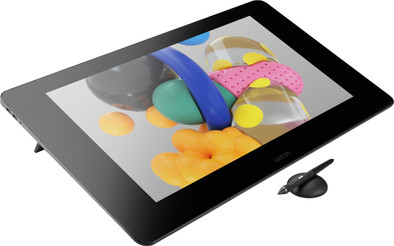
Wacom Cintiq Pro 24 Pen
Never available again
View alternatives in the sidebar
View alternatives in the sidebar
Compatible with operating system | Windows, macOS | |
|---|---|---|
Multi-touch | ||
Connection type | Wired | |
Width | 67,7 cm | |
Depth | 39,4 cm |
According to our drawing tablet expert
With the Wacom Cintiq Pro 24 inches, you have a drawing tablet to get the most out of your creativity as a professional artist. Thanks to the 24-inch Ultra HD (4K) screen, you have a lot of screen space and you can see the smallest details of what you're drawing. This screen has an authentic feeling while you draw, so it feels like you're working with a pen on paper. The included Wacom Pro Pen 2 has 8192 pressure levels, which is 4 times more than its predecessor. This ensures that you can determine exactly how thick or thin the lines are. The ExpressKey remote has 17 programmable buttons. So you can choose how to use the buttons to optimize your workflow.
Note: this drawing tablet is not a standalone model. You need to connect it to a PC or laptop.
5 stars
3
4 stars
3
3 stars
0
2 stars
0
1 star
0
Technically it's fine, sharp and precise! The remote control is included, but on the old tablets the buttons were built in, which was a bit more convenient. I keep having trouble with the remote control cord. You should also always turn on the remote control when you are not using it for a while.
schetsontwerp
11 February 2020
Automatically translated from Dutch
Wacom tablets are pricey, but you get what you pay for. For years I have enjoyed the Cintiq 21ux. Bought, used and sold a Huion tablet for a short period last year. And back to the 21ux again. In January I switched to the Cintiq 16. And now to the Cintiq 24 pro. And it offers the "it works" way I'm used to from Wacom. High resolution allows me to work on my drawings at almost full resolution.
The disadvantage is that you do need a sturdier computer to make applications such as clip studio not feel like a slide show. You need fast and a lot of memory for that. In principle, it has nothing to do with the tablet, but you should remember when you upgrade that you also have a suitable PC.
Issues:
John Bakker
11 July 2020
Automatically translated from Dutch
After having had a Wacom cintiq 13hd for years, this is a very nice upgrade. Colors are better, I can estimate better when making visuals how the ratio of text and image is. I have another iPad 12.9 and really wanted a Wacom that's bigger, otherwise little use. It took some puzzling to connect, but it wasn't very difficult. It draws wonderfully, the holder on the Wacom is handy (always forget where I put my pen). My old pen even works on this one, but both draw nicely. No extra ergo standard for now, the legs underneath are sufficient for now. I usually work with a landscape screen.
Julie Beerepoot
31 May 2021
Automatically translated from Dutch
Product number | 807891 | |
|---|---|---|
Manufacturer code | DTK-2420 | |
Brand | Wacom | |
Processing of your defect | Via Coolblue | |
Old product returned for free |
Drawing tablet has integrated screen | ||
|---|---|---|
Screen size | 24 inches | |
Resolution height | 2160 pixels | |
Resolution width | 3840 pixels | |
Lines per inch (LPI) | 5080 lpi | |
Response time | 12 ms | |
Brightness | 350 cd/m2 | |
Contrast ratio | 1000 | |
Color temperature | 6500 K | |
Color gamut | 99 % | |
Multi-touch | ||
Number of buttons | 18 | |
Programmable buttons | ||
Tilt sensitive | ||
Tilts | 60 ° | |
Compatible with operating system | Windows, macOS |
Connection type | Wired | |
|---|---|---|
Bluetooth |
Weight | 7 kg | |
|---|---|---|
Width | 67,7 cm | |
Depth | 39,4 cm | |
Height | 4,7 cm |
Power source | ||
|---|---|---|
Power supply type | Power grid | |
Cable length | 1,8 m |
