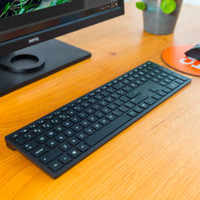
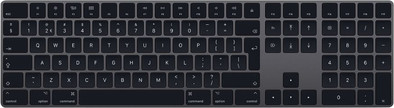
Apple Magic Keyboard with Numeric Keypad QWERTY Space Gray
Never available again
View alternatives in the sidebar
According to our keyboard expert
Although displayed differently on the photos, this keyboard features a small shift key.
The new Apple Magic Keyboard with numerical keypad lets you work on your Mac in style. This edition of the Magic Keyboard is fully wireless. Connect the keyboard just once with the supplied cable and your Mac is immediately connected to it via Bluetooth. This means no hassle with cables and you can type long texts comfortably on the scissor switch chiclet keys. Keyboard shortcuts are available for controlling your music and other multimedia. The Magic Keyboard battery runs for over a month on a full charge. This wireless Apple keyboard is about 1cm high and is therefore easy to store when you're not using it.
This is an original Apple accessory.
Suitable for Macs with Bluetooth and Mac OS 10.12.4 or higher and iOS devices with iOS 10.3 or higher.
Connection type | Wireless | |
|---|---|---|
Backlit keyboard | ||
Keyboard composition | Keyboard, Numpad | |
Bluetooth | ||
Geographic keyboard layout | US layout | |
Ergonomic design | ||
Suitable for gaming | ||
Mechanical keyboard |
5 stars
87
4 stars
12
3 stars
4
2 stars
0
1 star
0
Installation ease
Ergonomics
User friendliness
Although the keyboard types well, I can't recommend it wholeheartedly yet. I am a programmer and use the keyboard many hours a day. After a few weeks of typing on the smaller version - the one with those too small arrow keys and without a numeric keypad - and now the larger version, a weird (overuse?) pain has developed in my left arm that I can use with a Microsoft Natural 4000 keyboard. never had. This is probably because the keyboard is so flat on the desk.
The keyboard itself is comparable to that of the MacBook Pros up to 2015, so not with the butterfly mechanism.
For the amount you pay for these, you have almost 3 of those Microsoft keyboards. It's an Apple device, and that's what you pay for. Maybe it's comparing apples (hehe) with oranges, but that's something to think about when making your choice.
Then why bought this one? Because it makes less noise than such an MS keyboard. The silence results in a satisfied woman who is sitting nearby and that is also worth something. Mechanical keyboards and keyboards with more travel (i.e. pushing keys deeper) have a lot more noise and that is not very pleasant for the environment when you are sitting in the living room. This keyboard in itself does not make more noise than a regular macbook keyboard.
The numeric keyboard is something I never use, because the time it takes to move my hand to it is longer than the fingers move to the standard 1 to 0 keys. In my opinion they should have left them out.
Also a bit curious is the placement of the fn key. Since I always configure my keyboard to use the function keys as function keys instead of . "action keys", it is rather unintuitive to find the fn key vs. other Apple keyboards (this one is next to the backspace, while they are at the bottom left of the macbooks). If you don't normally use function keys, you will not be bothered by this.
I also wonder how useful the F13 to F19 keys are. I personally would have found it more convenient if they had included functions such as Exposé or the media controls (play, reel, volume). They don't get in the way, but I don't use them either.
What is positive is that the thing is extremely easy to connect and use. The appearance (the dark gray one) is also fine.
In conclusion: I am neither positive nor negative about the thing. I find the choice for a keyboard rather personal and I think the die-hard typists can agree with the above review.
Johan Mulder
10 October 2019
Automatically translated from Dutch
Finally working with an apple keyboard, even when I connect my macbook to a thunderbolt display.
It is a bit pricey, but as you are used to from Apple, it easily connects to new MacBooks. Wireless is of course very nice if you normally work with a Macbook, saves a USB stick/converter cable.
The battery life is striking. It lasts a long time and I haven't had to charge it yet. It comes with a charging cable (lightning to USB) in the color black.
It is a solid keyboard that lasts a long time in battery life. He types like an Apple keyboard should type, or as my 3-year-old son says 'tep, tapp, tapp'.
Tim van Iersel
29 July 2019
Automatically translated from Dutch
It's probably one of, if not the best looking keyboard to pair with your Mac machine. It comes at a pretty hefty cost but with the use I will get from it it will have paid for itself in no time and should last me many years to come if its anything like pervious Apple keyboards (I'm still using the one which came with my iMac back in 2009 with no issues....other than running through batteries).
I'm super happy with this new addition to my home office!
Scott Hodson
21 March 2019
Product number | 809684 | |
|---|---|---|
Manufacturer code | MRMH2N/A | |
Brand | Apple | |
Warranty | 2 years | |
Processing of your defect | Via Coolblue | |
Old product returned for free |
Keyboard layout | QWERTY | |
|---|---|---|
Geographic keyboard layout | US layout | |
Physical keyboard layout | ISO | |
Typing comfort | Mid-range | |
Backlit keyboard | ||
Spill-resistant | ||
Programmable keys | ||
Multimedia shortcuts | ||
Flat keys | ||
Suitable for gaming | ||
Mechanical keyboard |
Connection type | Wireless | |
|---|---|---|
Nano receiver | ||
Bluetooth | ||
Bluetooth version | 4.0 |
Power supply type | Via a different product |
|---|
Keyboard composition | Keyboard, Numpad | |
|---|---|---|
Ergonomic design | ||
Height | 1,09 cm | |
Width | 41,87 cm | |
Depth | 11,49 cm | |
Wrist rest | ||
Color | Black, Gray | |
Weight | 390 g |