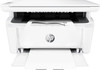
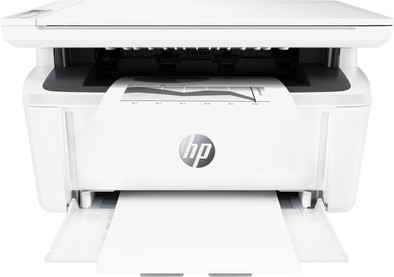
HP LaserJet Pro MFP M28w
Never available again
View alternatives in the sidebar
According to our printer expert
The HP LaserJet Pro MFP M28w is the smallest all-in-one laser printer in its range. Thanks to the business functions, this printer is also suitable for the office. You can scan your documents directly to your email or cloud, for example. Or easily make a copy of both sides of an ID card on a single sheet of paper. Despite its compact design, you can put up to 150 sheets of paper in the printer and there is room for 100 sheets in the output tray of the printer. Fold the paper tray after use, so the printer takes up even less space on your desk. The toner cartridge is pre-installed, so you can get started right away.
Print technology | Laser | |
|---|---|---|
Printer type | All-in-one | |
Automatic duplex printing | ||
Automatic document feeder (ADF) | ||
Color printer | ||
Maximum print size | A4 | |
Photo paper drawer | ||
Built-in WiFi |
5 stars
46
4 stars
40
3 stars
1
2 stars
0
1 star
0
Installation ease
Options
Print quality
Positive and Critical Points I was seriously surprised by how small and compact this printer is. Really great. And he is so fast! Such a huge difference with our previous printer. You really had a problem if you had to print something just before you had to leave the door for an appointment. I also printed an A4 with a very heavy black and white photo, it took him a little longer. The prints are neat. I tried the scanner and was surprised that it asked for access to the camera and you could take a picture on the spot and print it wirelessly. Crazy! And nice result. The installation via the website and app on the laptop was a snap. And I'm not that experienced in this. It finds the wireless network itself via your laptop, which is ideal. Critical points, what did I run into? -Unfortunately the app is not available for my phone (an LG G3) -The printer or computer does NOT clearly indicate what to do when printing double-sided. It doesn't do that automatically (also a small disadvantage), but you have to reload the paper at the bottom. That is obvious. In the pop-up is a picture that you then have to press a large round blue button. There isn't one. So you try what...... the round on/off button? So no. Everything's off, sucks. Then on the flashing light, the triangle. No, nothing will happen. Then tried to press 'ok' on the pop-up on the laptop. No, nothing will happen. Then pressed several buttons with rectangles on the printer.... and yes there he went. -Why is the installation instruction only available in icons and not in text? I didn't understand some pictures. That's how I didn't see the Styrofoam block at first. Installing went like a train, but unpacking and preparing the printer for this did not. -It keeps jumping back to single-sided printing. I want the eco mode as standard. -I was convinced beforehand, I wanted a laserjet that only prints black and white doesn't matter to me. Because I don't print much, a laserjet would ultimately be cheaper because you don't have dried out cartridges and therefore money wasted. Still, I noticed a few times that I missed the color. For example, I printed a route map and couldn't distinguish the red route from the rest. And in another image I couldn't separate the planes properly. I did look in printer settings to see if I could, for example, set it lighter, but I haven't been able to find that yet
Kiki
10 August 2018
Automatically translated from Dutch
Should have bought years ago
Sjan De Wit
28 October 2019
Automatically translated from Dutch
Initial difficulties with connecting the wifi. Once paired, communication with the network runs smoothly
Arjen
26 June 2019
Automatically translated from Dutch
Product number | 811688 | |
|---|---|---|
Manufacturer code | W2G55A#B19 | |
Brand | HP | |
Warranty | 2 years | |
Processing of your defect | Via Coolblue | |
Old product returned for free |
Printer size | Small | |
|---|---|---|
Width | 36 cm | |
Depth | 26,4 cm | |
Height | 19,7 cm | |
Color | White | |
Weight | 5,4 kg |
Printer type | All-in-one | |
|---|---|---|
Photo printer | ||
Portable (mobile use) | ||
Usage location | Office |
Toner cartridge line | HP 44 | |
|---|---|---|
Print technology | Laser | |
Number of cartridges/toner cartridges | 1 | |
Color printer | ||
Print speed black (ISO) | 18 ppm | |
First black page ready after | 8,2 seconds | |
Speed class | Standard | |
Usage costs per page | 0,06 euro | |
Maximum print resolution height | 600 dpi | |
Maximum print resolution width | 600 dpi | |
Maximum print size | A4 | |
Automatic duplex printing | ||
Borderless printing |
Scan functionality | ||
|---|---|---|
Maximum optical scan resolution width | 400 dpi | |
Maximum optical scan resolution height | 600 dpi | |
Scanner type | Flatbed scanner | |
Maximum scan size | A4 (21x29.7cm) | |
Automatic document feeder (ADF) | ||
Scan sizes | A4 | |
Scan speed (PPM) | 10 ppm | |
Color depth output | 24 bpp | |
Scan to | PC (network) | |
OCR |
Copying functionality | ||
|---|---|---|
Maximum copy resolution height | 600 dpi | |
Maximum copy resolution width | 400 dpi |
Fax functionality |
|---|
Built-in screen |
|---|
Compatible with operating system | Windows, iOS, macOS | |
|---|---|---|
Connection type | Wired, Wireless | |
Apple AirPrint | ||
Email print | ||
WPS (Wireless Protected Setup) | ||
Female standard USB-A port version | 2.0 | |
NFC | ||
Built-in WiFi | ||
Bluetooth | ||
WiFi direct | ||
USB port |
Manual input tray | ||
|---|---|---|
Photo paper drawer | ||
Output capacity output drawer | 100 | |
Maximum print size standard paper tray | A4 | |
Input capacity standard paper tray | 150 | |
Number of standard paper trays | 1 |
Memory card reader |
|---|