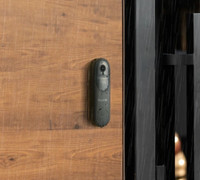
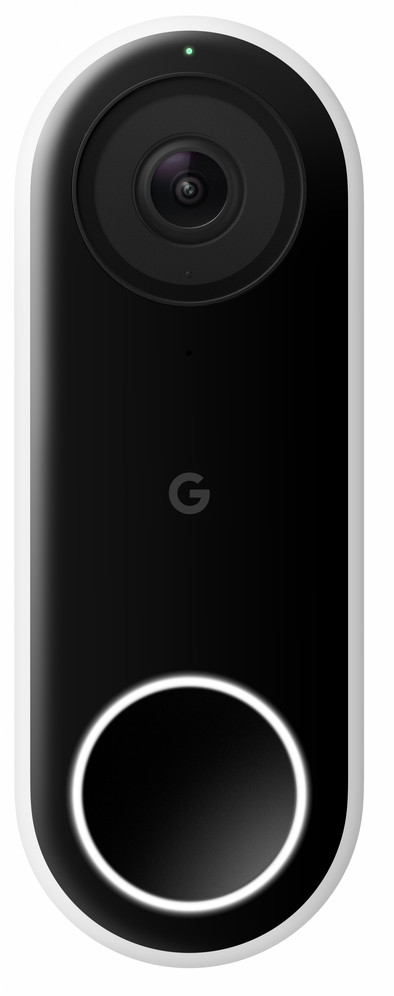
Google Nest Hello Wired
Never available again
View alternatives in the sidebar
View alternatives in the sidebar
To stream live footage from your smart doorbell, you need a strong and stable WiFi signal at your front door. Walls and doors limit the wireless signal. Read how to get WiFi at your front door here.

Product number | 811843 | |
|---|---|---|
Manufacturer code | NC5100EX | |
Brand | Google Nest | |
Processing of your defect | Via Coolblue | |
Old product returned for free |
Video doorbell | ||
|---|---|---|
Type of image definition support | UXGA (1200p) | |
Video resolution width | 1200 pixels | |
Video resolution height | 1600 pixels | |
HDR support | ||
Frames per second | 30 fps | |
Horizontal viewing angle | 160 ° | |
Vertical viewing angle | 160 ° | |
Optical zoom function | ||
Digital zoom function | ||
Digital zoom | 8 | |
Fisheye | ||
Night mode | ||
Infrared light range | 3 m |
Review event | ||
|---|---|---|
Number of seconds to review event | 5 seconds | |
Motion detection sensor | ||
Built-in microphone | ||
2-way audio | ||
Facial recognition | ||
Storage options | Cloud | |
Storage expandable | ||
Store maximum period of local images | 60 seconds | |
Number of days you can view for free | 0 d | |
Subscription needed for full use | ||
Monthly costs | 6 euros | |
Recording function | ||
Cloud recording function | Paid | |
Year introduced | 2018 | |
Introduction month | June |
Built-in WiFi | ||
|---|---|---|
Controls via app | ||
Controlled via Apple app | ||
Controlled via Android app | ||
Smart home platform | Google Assistant, Google Home, IFTTT, Samsung SmartThings | |
Power supply type | Power grid | |
Installation ease according to customers | Knowledge required |
Height | 11,7 cm | |
|---|---|---|
Width | 4,3 cm | |
Depth | 2,6 cm | |
Color | Black, White | |
Material | Plastic | |
Water-resistant | ||
IP certification | IPX4 |
Internet connection required | ||
|---|---|---|
Manufacturer account required | ||
Multi-factor authentication | ||
Usage possible without cloud environment manufacturer | ||
Expected date of last security update | January 2025 | |
Expected frequency security updates | Each quarter | |
Personal information required | ||
Type of information required | Personal information, Usage information |
Review event | ||
|---|---|---|
2-way audio | ||
Subscription needed for full use | ||
Type of image definition support | UXGA (1200p) | |
Smart home platform | Google Assistant, Google Home, IFTTT, Samsung SmartThings | |
Storage options | Cloud |
According to our doorbell expert
Because the doorbell has HDR, details and contrasts are more visible.
You can connect the bell to the existing wiring of your doorbell.
Pair the doorbell with the Google Assistant to make it work with your other smart devices.
You need a 12V bell transformer to install the Google Nest Hello.
To fully use the smart doorbell, you need a Google Nest Aware subscription that's available from € 50 per year.
Note: the smart doorbell isn't easy to install, so we recommend you use a professional installation service if you're not very handy.
The Google Nest Doorbell Wired lets you know who's in front of your door anytime, anywhere. Replace your current wired doorbell with this smart Google Next doorbell. The doorbell streams 24/7, allowing you to watch live at any time. Have a Google Nest Aware subscription? This smart doorbell recognizes family and friends via facial recognition in that case, and sends you a separate update in the app. You can also address your visitors with a press of a button using the built-in microphone and speakers, or by picking one of the pre-programmed messages. All images are stored in the cloud. This has secure encryption, ensuring all of your material is safely stored.
5 stars
159
4 stars
128
3 stars
17
2 stars
6
1 star
1
Installation ease
Image quality
Functionality
I had been looking forward to the Nest Hello for some time. When this became available, I ordered directly from Coolblue. Below I will explain what I think of it.
I've been looking at smart doorbells for some time now. There is nothing more annoying than missing a Coolblue package because the postman has already left before I have walked down from the attic. But I also wanted to combine the doorbell with permanent video surveillance. As a result, most doorbells from other manufacturers fell off. Moreover, I am already comfortable in the Nest ecosystem. I already use a Thermostat (v3), various smoke detectors and a Nest Cam Outdoor. Like the other Nest products, I think the Hello looks nice, better than the products of the competition.
As clearly described by Coolblue (and Nest), you cannot just install the Nest. Most Dutch households have an 8V doorbell system and Nest needs 16V-24V AC. So that was first shopping around at various electronics stores. In my case I needed: a 24V bell transformer and a new bell that works on 24V.
You don't necessarily have to be a rocket scientist to connect a few things, but if you have paid a bit of attention at school, it is easy to follow. In my case I asked my father to help me, I was too busy with Pokémon at school. No messing around: it's a matter of connecting the bell transformer, replacing the bell, connecting wires correctly and connecting and mounting the Nest Hello.
The Nest app on the phone helps with this. Before you start, you scan the QR code on the back of the Nest Hello and you will see a step-by-step plan that you basically simply have to carry out. Can't really go wrong. At the end of this step-by-step plan, the newly connected Nest Hello will immediately be provided with configuration and you will soon see your first images.
Afterwards I installed the supplied 15 degree wedge. As a result, the frame fell away neatly, leaving me with more garden in view.
It remains to be seen how long Hello will hang without being stolen. With a paperclip or (supplied) 'sim card ejector' you can release the bell in no time.
The Nest Hello does exactly what I want it to do: I can look outside via the app and when someone rings the bell, I receive a notification on my phone within moments. You can then choose to speak (similar to an intercom) or have one of the pre-programmed default answers spoken. These were already available in Dutch.
The first use was a bit different than I was used to with the Nest Cam Outdoor. I couldn't start watching video right away (apparently the Nest Aware demo wasn't activated yet). The camera also reacted somewhat slowly when viewing live images or having the standard answers spoken. But after an hour it was much better. I suspect an over-the-air update was available. Unable to check. After this hour everything works 100% smoothly and satisfactorily.
The sound is also different. On the Nest Cam Outdoor I can listen and hear background noise (birds, giant airplanes at 300 meters altitude) but the Nest Hello seems to apply some kind of suppression so that you only hear sound from the microphone after the microphone is pushed open by loud noises . In practice this works fine: as soon as someone walks through the garden gate, that person generates so much noise that I can follow everything. I hardly hear birds, but those planes go well luckily.
Which is a pity at the moment: sound from the other party is recorded, but if you speak through the intercom yourself, this is not recorded due to the sound suppression. If you look back images you will only hear the opponent speak. I had read this before, not a big problem, but hope this will be fixed with an update.
The image is (especially when you select image quality 'High') very good. The 4:3 aspect ratio is also nice, so that people fit well into the picture. The fisheye effect is present, but people are easy to recognize. The infrared mode works fine at night.
Nest Hello also recognizes people if you use Nest Aware. You will then see push notifications on your phone in which the name of the person is mentioned. Not necessarily an added value on the phone (because a screenshot is shown immediately) but I can imagine that this comes into its own with a Google Speaker (no Google speaker in the house).
Funny: you can set quiet times where the physical bell in the house does not go off, but you only receive a notification via the Nest app. Handy with sleeping children. Less convenient: you can only switch it on/off or switch it on via a timer (30, 60 or 90 minutes). I would rather see a timetable here, maybe that will come with an update as well. Oh, and I noticed during testing that sometimes the setting is ignored and the bell rings anyway. Can't figure out why that is yet.
As far as I'm concerned, a couple of points should be picked up to make it a perfect product (sound of yourself must also be recorded when using the intercom, schedule for silence times instead of just a timer function). Nevertheless, I am extremely satisfied and I can't wait for all future Coolblue packages that I will no longer miss ;-)
Dennis Zandvliet
23 June 2018
Automatically translated from Nederlands
Super product, just bizarre how quickly it was stolen by the thief (we have the footage, unfortunately it was unrecognizable in the picture) even though I had it installed by a mechanic (from another online store) I would like a Nest again, But I'm very afraid that it will be stolen again immediately. They should anchor him better or give a loud signal or something when he gets disconnected. Because unfortunately that's how a child can do the laundry. Nest called; not reachable. Hopefully they will respond to my email for disabling our Nest Doorbell for the thief. Very sorry!!
Susanne
23 November 2018
Automatically translated from Nederlands
Recommended, looks nice! Talk back via the Nest App, send standard messages to, for example, the postman.
You do have to buy a 24V bell transformer separately. Nest does not provide this as standard. (Something that is the case with the Ringpro)
Nest support does not indicate which bell transformers are suitable. In the Netherlands, most Bel Trafo's in the meter cupboard are standard 8 Volt.
In the end only 2 bell transformers could be found via the internet. Costs you extra between 20 and 50 euros.
All in all an expensive purchase because of the bell transformer which you have to look for/buy separately, but satisfied with it.
Krishen
25 June 2018
Automatically translated from Nederlands