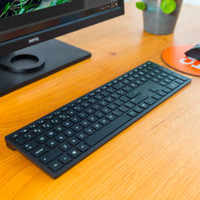
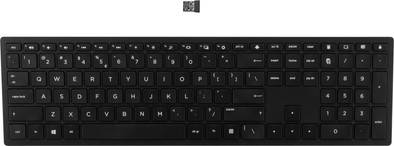
HP Pavilion Wireless Keyboard 600 QWERTY
Never available again
View alternatives in the sidebar
View alternatives in the sidebar
Product number | 823292 | |
|---|---|---|
Manufacturer code | 4CE98AA#ABB | |
Brand | HP | |
Processing of your defect | Via Coolblue | |
Old product returned for free |
Keyboard layout | QWERTY | |
|---|---|---|
Geographic keyboard layout | US layout | |
Physical keyboard layout | ANSI | |
Typing comfort | Mid-range | |
Backlit keyboard | ||
Spill-resistant | ||
Programmable keys | ||
Multimedia shortcuts | ||
Flat keys | ||
Suitable for gaming | ||
Mechanical keyboard |
Connection type | Wireless | |
|---|---|---|
Nano receiver |
Keyboard composition | Keyboard, Numpad | |
|---|---|---|
Ergonomic design | ||
Height | 1,87 cm | |
Width | 41 cm | |
Depth | 11,42 cm | |
Wrist rest | ||
Color | Black | |
Weight | 0,63 kg |
Power supply type | Rechargeable battery |
|---|
Connection type | Wireless | |
|---|---|---|
Backlit keyboard | ||
Keyboard composition | Keyboard, Numpad | |
Ergonomic design | ||
Mechanical keyboard | ||
Physical keyboard layout | ANSI | |
Geographic keyboard layout | US layout | |
Suitable for gaming |
According to our keyboard expert
With the multimedia keys you always have the control of your music and films at your fingertips during typing.
This keyboard is equipped with a numeric field, so you enter numbers easily.
The flat keys make little noise, so your environment does not suffer from your typing.
This keyboard does not have a palm rest for an ergonomic working posture.
Without illuminated keys, you can hit the wrong keys faster in the late hours than with a lighted keyboard.
Get more out of typing with the HP Pavilion Wireless Keyboard 600 QWERTY. You'll have a number of shortcuts at your fingertips, for example. And with the push of a button, you can start the calculator, control the volume of your music, or go to the printer settings. Thanks to the simplistic design, the keyboard fits any workstation. You won't be bothered by unattractive cables on your desk, since it's a wireless keyboard. Its flat keys are designed to not make too much noise while typing. This is useful if you don't want to bother your colleagues with your typing, or you find the noise annoying yourself.
Installation ease
Ergonomics
I chose this one because I wanted a keyboard that I could use nicely in my living room, without an ugly keyboard in my computer corner.
As far as the pros are concerned, it completely lives up to expectations, but the negatives are a deal breaker in my opinion. The (small) function keys are the same as the multimedia keys and unfortunately the latter is the default and this cannot be corrected (I googled it and found more people on the HP forum grumbling about this issue. My BIOS settings are fine and on my laptop does the double keys behave properly).
Now when I play a game or write code I have to use the FN key every time to make the multimedia keys behave like F1-F12. Very irritating.
It's that I already took the box out of the door, otherwise I would have sent it back. It's a shame because the keyboard is otherwise beautiful.
If you want the multimedia keys yourself and don't care about the F keys, I would recommend it.
Kaat
17 December 2018
Automatically translated from Nederlands
A very nice keyboard. It is a bit heavier than you would expect and therefore feels very solid. The attack is almost silent. Works right out of the box.
Kor
23 January 2021
Automatically translated from Nederlands
Nice sturdy board. Feels good right away. Positioned slightly obliquely. An advantage for me. That's a choice. Position cannot be changed.
Frank van der Teems
8 July 2022
Automatically translated from Nederlands