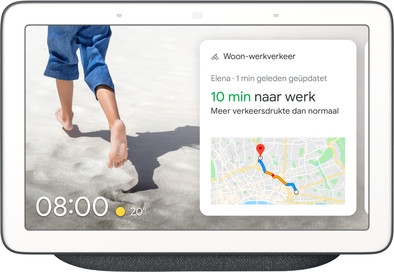
Google Nest Hub Charcoal
Never available again
View alternatives in the sidebar
View alternatives in the sidebar
Product number | 831560 | |
|---|---|---|
Manufacturer code | GA00515-NL | |
Brand | Google Nest | |
Processing of your defect | Via Coolblue | |
Old product returned for free |
Height | 8,8 cm | |
|---|---|---|
Depth | 21,6 cm | |
Width | 15,5 cm | |
Weight | 1 kg | |
Color | Gray | |
Built-in screen | ||
Touchscreen |
Power supply type | Power grid |
|---|
Link to router | Wireless |
|---|
Controls via app | ||
|---|---|---|
Compatible with smartphone / apps | ||
Controlled via Apple app | ||
Controlled via Android app | ||
Controlled via Windows app | ||
Linkable to home automation | ||
Control panel included | ||
Smart home platform | Google Assistant, Homey, IFTTT |
Clock speed | 1,2 GHz | |
|---|---|---|
Frequencies | 2400 | |
Number of frequency channels | 2 | |
Protocol | Bluetooth |
Guaranteed support with updates | 36 months after release date | |
|---|---|---|
Year introduced | 2019 | |
Introduction month | April |
Smart home platform | Google Assistant, Homey, IFTTT | |
|---|---|---|
Power supply type | Power grid | |
Touchscreen | ||
Linkable to a protocol |
According to our smart home hub expert
Via the screen, you're always aware of your calendar and the weather, but you can also view live footage from your smart doorbell or camera.
Thanks to the voice control, you can control the hub without using your smartphone or tablet.
The smart home hub can distinguish up to 6 voices, so you can use the device with several people.
The smart display doesn't have a camera, so you can't be seen during video calls.
You need a Google account to use functions such as calendar management.
You can control everything in your house with the Google Nest Hub Anthracite. Connect all your smart products to this smart display and control them with your voice or via the large touchscreen. This way, you can turn on your smart lights without getting out of your chair. When someone presses your smart doorbell, you can immediately see who it is on the 7-inch screen on the Nest Hub. The screen of this smart home hub also shows the weather, your calendar, or a recipe. Useful, in case you need to read along while you're cooking. Thanks to voice recognition, you can use the speaker with a maximum of 6 people. The Google Nest Hub doesn't provide any personal information in case it doesn't recognize your voice.
Sound quality
Range
Installation & user friendliness
Price-quality ratio
Connectivity
After recently purchasing a Google Home Mini, we decided it would be useful to have a Nest Hub in the living room so that the Mini could go to the bedroom. When ordering the Nest Hub from Coolblue, I was surprised that I also got a free Mini. It comes in the nursery.
The unit ensures that many things that previously required manual operations no longer require. It is a kitchen timer, translator, converter, shopping list, agenda, radio, etc. And the development continues, especially as more and more people start using this technology. You put your casserole in the oven, and at the same time you ask the Hub to set an alarm. The Nest Hub shows the alarm clock on the screen. At rest, it is a very nice photo frame, where you can easily put your own photos in via Google Photos. You can ask the Nest Hub to remember things for you, look up recipes, put appointments in your agenda, read your agenda for you, you can use it to control other devices in your house, bluetooth, and other Google devices, you can use it to say things to your children in other rooms, without having to 'yell' around the house.
And most importantly, the units learn who you are. They recognize your voice, so you can use your own Spotify preferences, place your own agenda items, everything on the person. And every other resident/sharer can also do this for his/her business. Meanwhile, we have three Google Homes here. One Nest Hub, two Minis, there's a ChromeCast, an old Android mobile that serves as a surveillance camera, and we're now looking at expanding it with a doorbell/camera, and an option to connect a baby monitor solution. The possibilities are great, and will soon become much larger.
G.R. Bouma
19 June 2019
Automatically translated from Nederlands
This beautiful device only showed English after installation. A quick call with Coolblue gave a quick solution, reset, by holding down the volume button harder and softer for 10 seconds. After restart everything ok! Set up the Nest Hub further via the app, sit down for a while and then okay. After yelling “Okay Google” in the morning and saying good morning, you will automatically see and hear the weather and the latest news from three radio stations, top! Afterwards, my set photos will automatically pass by! You also have a radio that you can put on any station by calling out. Buy this device and you too will be enthusiastic about even more possibilities that are possible with voice control.
Harry Harder
4 June 2019
Automatically translated from Nederlands
It's a step forward after all. Not in terms of sound but especially the screen. Very handy while cooking or just checking the weather for several days.
Rafael Van Amerongen
3 June 2019
Automatically translated from Nederlands