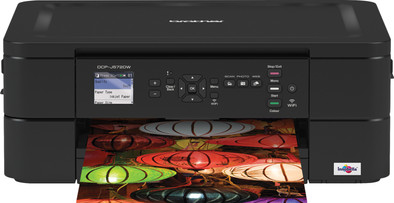
Brother DCP-J572DW
Never available again
View alternatives in the sidebar
View alternatives in the sidebar
Print technology | Inkjet | |
|---|---|---|
Printer type | All-in-one | |
Automatic duplex printing | ||
Automatic document feeder (ADF) | ||
Automatic duplex scanning | ||
Color printer | ||
Maximum print size | A4 | |
Photo paper drawer |
According to our printer expert
Print, scan, and copy in color with the Brother DCP-J572DW. With this wireless all-in-one printer, you can print documents from your computer, laptop, tablet, or smartphone. Via WiFi, you can even print from the attic or from your garden. The DCP-J572DW prints 27 pages per minute, so you never have to wait long for a print. You can print clear photos thanks to the high resolution of 6000 by 1200 DPI. You can do this on the standard photo format (10x15 centimeters) up to A4 format. You can store photo paper in the separate photo paper drawer. Insert a memory card in the Media Card Center to print directly from your camera. You can save paper thanks to duplex printing. You can easily adjust the settings on the 4.5-centimeter LCD screen.
Note: do you want to print a photo on photo paper? Place the back (with the logo) up in the printer.
5 stars
3
4 stars
3
3 stars
1
2 stars
0
1 star
0
A printer that simply works reliably under Linux, even as a network printer. Drivers on the Brother site in .deb and .rpm format (Debian/Ubuntu and RedHat/SUSE families). Installed on my Fedora laptop with no problems and working right away. Must open a terminal window, but the commands are there. The commands just worked, no weird errors or long Googling. On macOS, the printer is found immediately thanks to AirPrint and you can start printing after 1 click on "add printer". Don't think I'll ever go back to HP after this printer.
As an added bonus: integrates out-of-the-box with Home Assistant allowing you to write automations depending on printer and toner status, no need for third-party addons.
You can connect the printer to your Wi-Fi network on the printer screen itself. So you don't need an app on your phone to install the printer.
Sylvia van Os
16 May 2020
Automatically translated from Dutch
Printer in use for over a year and a half. Due to the many annoyances decided to write this review. It can't match the ease of use and the many times user-friendly app of my old HP printer. Unnecessary ink and paper consumption by printing all error messages such as ink level low and network problems. Definitely not recommended.
So
29 April 2021
Automatically translated from Dutch
It's the worst printer I've ever had. The children assume that he will never do it if you want to print. That says enough.
Edwin Metselaar
26 April 2021
Automatically translated from Dutch
Coolblue takes care of everything, from taking out an insurance to repairs
For almost all accidents
More coverage in case of damage than your standard warranty
No deductible
First, add your printer to your shopping cart. On the next page, choose the Protection Plan below. You always have a 30-day return window and pay no deductible in case of damage.
3-year Protection Plan
17,99
one-time5-year Protection Plan
35,99
one-time
Product number | 838104 | |
|---|---|---|
Manufacturer code | DCPJ572DWH1 | |
Brand | Brother | |
Processing of your defect | Via Coolblue | |
Old product returned for free |
Printer size | Medium | |
|---|---|---|
Width | 40 cm | |
Depth | 34,1 cm | |
Height | 15,1 cm | |
Color | Black | |
Weight | 8,3 kg |
Printer type | All-in-one | |
|---|---|---|
Photo printer | ||
Portable (mobile use) |
Cartridge line | Brother LC-3211 | |
|---|---|---|
Print technology | Inkjet | |
Number of cartridges/toner cartridges | 4 | |
Color printer | ||
Print speed black (ISO) | 15 ppm | |
Print speed color (ISO) | 10 ppm | |
First black page ready after | 8 seconds | |
Maximum print resolution height | 6000 dpi | |
Maximum print resolution width | 1200 dpi | |
Maximum print size | A4 | |
Automatic duplex printing | ||
Borderless printing | ||
Maximum print size duplex printing | A4 |
Scan functionality | ||
|---|---|---|
Automatic duplex scanning | ||
Maximum optical scan resolution width | 2400 dpi | |
Maximum optical scan resolution height | 1200 dpi | |
Scanner type | Flatbed scanner | |
Maximum scan size | A4 (21x29.7cm) | |
Automatic document feeder (ADF) | ||
Scan sizes | A4 | |
Scan speed (PPM) | 12 ppm | |
Color depth output | 30 bpp | |
Scan to | Cloud, Dropbox, Email, Evernote, Google Docs, Image, Microsoft SharePoint Connector, OCR, PC (local), PDF | |
OCR |
Copying functionality | ||
|---|---|---|
Copy speed black (ISO) | 6 ppm | |
Copy speed color (ISO) | 3 ppm | |
Maximum copy resolution height | 1200 dpi | |
Maximum copy resolution width | 1200 dpi |
Fax functionality |
|---|
Built-in screen | ||
|---|---|---|
Color screen | ||
Touchscreen |
Suitable for HP+ |
|---|
Compatible with operating system | Android, ChromeOS, Linux, Windows, iOS, macOS | |
|---|---|---|
Connection type | Wireless | |
Apple AirPrint | ||
Email print | ||
WPS (Wireless Protected Setup) | ||
Number of Ethernet ports | 0 | |
NFC | ||
Built-in WiFi | ||
Bluetooth | ||
WiFi direct | ||
USB port |
Manual input tray | ||
|---|---|---|
Photo paper drawer | ||
Output capacity output drawer | 50 | |
Input capacity photo paper tray | 20 | |
Maximum print size standard paper tray | A4 | |
Input capacity standard paper tray | 100 | |
Maximum print size photo paper tray | 10x15 | |
Number of standard paper trays | 1 |
Memory card | SDXC | |
|---|---|---|
Memory card reader |