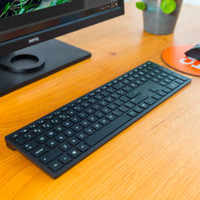
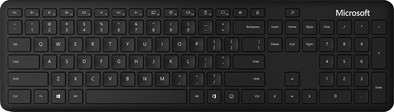
Microsoft Wireless Keyboard QWERTY
Never available again
View alternatives in the sidebar
View alternatives in the sidebar
According to our keyboard expert
You can work quieter and enjoy more freedom of movement with the Microsoft Wireless Keyboard. The keyboard has Bluetooth smart technology, so you don't need a receiver to connect to your device. Because the keyboard is wireless, you don't have a cable that limits you. In addition, the keyboard is compact and you can easily take it with you in your bag. Thanks to the low profile keys, you don't make a lot of noise when you type a long email or report. This way, you can concentrate better on what you're doing and you won't distract your surroundings with typing sounds.
Connection type | Wireless | |
|---|---|---|
Backlit keyboard | ||
Keyboard composition | Keyboard, Numpad | |
Bluetooth | ||
Geographic keyboard layout | US layout | |
Ergonomic design | ||
Suitable for gaming | ||
Mechanical keyboard |
5 stars
30
4 stars
11
3 stars
8
2 stars
0
1 star
0
It's a nice keyboard. The link, in combination with Windows 10, is super easy. Windows 10 automatically sees that your keyboard is nearby and automatically starts the pairing process. The keyboard types well, is quiet and has a nice layout.
A disadvantage I think is that there are no feet on it, so you can't tilt it slightly. Hence a lower score for ergonomics for me.
A small point to note is that the media functions on the function keys are active by default, instead of function keys F1 to F12. As a programmer, I find that annoying, because I often use the function keys. Fortunately, you can adjust this yourself, without software, by pressing FN and Caps Lock simultaneously. The setting is saved, even after you change your batteries.
Joey van Hummel
21 December 2020
Automatically translated from Dutch
Great keyboard for this price. The keys hit nicely, although a new keyboard always takes some getting used to. Nice slim design. There are no adjustable feet underneath, but from an ergonomic point of view that is not necessary at all. A couple of minor downsides: the shortcut key for locking the screen (because Windows key + L is too hard?) is cramped above the backspace key, so that even while typing this review I accidentally locked my screen a few times. By the way, try getting support from Microsoft. There are six keyboard shortcuts programmable according to a downloadable program (Microsoft Mouse and Keyboard Center) from Microsoft. Of course, the lock key is not one of them. In addition, Windows loses the connection with the keyboard after the laptop sleeps, but that could also be due to my laptop. Also good keyboard.
Mr. Thijs
19 July 2022
Automatically translated from Dutch
The wireless keyboard works perfectly with my Microsoft Surface Laptop 3. To be able to adopt a good ergonomic posture when working at home, I use it with my laptop and monitor. So far I haven't been able to find any real cons! After starting up the laptop, the keyboard is immediately connected again (provided the bluetooth on the device is switched on). Even if you have multiple Bluetooth devices (keyboard, mouse, headphones, etc.) connected, it stays connected and works well. The keystroke is pleasant and typing effortlessly. The keyboard is just thin enough that it feels ergonomically nice. Numeric section is perfect for people who work with numbers a lot. With Windows 10, this keyboard works very well!
Some things to consider before buying the keyboard: Fn keys can only be used if you simultaneously press the Fn key next to the Windows start button. This is not a problem for me, because I rarely use them, but if you use them regularly, it can be disturbing. In addition, the keys are not illuminated, but this does benefit the battery life. I've been using the keyboard heavily for a while and battery is still at 100%.
Thijs
28 April 2020
Automatically translated from Dutch
Product number | 839738 | |
|---|---|---|
Manufacturer code | QSZ-00008 | |
Brand | Microsoft | |
Warranty | 2 years | |
Processing of your defect | Via Coolblue | |
Old product returned for free |
Keyboard layout | QWERTY | |
|---|---|---|
Geographic keyboard layout | US layout | |
Physical keyboard layout | ANSI | |
Typing comfort | Basic | |
Backlit keyboard | ||
Spill-resistant | ||
Programmable keys | ||
Multimedia shortcuts | ||
Flat keys | ||
Suitable for gaming | ||
Mechanical keyboard |
Connection type | Wireless | |
|---|---|---|
Nano receiver | ||
Bluetooth | ||
Bluetooth version | 5.0 |
Power supply type | Battery, Rechargeable battery |
|---|
Keyboard composition | Keyboard, Numpad | |
|---|---|---|
Ergonomic design | ||
Height | 19 mm | |
Width | 434,9 mm | |
Depth | 123,7 mm | |
Wrist rest | ||
Color | Black | |
Weight | 461,6 g |