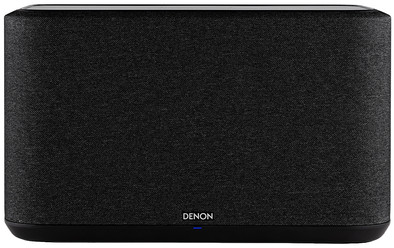
Denon Home 350 Black

Never available again
View alternatives in the sidebar
View alternatives in the sidebar
Product number | 854859 | |
|---|---|---|
Manufacturer code | DENONHOME350BKE2 | |
Brand | Denon | |
Processing of your defect | Via Coolblue | |
Old product returned for free |
Speaker composition | 1 speaker | |
|---|---|---|
Depth | 18 cm | |
Width | 38 cm | |
Height | 22,5 cm | |
Weight | 6,3 kg | |
WiFi speaker size | Large (25 - 40cm) | |
Color | Black | |
Material | Plastic | |
Built-in microphone | ||
Built-in screen | ||
Water-resistant | ||
Waterproofness certification | Not certified | |
Ambilight | ||
Output according to expert | Suitable for spaces larger than 40m² |
Multi-room audio | ||
|---|---|---|
Multi-room platform | AirPlay, Spotify Connect | |
Multi-room functions | Make a stereo pair, Surround sound mode, Zones separately, Zones simultaneously | |
Plays from network | ||
Bluetooth | ||
Bluetooth profiles | Standard Audio (A2DP) | |
NFC | ||
Streaming services support | ||
Streaming services | Napster, Spotify, iTunes |
Radio | ||
|---|---|---|
Internet radio | ||
DAB radio | ||
FM radio | ||
AM radio | ||
Plays from USB memory | ||
Plays from Apple devices via USB | ||
Plays from Android devices via USB |
Smart home platform | Amazon Alexa, Apple HomeKit | |
|---|---|---|
Voice control | ||
Integrated voice assistant |
USB port | ||
|---|---|---|
Type of USB port | Standard USB-A | |
Number of USB ports | 1 | |
RCA connector | ||
Headphone jack |
Power supply type | Power grid |
|---|
Guaranteed support with updates | 60 months after release date | |
|---|---|---|
Year introduced | 2020 | |
Introduction month | February |
Power supply type | Power grid | |
|---|---|---|
Bluetooth | ||
Multi-room audio | ||
Streaming services | Napster, Spotify, iTunes | |
Smart home platform | Amazon Alexa, Apple HomeKit | |
Multi-room functions | Make a stereo pair, Surround sound mode, Zones separately, Zones simultaneously |
According to our WiFi speaker expert
With extra Denon speakers, you can easily create a multi-room setup and stream music in the entire house.
With the touch controls, you're able to control the music without using your smartphone or tablet.
You can easily stream music via your phone, AirPlay, Bluetooth, and streaming services in Hi-Res quality.
To control your TV or other speakers via voice control, you need a Chromecast or Chromecast Audio.
The built-in voice assistant is only available in English.
The Denon Home 350 fills your home with your favorite tunes. This WiFi speaker has 6 D-class amplifiers, which provide a powerful stereo sound reproduction. Connect the speaker with other subwoofers, soundbars, and speakers for a home cinema or multi-room setup. You can control the speaker with your phone or with the touch control. Use the 6 quick-selection buttons to easily access your favorite radio station or playlist.
Note: with the built-in Amazon Alexa, you can control the device and play music with your voice. This function only works in English.
Sound quality
File Support
Build quality
Design
Options
The speaker was connected very quickly. Since I already have a Denon receiver, pairing was a piece of cake. Add HEOS Home 350 and start playing. Beautiful spatial sound that fills the entire room. I mainly use Spotify and the radio part of HEOS, which is called TuneIn. There is no channel or you can find it in this app. I've been enjoying this speaker for a week now and it hasn't been out yet, except at night. Even at low volume it still sounds good with background music.
Tsrac
18 February 2020
Automatically translated from Nederlands
Since I have owned a HEOS before (Heos HomeCinema HS1 black), I was very curious about what is different about a single speaker without a subwoofer compared to a single speaker. Well jam some speakers, there are a few (6 pieces) "hidden" in the housing.
The Home 350 is well packaged and therefore arrived in one piece. What struck me immediately is that it is a heavy device for its size. Not that it's small, but in general devices of that size are a bit lighter. That feeling alone makes me want to plug it in even more and get it started playing. Connecting is a piece of cake. Since the HomeCinema left my house not too long ago, the HEOS app is still on my phone. Of course, I first deleted that device in the app. Connecting the Home 350 is a matter of plugging in the device, finding a good place to put it and then plugging it into the socket. It takes a while to start up. But when he's done with that, I press the connect button on the back and the green light starts flashing to indicate that it can be found by the HEOS app. Open the app, press add device and after ten seconds the app will show that a device has been found. Confirm that this is the correct device and after a short time it will be added to your network.
Then comes the most exciting moment, is he really doing it? Well, I'm not disappointed in that. First I lowered the volume control in the app a bit, just to be sure, since I don't know yet how much sound will initially come from this device. I looked up a radio station via TuneIn, pressed play now and about five seconds later the first sound comes from the Home 350. And I don't mind. At first I like the sound even better than the sound from the HomeCinema HS1. Even after a long(er) time of listening, I still have that feeling.
I have played all kinds of music on the device. From ballads to heavy rock and from techno to pop music from all kinds of years. What I have a bit of a soft spot for is the music of The KLF. Anyone who knows and appreciates this music probably knows why. And I turned that volume up quite a bit. In addition, there is only distortion of the sound at a very high volume. That is really neat. This was already the case with the HomeCinema HS1 at a lower volume. I also don't miss the separate subwoofer at all. The speakers in the housing are in my opinion well balanced. Both The KLF and Evanesence with My Immortal sound fantastic. That last song is a lot more sensitive and that feeling knows how to penetrate you well.
What I think is a particularly good addition are the touch buttons on the top canoe of the HEOS 350. When your hand comes close, those buttons light up and you can quickly make your choice (6 presets and volume control). The presets are easy to set by pressing and holding the preset at a selected station.
I made an attempt to pair the Home 350 via bluetooth to play the sound of LG's recent OLED TV via the Home 350. But whatever I've tried and searched for, I haven't been able to. And I think that's a drawback. I've been a real Formula 1 fan for 30 years and it would have seemed great to be able to hear the sound of the cars through the Home 350.
Another disadvantage that I noticed is that the connection to my Wi-Fi network has already been lost 5 times. It is therefore no longer under my devices in the HEOS app. What should I do then re-pair the Home 350. And if that's happened 5 times in almost two weeks, I can't really call that a stable connection in my opinion. Perhaps this can be solved with a firmware update.
In addition, the HEOS app needs a makeover. Not primarily in terms of colors (I like the dark background), but especially in terms of intuitiveness. There is still quite a bit to do.
And then perhaps the biggest disadvantage for people who are attached to stereo. With one Home 350 you are not there yet. Then you have to buy two. And I think that's a lot of money.
Advantages
Cons
Vincent Hering
25 February 2020
Automatically translated from Nederlands
I come from a set of column speakers from b&w, so this is an unfair comparison, but many wifi speakers sound like a tin box. I have this feeling much less with this speaker. Generally good sound quality with a wide range from deepest bass to highest tone. Solid bass without 'blowing' and high tones without sounding shrill. It took some searching, but I'm happy with my choice.
Kris
8 April 2023
Automatically translated from Nederlands