Netgear GS116LP



5 stars
95
4 stars
53
3 stars
5
2 stars
0
1 star
0
Energy consumption
Speed
Installation & user friendliness
Options
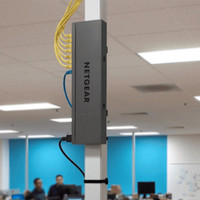
On the advice of the helpdesk, I chose the Netgear GS116 for installing a home network in a new-build home. Because science is still debating the harmful or not harmful effects of wireless networks, we erred on the side of caution and filled the house full of UTP connections. I use the Netgear Switch to connect to the modem of the internet provider. It couldn't be simpler: just hang it up, plug in the cables, plug in the power cable and you're done! Only remark: fixing the switch to the wall is done with two screws supplied. A little bit of measuring work is required to confirm the device properly
Johan Boxstaens
9 November 2010
Automatically translated from Nederlands
Situation sketch: At home I had a WiFi router from netgear and a NAS server from Qnap. Both my ISP's modem and my netgear router acted as DHCP, resulting in two different IP ranges. The Qnap has a double Gigabit LAN connection and I wanted to make the most of that, as far as my network allows.
Solution: This gigabit switch provides an extra boost in my network. All devices between which data must be exchanged (PC, laptop, NAS, AVR, ...) can now be neatly connected to one swtich. The future rooms can also each have their own network connection. To keep it simple, I set up my netgear router as an Access Point. Maybe a waste of the router but easier for the configuration of my network, there is now only one ip-range left.
Advantages
Cons
Bart Clarebout
17 December 2012
Automatically translated from Nederlands
I had issues with my internet, used 2 older switches... replaced them with this Netgear, the problems were solved and I was suddenly able to add an Access Point via PoE for even more stable internet
Laurens
28 December 2023
Automatically translated from Nederlands
Our digital expert will help you, but it can sometimes make mistakes, like humans do.
According to our network switch expert
For heavier devices: a PoE+ switch supplies more power than a regular PoE switch, so you can also connect IP cameras and access points.
Connect 15 devices: connect 15 devices to the internet with a wired connection via this switch.
Easy to set up: this switch is unmanaged, so you can easily connect it with little technical knowledge.
Not for the heaviest devices: PoE+ doesn't provide enough power for the heaviest devices, such as a large pan tilt zoom IP camera.
No extra network features: because this switch isn't a managed switch, you can't set up extra functions for your network.
167,-
167,-
Product number | 862029 | |
|---|---|---|
Manufacturer code | GS116LP-100EUS | |
Brand | Netgear | |
Processing of your defect | Via Coolblue | |
Old product returned for free |
Managed switch | ||
|---|---|---|
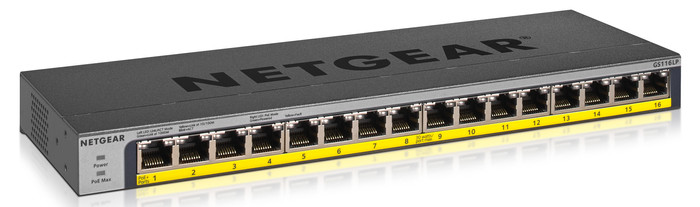
Number of Ethernet ports | 16 | |
Ethernet speed | Gigabit Ethernet (1000Mbps) | |
Switching capacity | 32 Gbit/s | |
SFP/GBIC ports | 0 | |
Quality of Service (QoS) | ||
LACP Link aggregation | ||
IGMP Snooping | ||
VLAN | ||
Jumbo frame support | ||
Port mirroring | ||
Professional use | ||
Suitable for business use in | Small business network |
PoE support | ||
|---|---|---|
Type of PoE | 802.3af (PoE), 802.3at (PoE+) | |
Total PoE power | 76 W | |
Highest PoE stand | PoE+ | |
Number of PoE ports | 16 | |
Number of PoE+ ports | 16 | |
Number of PoE++ ports | 0 | |
Maximum PoE power per port | 30 W |
Fan present | ||
|---|---|---|
Mounting possible | ||
Suitable for 19-inch rack mount | ||
Weight | 0,88 kg | |
Color | Gray | |
Height | 2,7 cm | |
Width | 28,6 cm | |
Depth | 10,2 cm | |
Material | Metal | |
Guided collections test property | 1 switch | 1Gbps Ethernet speed | 0 SFP ports, 1Gbps Ethernet speed | Suitable for a 19-inch rack |
Current product

PoE+
No PoE
PoE+
Gigabit Ethernet (1000Mbps)
2.5Gb Ethernet (2500Mbps)
Gigabit Ethernet (1000Mbps)
0
0
0
167,-
179,-
201,-
In stock
In stock
Coolblue takes care of everything, from taking out an insurance to repairs
For almost all accidents
More coverage in case of damage than your standard warranty
No deductible
First, add your network switch to your shopping cart. On the next page, choose the Protection Plan below. You always have a 30-day return window and pay no deductible in case of damage.
2-year Protection Plan
7,99
one-time3-year Protection Plan
8,99
one-time