Ezviz C3W Pro Husky Air Pro
Never available again
View alternatives in the sidebar
View alternatives in the sidebar
Product number | 874921 | |
|---|---|---|
Manufacturer code | 303101696 | |
Brand | Ezviz | |
Processing of your defect | Via Coolblue | |
Old product returned for free |
Type of image definition support | Full HD (1080p) | |
|---|---|---|
Video resolution width | 1920 pixels | |
Video resolution height | 1080 pixels | |
Horizontal viewing angle | 103 ° | |
Vertical viewing angle | 119 ° | |
Image quality according to customers | Very good | |
Pan | ||
Tilt | ||
Zoom (IPcam) | ||
Digital zoom | 8 | |
Fisheye | ||
Frames per second | 30 fps |
Number of cameras | 1 | |
|---|---|---|
IP camera type | HD camera, Night camera, WiFi camera | |
Usage location | Outdoors | |
Alarm system needed for use | ||
Subscription needed for full use | ||
Motion detection sensor | ||
Infrared lighting | ||
Infrared light range | 30 m | |
Infrared motion sensor | ||
Suitable for placement behind glass | ||
Dynamic DNS client | ||
2-way audio | ||
Built-in microphone | ||
Review event | ||
Number of seconds to review event | 5 seconds | |
Streaming |
Power supply type | Power grid | |
|---|---|---|
Battery (power source) | ||
Maximum battery life | 0 h | |
Storage options | Cloud, PC, SD card | |
SD card slot | ||
Type of SD card | microSD | |
Number of days you can view for free | 0 d | |
Installation ease according to customers | Simple | |
Built-in WiFi | ||
PoE support | ||
UPnP AV support | ||
ONVIF certified | ||
PSIA certified | ||
Cable length | 1,5 m |
Height | 7,2 cm | |
|---|---|---|
Width | 7,2 cm | |
Depth | 15 cm | |
Color | White | |
Mounting possible | ||
Water-resistant | ||
Water resistance | Waterproof | |
Waterproofness certification | IP certification | |
IP certification | IP67 |
Controls via app | ||
|---|---|---|
Controlled via Android app | ||
Controlled via Apple app | ||
Smart home platform | Amazon Alexa, Google Assistant, IFTTT |
Internet connection required | ||
|---|---|---|
Manufacturer account required | ||
Multi-factor authentication | ||
Log in with fingerprint on your phone | ||
Log in with Face ID on your phone | ||
Usage possible without cloud environment manufacturer | ||
Support for future updates | ||
Personal information required | ||
Country where information is stored | Ireland |
Guaranteed support with updates | Unknown | |
|---|---|---|
Year introduced | 2020 | |
Introduction month | December |
Usage location | Outdoors | |
|---|---|---|
Connection type | Power plug | |
Subscription needed for full use | ||
Storage options | Cloud, PC, SD card | |
Smart home platform | Amazon Alexa, Google Assistant, IFTTT | |
2-way audio | ||
IP camera type | HD camera, Night camera, WiFi camera |
According to our IP camera expert
With the SD card slot, you can store footage on this camera directly.
Thanks to the double WiFi antennas, you have a more stable internet connection.
The camera distinguishes people, animals, and objects.
You need a good WiFi signal where you're installing the camera, so you can use a WiFi extender to create a strong WiFi network near your camera.
Due to the size of the connector, you need an outdoor socket or you'll have to drill a hole in the wall.
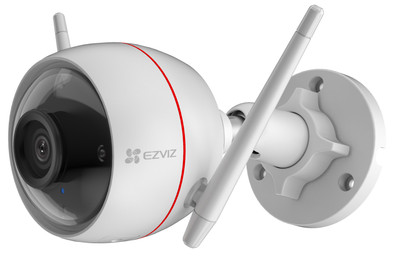
You can guard your house or office with the Ezviz C3W Pro security camera. This camera has two antennas, so it has a stable WiFi connection. Thanks to the built-in spotlights, you can also see what's going on in the dark. You can use the app to flash this light when you want to scare intruders. Or, you can use the spotlight as outdoor lighting and adjust the brightness to your liking. The camera has person detection, which means you'll only receive a signal if it detects people. You can store your camera footage on the cloud or on an SD card with up to 256GB storage (not included). To store on the cloud, you have to pay a monthly fee.
Installation ease
Image quality
Options
Packaging and device: The device comes in a cardboard box with a foam mold. The camera is well protected in the box and the lens is covered with a plastic film against scratches. The box also contains a quick-guide, a drilling template and some parts to connect the LAN cable watertight. Also 3 screws and some low quality nylon plugs.
The device is solid, almost entirely made of painted metal. It looks neatly finished and I couldn't find any flaws in the paint. The device does have a considerable weight, but that is also allowed for a metal construction. The foot can be used for wall, ceiling or floor mounting. It is also completely made of metal, including the ball joint as well as the nut with which you can secure the whole. At the bottom of the camera is a plastic cover with two screws that holds a microSD card (up to 256Gb). The reset button can also be found there. The lid has a rubber seal to make the whole (splash) waterproof and dustproof.
Installation: Installation is easy or difficult depending on the mounting location and what tools you have at home. If you opt for a hidden cable, you should be able to drill a hole of at least 20mm in a wall or ceiling. Many of us don't have a 20mm masonry or bell drill unless you are a handyman/professional. In my case, this was no problem. The holes for the 3 plugs must be drilled 6mm. In wood this is of course not a problem. When feeding the cable through a wall, it is best to stick some adhesive tape around the RJ45 connection (lan cable) to prevent the infiltration of drilling dust.
Configuration: Once the device is installed, you can start the configuration. This has to be done with an app on your phone. The unit provides feedback through the speaker (English) during installation. No problem here either, piece of cake. A minus point, if you have chosen a network and the signal turns out to be not strong enough, you have to reset the device before you can choose another network. The other settings were kept for me
Usage: Images are very sharp in full-HD mode. Zooming up to 4x shows few pixels, after that it gets a bit grainy. The two IR LEDs extend much further than I expected. At night still good images up to 10 to 15 m and depending on your placement and the reflection of walls / shutters, it can go even further. During the day, I can even recognize people at 25m. I haven't experimented much yet, but the motion detection seems to work well at night at short distances, +- 7m. The built-in white light cannot really be called stroboscopic, but it does make it clear that you have been detected. The sound alarm is very loud, your neighbors will be able to hear it too, even with the window closed. Both can be turned on or off. The angle of view could be a bit wider for me, preferably a 130°; but you should not expect this from a base class device.
The wifi reception is not too good with the two antennas. The user manual also clearly states that the device must be close to an access point. In my case it was 20m at first, and that was too far to have smooth images. I purchased an additional access point from Coolblue (€39) and installed it at a distance of 10m (1 outer wall and 1 inner wall in direct line). Now it's going perfectly.
Push notifications seem to come in smoothly, a few seconds after detection, which is acceptable. An image registration can be done on the sd card, but I have not yet been able to form an opinion about that since the card has only been in it since today.
Conclusion: Very solid camera with good to very good images. The software could be a bit better (messy layout). Push notifications work well. I can't really judge the rest yet.
This has to be about the best you can currently buy in a price range of <100€
David Thijs
20 July 2019
Automatically translated from Nederlands
Value for money is AMAZING! This camera is everything you could wish for at an unbelievably good price. Installation is based on the app and the camera is linked to your mobile phone by taking a photo of the QR code. Up to 4 cameras can be registered on the same app. Multiple users can log in and watch, adjust settings, etc. Motion detection is very sensitive, you will have to play with this to see what is best for you (indoor/outdoor). But can't complain about it. Get notified whenever motion is detected with the clip attached in the inbox. You can select whether your alarm will activate automatically when there is movement or whether you can switch it on manually after a notification. 2-way voice communication via the camera, which makes communication easy if someone from the family unexpectedly pops in when I'm not at home. You can set motion detection as a calendar at fixed times, just think of switching it on automatically from 9 a.m. to 4 p.m. during workdays, so that when you are home after workdays, it no longer gives an alarm. Sleep mode also available when the camera does not need to detect. The camera also has a frame on which you can select which areas should be detection sensitive for you and which should not.
In short, very satisfied and surprised.
S.A
15 May 2019
Automatically translated from Nederlands
Installation is very simple: install the app, scan the QR code, set up the WIFI network (2.4GHz only) and there is a picture. Screwing the camera to the wall is also no problem with the supplied template and mounting material. Only getting rid of the cables (power and LAN) is a bit more difficult. Especially the LAN connection is a rather bulky plug on a short wire. If you want to have it lead neatly through a wall, you have to drill a hole of 20 mm. I solved it by hiding the cables in an insulation box on the outside wall and only letting the power go through the wall (camera connected via WIFI). When everything is connected and the camera is adjusted to the correct position, you can also set in the app when notifications should be given, you can zoom in, activate the microphone and speak, set off an alarm (gimmick, not really functional) and take photos and video of the live image. Unfortunately, the images can only be viewed via the Ezviz app or web page. Would have liked to have integrated the camera in Home Assistant, but I have not yet succeeded (can be done via a detour via IFTTT).
Rikkie80
10 August 2018
Automatically translated from Nederlands