Mio Mivue 818
Never available again
View alternatives in the sidebar
View alternatives in the sidebar
Type of image definition support | Full HD (1080p), QHD (1440p) | |
|---|---|---|
Dual dash cam | ||
GPS sensor | ||
Image stabilization | ||
Built-in WiFi | ||
Viewing angle | 140 ° |
According to our dash cam expert
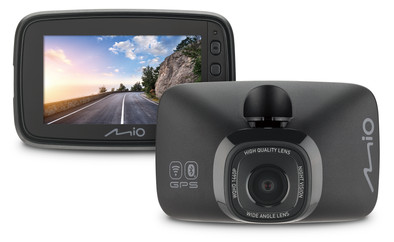
With the Mio Mivue 818, you can record the traffic situation in front of your car during the day and at night. The dashcam records in Quad HD resolution at 30 frames per second. This provides smooth images at normal speeds. The Mio Night Vision sensor provides detailed video footage, so you can still read license plates in twilight. Thanks to the viewing angle of 140 degrees, the lanes next to you are visible as well. You'll receive notifications when you drive too fast or are around a speed camera. In addition, the dashcam shows the distance and time in seconds to the next speed camera. Connect to the device via Bluetooth, so you can easily find your parked car. You can easily watch the footage on the 2.7-inch screen.
5 stars
4
4 stars
8
3 stars
0
2 stars
0
1 star
0
The most important thing about a dashcam is of course that it records sharp images. The Mio MiVue 818 does that very well. I am especially satisfied with the image quality in the dark. Removing and replacing the dash cam takes little effort, so I get in and out quickly. I do find it a disadvantage that I have to attach the window holder with an adhesive strip. I would have preferred the mount to have a suction cup so I use it in multiple cars.
Image quality The images of this dashcam are sharp and clear. I think it is important that the number plate of my predecessor is legible, for example as proof in the event of an accident. As soon as I drive within a few meters of another car, I can read the license plate well. This is difficult from further away. Even in the dark, the shots are detailed. When I look back at these images afterwards, I find them very clear. My whole environment is visible. This gives me a safe feeling on the road at night. I do drive on a lighted road. On an unlit road, the dashcam records less clear images.
Useful functions As soon as I drive faster than the speed limit, the dash cam makes a sound. This is a useful feature, as it prevents traffic fines. I also like that the dashcam warns of speed cameras. It is important to always be aware of your speed, but the signal from the dashcam means I know when to pay extra attention. As soon as I drive near a speed camera, the dash cam will let me know. He also mentions the speed limit, so that I slow down if necessary.
Confirmation I connect the dashcam to the 12 Volt connection of my car and it immediately starts recording. Installing takes little effort, which I did not expect. I hang the dashcam on the windscreen of my car with a window holder. This window holder has an adhesive strip. When I remove it, the strip no longer sticks properly. That's why I don't use the holder in several cars. For this I need an extra window holder, which is not included. When I get out of the car, I leave the window holder hanging. I easily slide the dash cam off the window holder, so this takes me little extra time. This way I quickly get in and out of the car.
Nina. dashcam specialist.
25 April 2023
Automatically translated from Dutch
A dashcam with more than the basic options is nice, but better explain it in the user manual, this one has smartphone connect, but the way it connects is not well explained and the settings menu which dashcam to choose is not at all clear, get it icons away and put down type numbers, is clearer and friendly, now I could only choose the correct setting on the sixth attempt. I also miss an explanation of how 'stamps' work and an explanation with examples. Stamps are the txt print in your image at the bottom right, you can explain that briefly. At 1080p 60 fps, quality is a bit disappointing. Choose the 1440p 30 fps, but then you have higher data storage and then you cannot save it in a week of driving hours if you are on the road a lot. 256GB would have been better. Menu on the cam is easy to operate, is logically put together. Image stabilization is not included, and you do not need it.
Luc Wijdeveld
10 November 2021
Automatically translated from Dutch
Putting it into use is difficult, due to firmware upgrade and speed camera upgrade. This has to switch over the phone and from WiFi several times. The memory has a fixed size on the SD card (can be set once). I don't know yet
Jan Lievense
31 January 2022
Automatically translated from Dutch
Product number | 876257 | |
|---|---|---|
Manufacturer code | 5415N6600002 | |
Brand | Mio Technology | |
Processing of your defect | Via Coolblue | |
Old product returned for free |
MicroSD memory card version | MicroSD, MicroSDHC, MicroSDXC | |
|---|---|---|
Weight | 86 g | |
Color | Black | |
Material | Plastic | |
Width | 5,47 cm | |
Height | 8,56 cm | |
Depth | 3,61 cm | |
Memory card | MicroSD | |
Expandable storage capacity up to | 128 GB | |
Number of memory slots (filled) | 1 |
Wide-angle | ||
|---|---|---|
Viewing angle | 140 ° | |
Image stabilization | ||
Type of image sensor | CMOS sensor | |
Technology image sensor | Starvis CMOS | |
Type of image definition support | Full HD (1080p), QHD (1440p) | |
Full HD (1080p), frames per second | 30p, 60p | |
Video file format | H.264, MP4, MPEG-4 | |
LCD screen | ||
Screen size | 2,7 inches | |
Touchscreen | ||
Dual dash cam | ||
Night vision |
Bluetooth | ||
|---|---|---|
Bluetooth version | 5.0 | |
NFC | ||
Built-in WiFi | ||
USB port |
Loop recording | ||
|---|---|---|
Motion detection sensor | ||
Parking mode | ||
GPS sensor | ||
GPS function | Yes, integrated | |
Power supply type | Car charger 12V |
Coolblue takes care of everything, from taking out an insurance to repairs
For almost all accidents
More coverage in case of damage than your standard warranty
No deductible
First, add your dash cam to your shopping cart. On the next page, choose one of the Protection Plans below. You always have a 30-day return window and pay no deductible in case of damage or theft.
2-year Protection Plan
7,99
one-time2-year Protection Plan with theft cover
8,99
one-time3-year Protection Plan
8,99
one-time3-year Protection Plan with theft cover
13,99
one-time