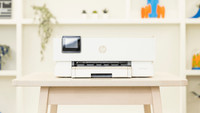
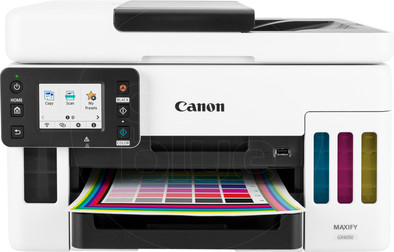
Canon MAXIFY GX6050
Never available again
View alternatives in the sidebar
View alternatives in the sidebar
Print technology | Ink tank | |
|---|---|---|
Printer type | All-in-one | |
Type of ink | Ink bottles | |
Automatic duplex printing | ||
Automatic document feeder (ADF) | ||
Automatic duplex scanning | ||
Color printer | ||
Maximum print size | A4 |
According to our printer expert
5 stars
28
4 stars
9
3 stars
1
2 stars
2
1 star
0
With the Canon MAXIFY printer, the ink reservoirs and the clear touchscreen stand out. I can see at a glance how much ink is in the tanks. I can easily select the scan and copy function on the touchscreen.
Ink Level I don't trust the ink warnings and that's why the 4 ink tanks with this printer are nice. They are on the front so I can see how much ink is left at any time. I've always used cartridges until now, but refilling the ink with ink bottles is much easier. Place the ink bottles separately from each other on the 4 attachments and the ink automatically flows into the reservoirs. All this without spilling. Canon promises to print thousands of pages before refilling the ink. After printing 500 pages I saw that the ink level was still the same. I was skeptical at first, but now I do believe in the number of prints.
User friendly I only find a printer user-friendly if it is easy to install and you quickly understand how it works. I go through all the steps and connect the printer to WiFi. I have fairly large hands, so it's nice that the touchscreen is large. I quickly give a print job via the handy menu. This is sometimes different with other printers. The wireless printing options are also nice. Printing via Apple AirPrint and the Canon PRINT app is smooth.
Experience There are many options on the printer. The software on the control panel is clear and the Canon PRINT app is also well-arranged. You can make prints or scan images from the app. Handy for receipts in the administration. The ADF function is ideal if you regularly scan or copy large stacks of paper. The paper tray has room for 250 A4 pages. I put a stack of 50 pages in the input tray at the top and the printer copies all pages automatically. The print quality of the texts is fine, but photos are a bit flat with the default settings. At high settings, the quality is better, but a printout also takes a lot longer. The printer is not the fastest anyway. The printer took over 60 seconds to print 10 black and white pages. The speed is slightly slower when printing on both sides. Printing a photo directly from your computer takes about 30 seconds with default settings. If you make a scan via the Canon app and print it out, the print is ready in 15 seconds
Conclusion This printer is ideal for the home office. Due to the small dimensions, the printer does not quickly get in the way. With the ADF function, you can easily scan or copy large stacks of paper in one go. Due to the large paper tray, you don't often replenish the stock and the ink reservoirs offer a lot of convenience. Because you use colors, your reports are clear and your graphs are easier to read, but the quality is too poor for photos with many color nuances. The print speed is not very high.
Laszlo. Printer specialist.
30 April 2021
Automatically translated from Dutch
I've really had all types of printers available, HP with cartridges, Oki LED printer, Brother laser printer, Epson ink tank printer, but this Canon is head and shoulders above it. Cartridges dry out quickly. The toners for laser printers are dying. With this printer, you get enough ink for years upon delivery and no dried out printheads.
My last printer was the Epson ET2550, ecotank. I can give this one a pass, print quality so-so, slow printing but it worked. After reporting "replace ink pads" (bring printer to Epson + the necessary costs) decided to purchase another printer. Hesitated for a long time for an Epson ET-4850, but finally opted for the Canon Maxifiy GX6050 because of the positive reviews on Coolblue.
What a device, fast, excellent print quality, top scanning. A bit special looking but it certainly doesn't look out of place. With its rounded corners, it is a somewhat playful device. May also be, better than those boring, black boxes... The screen on the front is large enough, clear and the software provides clear instructions. After connecting, my desktop found the drivers itself. Piece of cake. Network connection ideal for multiple users. Also not unimportant, here you can replace the ink pads yourself! No intervention from Canon necessary!
Conclusion, SUPER device and it never ceases to amaze me that a manufacturer can make this technology work so perfectly in a compact device.
Order via Coolblue perfectly fine. Perhaps a bit more expensive than other online shops, but the Coolblue website provides so much information + reviews that I am happy to pay this bit extra.
Danny
24 April 2023
Automatically translated from Dutch
I am now done with expensive ink practices from HP. Canon is much fairer and product is much more user-friendly.
Onno
13 September 2021
Automatically translated from Dutch
Coolblue takes care of everything, from taking out an insurance to repairs
For almost all accidents
More coverage in case of damage than your standard warranty
No deductible
First, add your printer to your shopping cart. On the next page, choose the Protection Plan below. You always have a 30-day return window and pay no deductible in case of damage.
3-year Protection Plan
78,-
one-time5-year Protection Plan
173,-
one-time
Product number | 880451 | |
|---|---|---|
Manufacturer code | 4470C006AA | |
Brand | Canon | |
Processing of your defect | Via Coolblue | |
Old product returned for free |
Printer size | Large | |
|---|---|---|
Width | 41 cm | |
Depth | 25,4 cm | |
Height | 39,9 cm | |
Color | Black | |
Weight | 11,6 kg |
Printer type | All-in-one | |
|---|---|---|
Photo printer | ||
Portable (mobile use) | ||
Recommended for use printers | Business printing |
Cartridge line | Canon GI-56 | |
|---|---|---|
Print technology | Ink tank | |
Type of ink | Ink bottles | |
Number of cartridges/toner cartridges | 4 | |
Color printer | ||
Print speed black (ISO) | 24 ppm | |
Print speed color (ISO) | 15,5 ppm | |
First black page ready after | 7 seconds | |
Speed class | Good | |
Maximum print resolution height | 600 dpi | |
Maximum print resolution width | 1200 dpi | |
Maximum print size | A4 | |
Automatic duplex printing | ||
Borderless printing | ||
Maximum print size duplex printing | A4 |
Scan functionality | ||
|---|---|---|
Automatic duplex scanning | ||
Maximum optical scan resolution width | 1200 dpi | |
Maximum optical scan resolution height | 600 dpi | |
Scanner type | File scanner, Flatbed scanner, Photo scanner | |
Maximum scan size | A4 (21x29.7cm) | |
Automatic document feeder (ADF) | ||
Maximum paper size ADF | A4 | |
Scan sizes | A4 | |
Scan speed (PPM) | 5 ppm | |
Color depth output | 8 bpp | |
Scan to | Cloud, Dropbox, Image, PC (local), PDF, PDF/A | |
ADF capacity | 50 | |
OCR |
Copying functionality | ||
|---|---|---|
Copy speed black (ISO) | 7 Hz | |
Copy speed color (ISO) | 7 Hz | |
Maximum copy resolution height | 1200 dpi | |
Maximum copy resolution width | 600 dpi |
Fax functionality |
|---|
Built-in screen | ||
|---|---|---|
Color screen | ||
Touchscreen |
German awards |
|---|
Compatible with operating system | Android, ChromeOS, Windows, iOS, macOS | |
|---|---|---|
Connection type | Wireless | |
Apple AirPrint | ||
Email print | ||
WPS (Wireless Protected Setup) | ||
Female standard USB-A port version | 2.0 | |
Ethernet port | ||
Number of Ethernet ports | 1 | |
NFC | ||
Built-in WiFi | ||
Bluetooth | ||
WiFi direct | ||
USB port |
Manual input tray | ||
|---|---|---|
Photo paper drawer | ||
Output capacity output drawer | 100 | |
Maximum print size standard paper tray | A4 | |
Input capacity standard paper tray | 250 | |
Number of standard paper trays | 1 |
Memory card reader |
|---|
Quality mark sustainable company | EcoVadis Gold |
|---|