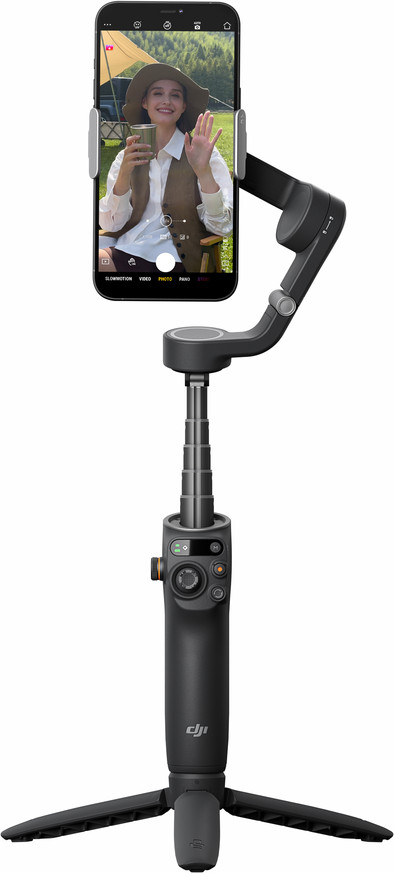
DJI Osmo Mobile 6 (OM 6)
Never available again
View alternatives in the sidebar
According to our gimbal expert
Maximum load capacity | 290 g | |
Weight | 309 g | |
Controlled via buttons on device | ||
Tilt range | -25 - 40 ° |
5 stars
9
4 stars
13
3 stars
3
2 stars
0
1 star
1
In the beginning, the gimbal is complicated I think. It takes some time to master it. After some practice, the OM 6 is very nice. I record super smooth handheld videos. It has automatic modes that help me get different shots. The design is very compact which makes it suitable for travel. I recommend this gimbal if you like to film with your phone, for example to capture the highlights of your vacation. I cannot use the gimbal without the DJI Mimo app. Installing for Android is not easy because this app is not in the Android Play Store.
Sturdy and user-friendly design I like the quality of the gimbal. It feels sturdy and I think the design looks sleek. I attach my phone with a magnet. The magnet shows me how to put my phone in it. It also has a marking on how the magnet should be placed on the gimbal. The magnet feels very sturdy, I have the idea that my phone will not just fall. I screw a mini tripod to the bottom and extend the arm for selfies or vlogs. Sliding out is a bit stiff. Maybe this will get smoother if I do this more often.
Use with the DJI Mimo App I use the gimbal with the DJI Mimo App. I myself have a Samsung phone, so I don't easily download the app. It is not in the Android Play Store. I download the app from DJI's website. Then I install the app on my phone with a separate APK Installer app. It's a roundabout way, but it works fine in the end. The Mimo app is available in Apple's Appstore. The Mimo app contains various explanation videos about the OM6, which I think is a plus. I use these videos to master the gimbal.
Takes some time to get the hang of it After watching a number of instructional videos, I understand the gimbal better and better. For example, it has a Story mode, with which I can easily make videos that are immediately ready for social media. The gimbal shows with an example what kind of shot I'm recording and how I should move the gimbal. With the Follow mode I follow moving subjects. I swipe my finger across my phone screen and select the subject. The gimbal does the rest. If the subject is out of the picture, it will search for the subject. As soon as he sees the subject again, he immediately follows it.
Manon. cameraspecialist.
22 December 2022
Automatically translated from Dutch
I had the first Osmo Mobile but this one feels much more finished. And the focus pull is, of course, great. Too bad there's no out-of-the-box Magsafe solution for the new iPhones (but with a little Googling you'll find an adapter). I would have liked the selfie extension pole a little longer, although I doubt you'll keep the weight.
Viktor
7 October 2022
Automatically translated from Dutch
Easy to use, does what I expected. Good mode in app that teaches you to use the gimbal and also learn how to take better shots. The spin mode is limited because it cannot rotate 360 degrees. Recommended!
Bob van Leeuwen
16 November 2022
Automatically translated from Dutch
Product number | 915329 | |
Manufacturer code | CP.OS.00000213.01 | |
Brand | DJI | |
Warranty | 2 years | |
Processing of your defect | Via Coolblue | |
Old product returned for free |
Material | Metal, Plastic | |
Weight | 309 g | |
Color | Gray | |
Compatible with product type | Smartphone | |
Made for brand | Universal | |
Maximum load capacity present | ||
Maximum load capacity | 290 g |
Image stabilization type | 3-axis | |
Number of gimbal axes | 3 | |
Type of gimbal handle | Single handle | |
Controlled via buttons on device | ||
Pan range | 190 ° | |
Tilt range | -25 - 40 ° |
Power supply type | Rechargeable battery | |
Replaceable battery |