Never available again
View alternatives in the sidebar
According to our router expert
The D-Link DIR-868L Cloud Router is a simultaneous dual-band router and uses the 802.11ac WiFi standard, better known as Wireless AC or 5G WiFi. Thanks to this new wireless technology, a faster WiFi connection has become possible. The D-Link DIR-868L is known as a 1650AC router. This means that the D-Link-868 can reach a maximum speed of 450Mbps on the often used 2.4GHz frequency band, and a maximum of 1300Mbps on the 5GHz frequency band. This high speed on 5GHz is only possible with peripherals that also use 802.11ac. The D-Link DIR-868L is extremely suitable for demanding users that need a fast home network for their computers, media player, smart TV, laptop, tablet, smartphone and more. The DIR-868L makes use of D-Link's SmartBeam technology for the best WiFi range.
Ethernet speed | Gigabit Ethernet (1000Mbps) | |
|---|---|---|
Frequency bands | Simultaneous dual-band | |
WiFi speed | AC1750 | |
Number of Ethernet ports | 4 |
5 stars
107
4 stars
89
3 stars
14
2 stars
2
1 star
1
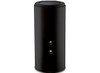
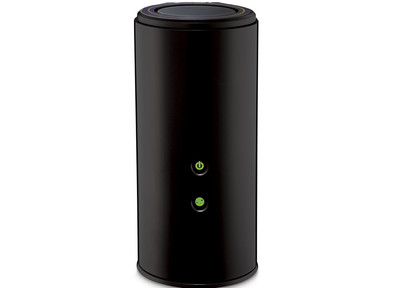
A turret, because this is the design of this router. You have to be for it. Screwing to the wall is possible but gives a more peculiar view than one with a flat housing. That's why it's behind my printer so it won't stand out.
He came to replace my current dual band router. The old copy, also a d-link, could then serve to extend the WiFi signal to the back of the house, by using it as an access point.
The Dir-868L was delivered neatly in a full cardboard box. No styrofoam present. A CD, manual, 230 volt power supply and a 1 meter utp cable. You can use it directly as a router. You only need to adjust your WiFi and administrator rights.
If you want to set up a little more, you only have to surf to your router. If you do this, a menu, as we are used to from d-link, will appear. There is little difference here with my older copy. The layout is identical and not modernized.
Here we have the menus : setup, advanced, tools, status and support.
It is important during set-up that in addition to the settings of the internet and the wireless signal, you can also reserve or define IP addresses for devices that require a fixed IP address, such as a NAS and media center server here. This is important if you want to access these devices outside your network. At "setup" you will also find settings for IPv6 and the option to use the USB port with media files or a printer. You can also share the latter in the network with the shareport application. A program for this is included on the CD. You can define a Mydlink account further in the menu for use with the mydlink web interface and android or ios apps.
With advanced you can further customize your router such as virtual server, port forwarding, QOS, access control and much more. 16 functions in total. At the top of each function you can read what they are for. Well in English.
In the tap tools you have the option to connect your router to a dyndns account, adjust your firmware, set an ntp clock, and .......
The tap status gives you the current status of the router and its connected devices. You can also read log files here.
The tap support is a help with the settings of your router. Here you will find very extensive information about what each tab in the menu stands for. Indeed in English.
In theory, if you know something about networking, setting up the router is easy. In practice, the range is very good. Better than my older type a Dir-855 The 5 GHz bandwidth, in particular, has a wider range in the living room despite the hidden setup behind my printer. In fact, this is so good that my old router doesn't have to be used as an access point.
The connection with andoid or ios is done with an app from the store and a mydlink account. The router can give you a reset or software update here. You can also read out the status and read which internet addresses they have visited per connected user. You can also block devices here.
Marc Crab
8 December 2013
Automatically translated from Dutch
I hooked up this d-link 868L in 10 minutes and it works so much faster! I should have bought this router much sooner. Connecting is very easy. It comes with a clear manual and even without one it would be a breeze.
The reach is huge! I live in an apartment and I even have coverage when I'm in the elevator meters from my house.
Speed of this router is really the best of the best.
You can even connect a hard disk to it via a USB port to share files with each other. Very nice feature
Highly recommended.
Bennie
24 January 2014
Automatically translated from Dutch
I'm not much of a tester concerned with all the pros and cons. The only thing I want to say here is that I now finally have a router that I can set up the way I want, contributes to a fast transfer of data, is beautiful in shape, and allows fantastic streaming of movies and videos. It took me a long time to spend that much money on a router, but it's worth it!! Eric.
Erick
11 December 2013
Automatically translated from Dutch
Product number | 340636 | |
|---|---|---|
Manufacturer code | DIR-868L/E | |
Brand | D-Link | |
Warranty | 2 years | |
Processing of your defect | Carry-in warranty | |
Old product returned for free |
Can be expanded with extra stations |
|---|
Frequency bands | Simultaneous dual-band | |
|---|---|---|
WiFi speed | AC1750 | |
2.4GHz band speed | 450 Mbit/s | |
5GHz band speed | 1300 Mbit/s | |
Number of WiFi antennas | 0 | |
Jumbo frame support |
Ethernet speed | Gigabit Ethernet (1000Mbps) | |
|---|---|---|
Network connector | ||
Number of Ethernet ports | 4 | |
PoE support | ||
USB port | ||
Number of USB ports | 1 |
Automatically switches to 3G/4G | ||
|---|---|---|
SIM card slot |
Quality of Service (QoS) | ||
|---|---|---|
MU-MIMMO | ||
Seamless roaming | ||
Beamforming | ||
Port forwarding | ||
LACP Link aggregation |
Parental controls | ||
|---|---|---|
WLAN security | WPA, WPA2 | |
Firewall | ||
Firewall type | NAT Firewall, SPI Firewall | |
Guest network | ||
VPN server | ||
VPN client | ||
VPN passthrough |
Mounting possible | ||
|---|---|---|
Width | 10,3 cm | |
Height | 21 cm | |
Depth | 12,5 cm | |
Weight | 560 g | |
Color | Black | |
Material | Plastic |
Battery level indicator |
|---|