AVM FRITZ!Box 7490 International
Never available again
View alternatives in the sidebar
View alternatives in the sidebar
According to our router expert
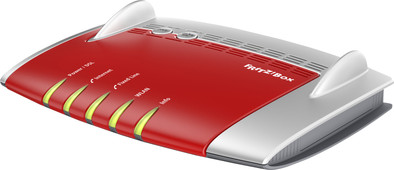
The FRITZ!Box 7490 is a dual-band router with integrated ADSL2+ modem and a wireless speed of 1,300Mbps. This router is also a base station for DECT phones and supports VDSL and VoIP. To use the router as NAS, connect a USB stick or hard drive to one of its USB ports. With the FRITZ!App, you can access your home network anytime and anywhere.
Ethernet speed | Gigabit Ethernet (1000Mbps) | |
|---|---|---|
Frequency bands | Simultaneous dual-band | |
WiFi speed | AC1750 | |
Number of Ethernet ports | 4 |
5 stars
32
4 stars
28
3 stars
3
2 stars
0
1 star
0
A machine that is fully equipped. Telephony, internet, network disk, media server, fax machine, answering machine. You can almost call it an all-in-1 package. No extra boxes for your DECT telephones. No extra NAS server in your room. But only this modem that saves all this space.
Wireless Range: With Ziggo's standard Ubee modem, I had no reception upstairs. Before I had the FRITZ!Box, I had placed an extra router in one of the upstairs rooms that acted as an access point. This is to amplify the WiFi signal. This is no longer necessary after the FRITZ!Box has been commissioned!
The FRITZ!Box has since been placed in the same room as the Ubee modem (in the meter cupboard). The Ubee modem is in bridge mode, so that the FRITZ!Box takes over all communication and the Ubee modem only provides the signal from the provider.
I can say that the range on the top floor with the FRITZ!Box is just perfect, just 1 line less than the maximum, in places where I normally had no range!
The FRITZ!Box uses a 2.4 GHz and a 5 GHz frequency. This is to keep the speed and WiFi range as optimal as possible. It is also possible to have guests connect via a special guest network, this is useful so that you leave your own devices in your own network where your guests cannot reach. So safe!
NAS: To some of you, a NAS may not sound familiar. A NAS is also called a network drive/network storage. The FRITZ!Box offers the possibility to connect your EHD (external hard disk) to the FRITZ!Box, so that it can be turned into a network disk.
Everything on this EHD becomes available to the people who are connected to the network and have permissions to reach this network drive. These permissions are also easy to set via the control panel. You decide which person has access to the entire disk or just a certain folder. After this you can even decide whether the person can only view the files or also edit them, or add files.
manageability: The control panel is divided into the main points of what the FRITZ!Box can do. All these headings are neatly subdivided into multiple options so that everything remains clear and you do not have to search here and there. That search will still occur anyway, because sometimes I don't know whether I can find it under WLAN or under Internet. But once you figure this out, that's no problem.
The system is programmed in such a way that when the WiFi network is no longer used, it reduces the transmission power, in order to save energy. Because the modem can be used as a fax machine and as a NAS, you do not need these additional devices. As mentioned before, this saves space and money, not only in purchase but also in energy consumption.
Support: First of all, the support regarding the devices. So far, every device has been able to access the network without difficulty. Some simply with the network key and some via the WPS that is also on this router.
In addition, AVM (the manufacturer of FRITZ!Box) has had a special app developed. The so-called "MyFRITZ!App". With this app you can connect to your FRITZ!Box so that you can always access your NAS files and see which people have called in the meantime.
For real problems, you can always contact AVM's so-called "question center". If you still don't know, you can always Google it or contact AVM Nederland.
Price: You'd say yes, it's an expensive thing. But think about how much money you save. ● Buy a NAS, these usually start from 100 euros. ● A WiFi repeater often starts at 30 euros. You need this because the standard supplied modems from your provider do not have nearly as good a range as this FRITZ!Box. ● An answering machine. The FRITZ!Box can even have recorded messages directly forwarded by e-mail so that you can still contact us directly via your mobile phone if you wish! ● A fax machine. The FRITZ!Box can easily receive faxes and then send them in PDF to a specified e-mail address.
Pros and cons Pros: ● The WiFi range is really excellent. Even at the end of my street I still have coverage. The entire top floor has almost the full range, on my iPhone I have 2 of the 3 bars of the WiFi signal on the top floor. ● Speed. Because the FRITZ!Box uses a 2.4 GHz and a 5 GHz frequency, the wireless speed is optimal as soon as you are connected to the 5 GHz frequency. This frequency can transfer data faster than the 2.4 GHz frequency, but has a smaller range as a result. This is not a problem because it then switches to the 2.4GHz signal. ● Accessibility. It is very easy to connect a device to the FRITZ!Box. Thanks to the WPS option, this is also super fast. ● manageability. All settings can be found in a control panel that is well divided into sections. This way you can easily find what you are looking for.
Cons: ● The FRITZ!Box is quite large. My meter cupboard is very small, if you consider that you already have a modem from your provider in it, there is little space left for me. ● The FRITZ!Box doesn't rely on the design. It looks rather old-fashioned compared to other recent routers. ● The FRITZ!Box control panel is not in Dutch. Now that is not a problem for most people since the panel is in English.
Conclusion: This router comes with a hefty price tag, but it certainly pays for itself. ● This is because there is a built-in energy-saving function. ● He immediately solves bad WiFi range. ● You always have access to your files by means of the supplied NAS function. ● You will find all the information you need (telephone, voice messages, fax, files) in 1 device, the FRITZ!Box.
Naud
21 December 2015
Automatically translated from Dutch
With the transition from XS4all DSL to glass from Reggefiber and KPN, I had to purchase my own Fritz!box. KPN's Experiabox is terrible and I only use it for telephony (unfortunately that has to be...) XS4all supplies routers from AVM Fritz!box for a reason. It is easy to set up, fast and for the technician there is still plenty to set up yourself.
Reliability: The reliability of AVM Fritz!boxes in general is excellent. I've only had this 7490 for a few weeks, but my previous one never failed on its own. (thick 4.5 years in a row, total lifespan about 10 years)
Security: The Security is good. Good firewall with good options for protecting your network. The Firewall is good for generic applications, but if you want to set up more detail, for example special rules per device or profile (access profile), that is difficult to do. For example, only one blacklist or whitelist can be made, these cannot be set per profile. Allowing specific IP Addresses (the rest are blocked if you go directly out on IP address) is very tedious and time consuming. AVM does listen carefully to its customers and regularly provides updates for its hardware.
Telephony: I connected the Fritzbox as an analog DECT telephone exchange directly to the analog output of the ExperiaBox. The telephone exchange functions are very good for me. Easily adjustable address book, logging of telephone calls, answering machine (with forwarding function to your mail (in case you want to listen to your answering machine messages when you are on the road)) In addition to analog numbers, you can also link VOIP numbers to the FritzBox, then the calls go via internet, and not via KPN.
Wireless: The Fritz!Box hangs in my meter cupboard (design not important). The wireless range is sufficient for my guests in the living room. That could be expanded with Fritz! repeaters if you want to use it for yourself throughout the house.
Speed: The Fritzbox can effortlessly operate the 100/100 Mbit connection from KPN, there is no measurable delay of the Fritzbox compared to a direct glass connection.
My setup: The Fritzbox is my analog DECT telephone exchange (connected directly to the analog telephone output of the Experiabox) and internet router (via Switch directly on the glass). I route TV through a few switches with VLAN support (see http://netwerkje.com).
Alternatives: In my opinion there is no competitor for this Fritz!Box. It's expensive, but it can do a lot more than routers in the same price range. An alternative in terms of adjustability and security would be a completely DIY router/firewall/proxy server based on Linux, for example in a RaspBerry PI. But then you have to have a lot of understanding of Linux and firewalls and manage it well.
Roeland
4 December 2015
Automatically translated from Dutch
After one month and searching the internet for solutions, the telephony still doesn't work. Scarlet is not a known provider at AVM and a number of settings are not set correctly (I am not the only one with these problems.)
If you want to buy this, it is better to look on the internet first to see if it is possible.
Patrick de meersman
4 December 2014
Automatically translated from Dutch
Product number | 454436 | |
|---|---|---|
Manufacturer code | 20002647 | |
Brand | AVM FRITZ! | |
Processing of your defect | Carry-in warranty | |
Old product returned for free |
Can be expanded with extra stations |
|---|
Frequency bands | Simultaneous dual-band | |
|---|---|---|
WiFi speed | AC1750 | |
2.4GHz band speed | 450 Mbit/s | |
5GHz band speed | 1300 Mbit/s | |
Number of WiFi antennas | 3 | |
Jumbo frame support |
Ethernet speed | Gigabit Ethernet (1000Mbps) | |
|---|---|---|
Network connector | ||
Number of Ethernet ports | 4 | |
PoE support | ||
USB port | ||
Type of USB port | Standard USB-A | |
Number of USB ports | 1 |
Automatically switches to 3G/4G | ||
|---|---|---|
SIM card slot |
Quality of Service (QoS) | ||
|---|---|---|
MU-MIMMO | ||
Seamless roaming | ||
Beamforming | ||
Port forwarding | ||
LACP Link aggregation |
Parental controls | ||
|---|---|---|
WLAN security | WPA2 | |
Firewall | ||
Firewall type | NAT Firewall | |
Guest network | ||
VPN server | ||
VPN client | ||
VPN passthrough |
Mounting possible | ||
|---|---|---|
Width | 24,5 cm | |
Height | 5,5 cm | |
Depth | 17,5 cm | |
Weight | 798 g | |
Color | Red, White | |
Material | Plastic |
Battery level indicator |
|---|