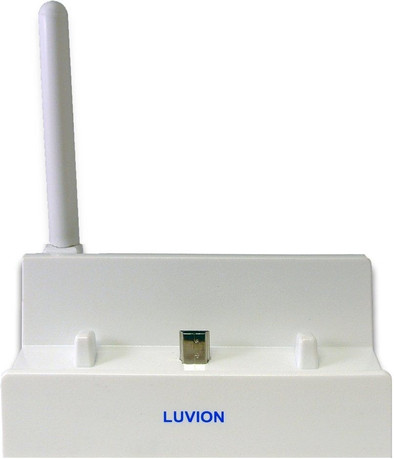
Luvion Supreme Connect WiFi Bridge
Never available again
View alternatives in the sidebar
View alternatives in the sidebar
With the Luvion Supreme Connect WiFi Bridge, you can modernise your Luvion Supreme baby monitor even further. Use your smartphone or tablet as a baby monitor, and receive sounds and images via your WiFi connection. Connect the Luvion Supreme Connect WiFi Bridge with your router, download the free appcessory for Android and iOS, and use your smartphone or tablet as the parent unit. Enjoy virtually unlimited range. And it's not just for you: because no fewer than 3 users can look, that means Grandma and Grandpa can also join in.
Note: connecting the WiFi bridge to your router is recommended, so that the initial connection stays intact. The WiFi bridge has to be connected to the router by a cable, so not just during installation, (or via an Internet socket), but constantly. The appcessory doesn't send push notifications, so you have to open the appcessory yourself to see how things are going. In addition, the appcessory only works with iOS 5.1 or higher and Android, but unfortunately not with Windows.
Go here to read the manual for installation.
Frequency bands | Single-band (2.4GHz) | |
|---|---|---|
2.4GHz band speed | 600 Mbit/s | |
WiFi standards | Wireless AC | |
WLAN security | WPA2 | |
Number of WiFi antennas | 1 | |
Number of Ethernet ports | 1 |
5 stars
2
4 stars
0
3 stars
2
2 stars
3
1 star
0
As an IT person, I am always amazed at the clumsiness of certain suppliers. They make something that is misnamed and more suggested than possible. This also applies to the bridge that does nothing with WiFi but is connected to a fixed Ethernet connection to the router. The fact that the Router is connected to your tablet via WiFi where you can get an image of the Luvion is nice if it would work properly. But it's a rickety connection that may or may not work. In short, a product that is under development and was put on the market much too early.
G.A.M. Delahaije
10 April 2015
Automatically translated from Dutch
Does what I expected. Although I had read here that the app would not be stable, I do not suffer from that on the iPhone 6
Laurens
15 September 2016
Automatically translated from Dutch
We bought this as a nice extra option with the baby monitor. Worked fine for the first few weeks, despite not being able to control the camera remotely. Was just worth the money at the time.
Until he lost the connection after a few weeks. Tried everything to reconnect, but no luck. So dissatisfied that we did not return this device, but immediately threw it in the bin. Do not buy this device; little added value and, moreover, it works poorly.
A.J.M. van Oostenbrugge
21 May 2018
Automatically translated from Dutch
Product number | 484965 | |
|---|---|---|
Manufacturer code | 73 | |
Brand | Luvion | |
Warranty | 2 years | |
Processing of your defect | Carry-in warranty | |
Old product returned for free |
WiFi standards | Wireless AC | |
|---|---|---|
Frequency bands | Single-band (2.4GHz) | |
2.4GHz band speed | 600 Mbit/s | |
Number of WiFi antennas | 1 | |
WLAN security | WPA2 | |
WiFi on/off switch | ||
Replaceable WLAN antennas | ||
MAC address filter |
Number of Ethernet ports | 1 |
|---|---|
Wired connector type | Connector (outside device), Port (in device) |
Connector type | Power connector |
Width | 18 cm |
|---|---|
Depth | 11 cm |
Height | 25 cm |
Weight | 2 kg |
Color | White |