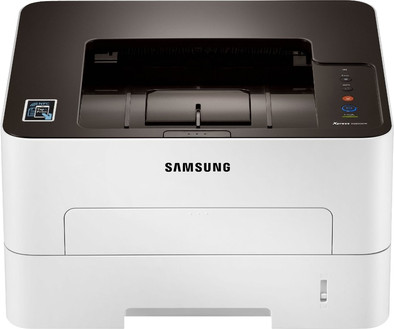
Samsung Xpress M2835DW
Never available again
View alternatives in the sidebar
View alternatives in the sidebar
According to our printer expert
The Samsung Xpress M2835DW makes printing easy. With the touch of a button, you can connect the printer to your WiFi network and wirelessly send commands to your printer. The high print speed and the option for automatic double-sided printing make this printer suitable for anyone who wants to print documents on a regular basis. Thanks to its compact size, this printer fits on every desk.
Print technology | Laser | |
|---|---|---|
Printer type | Printing only | |
Automatic duplex printing | ||
Color printer | ||
Maximum print size | A4 | |
Photo paper drawer | ||
Built-in WiFi |
5 stars
44
4 stars
53
3 stars
4
2 stars
0
1 star
0
Compact printer, with good prints. I chose the M2835DW because the M2825DW was not available. This has the extra: Printing via NFC. You just need to touch the printer with your smartphone (with NFC), and you can print directly from your smartphone. That works nice, and well.
Arnold
30 September 2014
Automatically translated from Dutch
At first glance, it seems like the ideal laser printer. Also came out on top in the test at the Consumers' Association. That's why I bought it too. But with double-sided printing, the odd pages were printed skewed. I have returned it twice for repair. However, this defect could not be remedied. Finally handled extremely correctly by Coolblue: I was allowed to choose another printer.
R. Kluiving
19 March 2016
Automatically translated from Dutch
The printer was delivered quickly. Although PostNL came later than planned, but Coolblue can't do anything about that. The installation was a bit difficult. Only an installation CD is included which makes it difficult to install on a computer without a CDR Drive. So first download and install the operating system. After that it went without a hitch. The print quality is superb and the printer prints quickly. The dimensions are less accurate. These are mentioned without taking into account the paper fed (A4 protrudes at the back) and the plug inserted at the back. As a result, you need a deeper space than the dimensions suggest. Well, an inch or so! All in all, a fine printer with which you can produce professional prints.
Rdonk
13 June 2017
Automatically translated from Dutch
Product number | 494228 | |
|---|---|---|
Manufacturer code | HPSS346A-EEE | |
Brand | Samsung | |
Warranty | 2 years | |
Processing of your defect | Carry-in warranty | |
Old product returned for free |
Width | 36,8 cm | |
|---|---|---|
Depth | 33,45 cm | |
Height | 20,2 cm | |
Color | White | |
Weight | 7,4 kg |
Printer type | Printing only | |
|---|---|---|
Photo printer | ||
Portable (mobile use) |
Toner cartridge line | Samsung 116 | |
|---|---|---|
Print technology | Laser | |
Number of cartridges/toner cartridges | 1 | |
Color printer | ||
Print speed black (ISO) | 28 ppm | |
First black page ready after | 8,5 seconds | |
Maximum print resolution height | 600 dpi | |
Maximum print resolution width | 4800 dpi | |
Maximum print size | A4 | |
Automatic duplex printing | ||
Borderless printing | ||
Maximum print size duplex printing | A4 |
Scan functionality |
|---|
Copying functionality |
|---|
Fax functionality |
|---|
Built-in screen |
|---|
Compatible with operating system | Linux, Windows | |
|---|---|---|
Connection type | Wired, Wireless | |
Apple AirPrint | ||
Email print | ||
WPS (Wireless Protected Setup) | ||
Number of Ethernet ports | 1 | |
NFC | ||
Built-in WiFi | ||
Bluetooth | ||
WiFi direct | ||
USB port |
Manual input tray | ||
|---|---|---|
Photo paper drawer | ||
Output capacity output drawer | 100 | |
Maximum print size standard paper tray | A4 | |
Input capacity standard paper tray | 150 | |
Number of standard paper trays | 1 |
Memory card reader |
|---|
