Never available again
View alternatives in the sidebar
View alternatives in the sidebar
According to our mouse expert
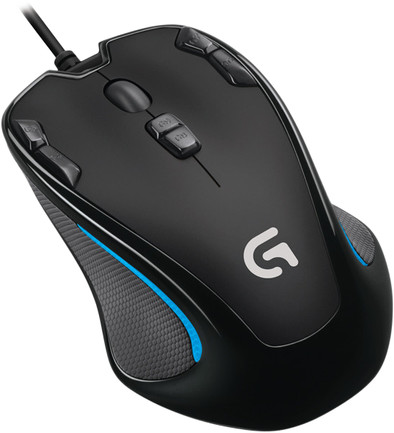
The Logitech's G300 mouse has many faces. At least three. Its memory has room for three game or player profiles. You can store these on the mouse, not on your PC. It comes in handy when you want to use the G300s to play on a different PC. This way, you won't have to bother with configuring everything again. Another useful feature: the lighting. Assign one of the seven available colors to every game or user profile, so you can see at a glance which profile you're dealing with.
Connection type | Wired | |
|---|---|---|
Mouse model | Full-size | |
Ergonomic design | ||
Left or right-handed | Left-handed, Right-handed | |
Suitable for gaming | ||
Bluetooth | ||
Silent mouse | ||
Depth | 113 mm |
5 stars
42
4 stars
31
3 stars
2
2 stars
0
1 star
0
I've had the logitech g300s for a week now. What a great purchase this is! I'm twelve and it fits very nicely in the hand (especially for children). The buttons are very easy to set up with the software. The different profiles that you can set are very nice. for example: 1 for gaming, 1 for regular internet and 1 for whatever you want. The colors of the profiles are nice but also useful to see which one you have. I have a wooden desk without a mouse pad and it works fine on it, I don't feel any difference with or without a mouse pad. The laser makes it very precise. Because you can set the DPI, it wakes up exactly the way you want it. He has a wire but I don't mind at all. then he cannot suddenly turn off or fall away.
In short, a top mouse!!!!!!!!!!!!!!!!!!!!!
Jip
16 May 2015
Automatically translated from Dutch
A great mouse for the money. Use of the extra buttons really only two, the others are a bit weird to reach when you hold the mouse normally.
Switching through the different pre-sets with a button is very handy, now have 1 preset for a game and 1 other for normal web browsing (with buttons for next and previous page).
The mouse is quite beautiful, purely because of the light (which also shows you which mode you have selected) on both sides.
Software with which you can do button-mapping and sensitivity is from Logitech itself, you can find it on the website (both Mac and Windows
Joost van den Akker
2 November 2015
Automatically translated from Dutch
I've been using the Logitech G300s since November 2016 (so for over 2.5 years) and I'm still very pleased with it.
First of all, the supplied software is very useful to set the sensitivity and you can set 3 profiles for different activities (I use them for gaming, browsing, photoshop) between which you can easily switch. Each button can be configured via the software, for example I have set the buttons for my "browse" profile in such a way that I can switch between tabs and via another button I can easily go back a page. So very handy.
The most important is of course the precision and the speed, which are spot on. I game pretty much every day and in terms of precision, this product has never let me down.
Furthermore, this thing is nice in the hand. When I use a "normal" mouse again on another PC, I immediately notice this difference because it feels much more unpleasant than this product.
Disadvantages are in the cable. It is a long cable that will probably not bother you as a PC user, but for me as a laptop user it is in the way. Also, the USB connection is no longer what it used to be and the mouse sometimes wants to disconnect randomly. I bought an external USB HUB for this, which makes it "tighter" now, which has largely solved the problem.
All in all a great product for a very reasonable price.
Remo van der Kloet
15 July 2019
Automatically translated from Dutch
Product number | 524537 | |
|---|---|---|
Manufacturer code | 910-004346 | |
Brand | Logitech G | |
Processing of your defect | Carry-in warranty | |
Old product returned for free |
Mouse model | Full-size | |
|---|---|---|
Input | Optical | |
Number of buttons | 9 | |
Ergonomic design | ||
Left or right-handed | Left-handed, Right-handed | |
Adjustable DPI | ||
Mouse controls | Buttons, Scroll wheel | |
Suitable for gaming | ||
Recommended for game genre | RPG | |
Mouse grip technique | Palm | |
Mouse weights | ||
Programmable buttons | ||
Number of programmable buttons | 9 | |
Lighting peripherals | ||
Silent mouse | ||
Horizontal scrolling | ||
Mouse surface | Any surface | |
Product family | G |
Connection type | Wired | |
|---|---|---|
Type of USB port | Standard USB-A | |
Bluetooth | ||
Braided cable | ||
Cable length | 2 m |
Plug and Play | ||
|---|---|---|
Compatible with operating system | Windows |
Power supply type | USB port PC/laptop | |
|---|---|---|
Battery level indicator |
Color | Black | |
|---|---|---|
Width | 72 mm | |
Height | 40 mm | |
Depth | 113 mm | |
Material | Plastic | |
Finish | Matte and glossy |
