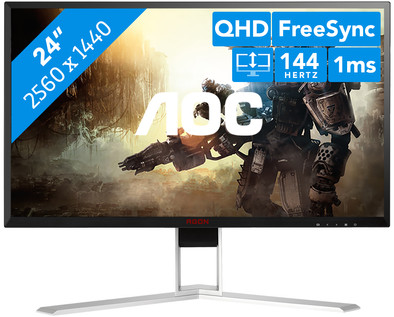
AOC AGON AG241QX
Never available again
View alternatives in the sidebar
View alternatives in the sidebar
According to our monitor expert
The AOC AGON AG241QX gaming monitor smoothly displays fast-moving images,thanks to the 144Hz refresh rate.This shows especially in action games such as Destiny 2. This monitor has Freesync and is G-sync compatible, which prevents you from interrupting both NVIDIA and AMD video cards. With the included AGON QuickSwitch keypad, you can easily switch between various gaming presets. This allows you to quickly set the brightness or contrast you need for different games. Pivot, tilt, and rotate the monitor, or adjust its height to find the most comfortable playing posture. If you want to pull an all-nighter, the flicker-free technology will reduce eye strain.
Note: for QHD gaming, you need a powerful video card, such as an NVIDIA GeForce RTX GPU or AMD Radeon RX 5000 series GPU, an Xbox One, Xbox Series X or S, or a PlayStation 5.
Sharpness | Quad HD (1440p) | |
|---|---|---|
Curved | ||
Aspect ratio | Standard (16:9) | |
Refresh rate | 144 Hz | |
Response time | 1 ms | |
Panel type | TN panel | |
Color depth | 17 million colors (8-bit) | |
Built-in speakers |
5 stars
22
4 stars
17
3 stars
0
2 stars
0
1 star
0
Installation ease
User friendliness
Image quality
Price-quality ratio
Design
Since the recent driver update from Nvidia, the G-Sync function of Nvidia video cards (10 series and above) also works with some freesync displays. That is, the refresh rate of the screen adapts to the amount of frames sent by the video card.
Nvidia has already published a short list of 100% compatible Freesync monitors, but many Freesync monitors that are not (yet) on that list are also working since this driver update. I got this screen, the AG241QX, working without any problems (including G-Sync) with my GTX1070.
-in Nvidia panel activate "enable G-Sync" for the monitor. Was even automatically activated for me
In terms of colors, this monitor has quite a good balance. He's just way too bright. I've set brightness to 35/100, and shadow setting to 40/100 instead of 50/100. I have Overdrive on medium, LowBlueight on medium, and as a gamer profile I have "gamer2". That gamer profile doesn't do much (some default settings that you can change) but if you turn off gamer profile, the response time seems to be slightly higher. Didn't notice much myself.
In short: just set it up properly, and you have a lightning-fast G-Sync compatible screen for the price of a Freesync screen. And for a TN screen the colors are fine
Rommert de Bruijn
22 February 2019
Automatically translated from Dutch
144hz 1440p 1ms adaptive sync .. with such a nice picture ... integrated speakers .. so many options for connections ... that it is not an ips screen ... I do not notice myself ..
Have tested many monitors ... this one is price / quality 100% recommended !!
Sammie Gezels
28 May 2017
Automatically translated from Dutch
Super screen to take as an entry to the 144 Hertz arena. Quality is good, only the dark spots of the games are too dark in my opinion. Because of this it is possible that you can miss a key item in game. No other comments about this panel.
299 euros for these specs I think is a bargain not to pass up. Bought the first 2 months ago and just got a 2nd extra.
Tip: Nvidia GPU does not work well with different refresh rates. So don't try to connect a screen of 60hz and 144hz because then you will get weird problems like locked fps at 60 if you play a video on your 2nd screen that is 60hz. If the step is to 144hz. Then use 2 screens with 144hz. AMD is not bothered by this.
Jeffrey Walst
31 January 2020
Automatically translated from Dutch
Product number | 756086 | |
|---|---|---|
Manufacturer code | AG241QX | |
Brand | AOC | |
Processing of your defect | Carry-in warranty | |
Old product returned for free |
Recommended display resolution | 2560x1440 | |
|---|---|---|
Sharpness | Quad HD (1440p) | |
Aspect ratio | Standard (16:9) | |
Refresh rate | 144 Hz | |
Response time | 1 ms | |
Panel type | TN panel | |
Brightness | 350 cd/m2 | |
Local dimming | ||
HDR support | ||
Contrast ratio | 1000 | |
Touchscreen | ||
Screen reflection | Anti-glare | |
Blue light filter | ||
Flicker-free technology | ||
Color space | sRGB | |
Color depth | 17 million colors (8-bit) | |
Adaptive Sync | ||
Type of adaptive sync | G-Sync Compatible | |
Resolution width | 2560 pixels | |
Resolution height | 1440 pixels | |
Anti-reflection type | Matte | |
Horizontal viewing angle | 170 ° |
Height | 48,9 cm | |
|---|---|---|
Width | 55,44 cm | |
Depth | 21,3 cm | |
Weight | 5,53 kg | |
Color | Black, Red, Silver | |
Including stand | ||
Material | Metal, Plastic | |
Cable management | ||
Appearance | Gaming | |
Curved |
Number of HDMI connectors | 2 | |
|---|---|---|
Number of Female HDMI type A 1.4 ports | 2 | |
Number of Female Standard DisplayPort 1.2 ports | 1 | |
Number of female standard VGA ports | 1 | |
Number of female 3.5mm TS Audio Jack ports | 1 | |
Type of USB port | Mini USB-A | |
Number of USB ports | 5 |
Adjustable in height | ||
|---|---|---|
Tiltable | ||
Pivotable stand | ||
Pivot function | ||
VESA mount option | ||
VESA mount | 100x100mm |
Energy label | G | |
|---|---|---|
Energy consumption standby | 0,5 W | |
Energy consumption active | 37 W | |
Energy consumption per 1000h | 26 kWh | |
Annual energy consumption | 37,96 kWh | |
Annual energy costs | 8,35 euros |
Built-in speakers | ||
|---|---|---|
Sound system | Stereo | |
Webcam | ||
Split screen | ||
Kensington lock | ||
Best tested |
Image quality according to customers | Very good | |
|---|---|---|
Design according to customers | Neutral | |
Recommended for use | Gaming, Internet, email, and text processing, Watching movies in Full HD |
