Netgear Orbi RBK40 Mini Multi-room WiFi
Never available again
View alternatives in the sidebar
View alternatives in the sidebar
According to our router expert
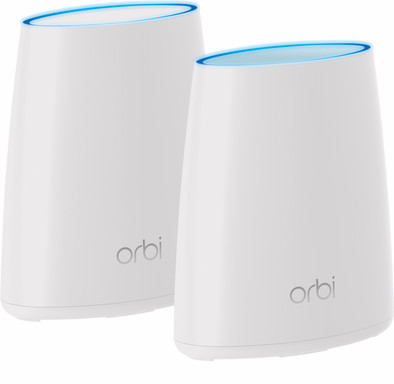
Set up 1 large WiFi network with 1 network name in your home with the Netgear Orbi RBK40 Mini. This compact multi-room WiFi system consists of a base station and a satellite. You can connect the base station to your modem and place the satellite somewhere else in the house. The base station and the satellite communicate with each other via a special connection, which means that you're always automatically connected to the strongest signal. This way, your stream will stay stable while you're walking through the house with a smartphone. Wired devices such as desktops and smart TVs can be connected using any of the 4 network ports on the base station or the 1 port on the satellite. Is there still an area in the house where your signal isn't strong enough? You can easily expand the Netgear Orbi mini with an additional satellite.
Ethernet speed | Gigabit Ethernet (1000Mbps) | |
|---|---|---|
Frequency bands | Simultaneous tri-band | |
WiFi speed | AC2200 | |
Number of Ethernet ports | 4 |
5 stars
7
4 stars
5
3 stars
1
2 stars
4
1 star
0
After reading something about orbi bought this one. But unfortunately no success. The promised range and speed is not good. In fact, the improvement with the old router is really minimal.
Annemiek Wijker
7 August 2017
Automatically translated from Dutch
Netgear Orbi or Google WIFI Because the Ziggo modem/router did not provide a good WIFI signal, I wanted to replace the ConnectBox with a MESH WIFI system. I've been debating between the Orbi and the Google Wifi. Finally decided to try the Orbi RBK40 first given the many good reviews and tests. The reviews and tests are largely for the Orbi RBK50, but Netgear itself indicates that the RBK40 is next to nothing. The price is also a lot friendlier.
Installation The installation went reasonably well, not as easy as Netgear advertises. During installation it crashed due to an update for the router..... Compared to the Google WIFI, the Orbi only has 1 satellite, so the router is in the meter cupboard (front of the house) and the satellite in the bedroom/office on the 1st floor (back of the house). Exactly as Netgear states.
Connect devices After installation tried to connect to all WiFi devices. Except for the Siemens oven (router has no WPS button), this all went pretty well.
Control options The Orbi has the advantage over the Google WIFI that it provides both an app and a web interface. There is a lot to adjust, especially on the web interface.
Illogical choice of connections After setting everything up correctly, it was time to give the devices a good name in the network. It was very strange that for example the laptop which works a lot better on 5 Ghz was put on the 2.4 Ghz band?!? Also other devices that support 5Ghz regularly switch from 2.4 to 5 without any logic.
You can also see which station the device uses. Strange but true at some point no device connected to the satellite on the 1st floor, not even the printer which is 1 meter next to it, but it was connected to the modem in the meter cupboard. Mmm, then you're going to ask yourself why the satellite.
Range Because the satellite was placed at the rear of the house, I hoped for some WiFi reception in the backyard. After the first two meters in the backyard there was no WiFi signal at all.
Disconnections It was striking that several devices such as the Nexus phone, Android TV and Tablet lost the WIFI connection several times during use. The speed measured with multiple speed tests was also very variable, the speed occasionally dropped to 15 Mbit in the living room.
Switch to the Google WIFI Ultimately very disappointed in the Orbi returned the device. It definitely did not live up to expectations at all and certainly not for the requested price.
Because Bol had a discount of 40 euros on the Google WIFI tri-pack, decided to order it. In short, what a relief compared to the Orbi! Simple installation, reception everywhere due to the 3 satellites (even in the backyard), stable connections, possibility to easily designate 1 device as a priority device. Finally, the price for a possible extra satellite is also cheaper than the Orbi.
In short, Orbi was very disappointing compared to the Google WIFI
Hendrik Mussche
13 March 2018
Automatically translated from Dutch
Netgear Orbi or Google WIFI Because the Ziggo modem/router did not provide a good WIFI signal, I wanted to replace the ConnectBox with a MESH WIFI system. I've been debating between the Orbi and the Google Wifi. Finally decided to try the Orbi RBK40 first given the many good reviews and tests. The reviews and tests are largely for the Orbi RBK50, but Netgear itself indicates that the RBK40 is next to nothing. The price is also a lot friendlier.
Installation The installation went reasonably well, not as easy as Netgear advertises. During installation it crashed due to an update for the router..... Compared to the Google WIFI, the Orbi only has 1 satellite, so the router is in the meter cupboard (front of the house) and the satellite in the bedroom/office on the 1st floor (back of the house). Exactly as Netgear states.
Connect devices After installation tried to connect to all WiFi devices. Except for the Siemens oven (router has no WPS button), this all went pretty well.
Control options The Orbi has the advantage over the Google WIFI that it provides both an app and a web interface. There is a lot to adjust, especially on the web interface.
Illogical choice of connections After setting everything up correctly, it was time to give the devices a good name in the network. It was very strange that for example the laptop which works a lot better on 5 Ghz was put on the 2.4 Ghz band?!? Also other devices that support 5Ghz regularly switch from 2.4 to 5 without any logic.
You can also see which station the device uses. Strange but true at some point no device connected to the satellite on the 1st floor, not even the printer which is 1 meter next to it, but it was connected to the modem in the meter cupboard. Mmm, then you're going to ask yourself why the satellite.
Range Because the satellite was placed at the rear of the house, I hoped for some WiFi reception in the backyard. After the first two meters in the backyard there was no WiFi signal at all.
Disconnections It was striking that several devices such as the Nexus phone, Android TV and Tablet lost the WIFI connection several times during use. The speed measured with multiple speed tests was also very variable, the speed occasionally dropped to 15 Mbit in the living room.
Switch to the Google WIFI Ultimately very disappointed in the Orbi returned the device. It definitely did not live up to expectations at all and certainly not for the requested price.
Because Bol had a discount of 40 euros on the Google WIFI tri-pack, decided to order it. In short, what a relief compared to the Orbi! Simple installation, reception everywhere due to the 3 satellites (even in the backyard), stable connections, possibility to easily designate 1 device as a priority device. Finally, the price for a possible extra satellite is also cheaper than the Orbi.
In short, Orbi was very disappointing compared to the Google WIFI
Hendrik Mussche
6 March 2018
Automatically translated from Dutch
Product number | 774418 | |
|---|---|---|
Manufacturer code | RBK40-100PES | |
Brand | Netgear | |
Processing of your defect | Carry-in warranty | |
Old product returned for free |
Can be expanded with extra stations |
|---|
Frequency bands | Simultaneous tri-band | |
|---|---|---|
WiFi speed | AC2200 | |
2.4GHz band speed | 400 Mbit/s | |
5GHz band speed | 866 Mbit/s | |
Number of WiFi antennas | 4 | |
Jumbo frame support |
Ethernet speed | Gigabit Ethernet (1000Mbps) | |
|---|---|---|
Network connector | ||
Number of Ethernet ports | 4 | |
PoE support | ||
USB port |
Automatically switches to 3G/4G | ||
|---|---|---|
SIM card slot |
Quality of Service (QoS) | ||
|---|---|---|
MU-MIMMO | ||
Seamless roaming | ||
Beamforming | ||
Port forwarding | ||
LACP Link aggregation |
Parental controls | ||
|---|---|---|
WLAN security | WPA, WPA2-PSK | |
Firewall | ||
Firewall type | NAT Firewall, SPI Firewall | |
Guest network | ||
VPN server | ||
VPN client | ||
VPN passthrough |
Mounting possible | ||
|---|---|---|
Width | 16,25 cm | |
Height | 20,23 cm | |
Depth | 7,87 cm | |
Weight | 748 g | |
Color | White | |
Material | Plastic |
Power supply type | Power grid |
|---|---|
Battery level indicator |