Never available again
View alternatives in the sidebar
View alternatives in the sidebar
According to our processor cooler expert
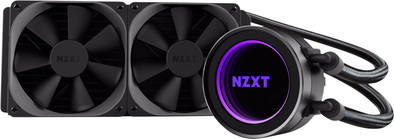
The NZXT Kraken X52 is a water cooler that fits on every Intel or AMD processor socket, even on an AMD AM4 socket. You can control both the 120mm fans and the water pump at 4 speeds for maximum cooling or for a limited noise level. The CAM software lets you set the LED lighting of the water cooler to any desired color. Thanks to the copper heatsink, you can immediately direct the heat away from the processor. This allows you to extend your processor's lifespan. NZXT believes in the quality of their water coolers and offers 6 years of warranty.
Cooling method | Water |
|---|---|
Socket (CPU) | 1150, 1151, 1155, 1156, 1366, 2011, 2011-v3, AM2, AM2+, AM3, AM3+, AM4, FM1, FM2, FM2+ |
Fan diameter | 123 mm |
Connector fan (CPU) | 4-pin |
5 stars
9
4 stars
6
3 stars
1
2 stars
0
1 star
0
I find the NZXT Kraken X52 a very good cooling. If you buy the cooling, you will of course have it at home tomorrow! That's nice.
Once the Kraken X52 is installed, all you need to do is download the CAM software. https://camwebapp.com/. You can find and download it with this link.
Now about CAM. CAM is a great software! You can completely customize your X52 the way you want! You can:
CAM also displays data from your system. For example your FAN RPM (How fast your fan is spinning). You not only get information about your CPU and its cooling, but also about your possible GPU (video card). You can see the FAN RPM of your video card, but also the temperatures. You can even overclock the video card with CAM. Be careful with this! Overclocking can be harmful to your system! Don't do it if it's not necessary, I think.
Now that I've talked a lot about what this cooling can do, let's take a look at the 'looks'. This cooling is the sexiest water cooling I've ever seen. Everything is just of very good quality! Even hoses between the pump and the radiator are beautiful and are also of very good quality. So you don't have to worry about a water leak in your system! Also, the fans that you get with it are of very high quality!
Now one more recommendation, and then I'll tell you step by step how to install the X52 or X62. I recommend this cooling with just about any theme. Whether it's ''Black and White'', as I have, or all the colors of the rainbow, the X52 or X62 definitely fits! I paired it with the NZXT s340. The X52 and X62 are made to fit in the s340. Everything fits perfectly. So I recommend buying the X52/X62 together with the s340.
Finally, the installation of the X52. Step 1: Put the plate on which the X52 will be installed on the back of the motherboard and push it into the holes in the motherboard. Put in the holes the 4 screws that you received with the X52. Step 2: Place the X52 on the motherboard and tighten all 4 screws little by little. Do not screw them tight in turn, because otherwise there may be too much pressure in 1 place of the processor. Step 3: Screw the fans to the radiator and screw the radiator into the case. You can place the radiator above or on the side. Now the X52 is in place. It's just not connected yet, so we're going to do that now. Connect the 2 + 6 wire to the pump. The wire of 2 wires goes to the CPU_FAN on the motherboard. The other 6 wires go to the SATA cable coming from the power supply. The fans get their electricity from the fan cable set. You use 2 connections and then you have 2 left. You can use this for other fans such as case fans. Install CAM now. And you're done!
Conclusion: This cooling is a bit expensive, but you get everything for your money! Lights and good cooling performance. And of course tomorrow at home!
Hopefully this review has helped you! greetings, Olivier
Olivier Smit
29 June 2017
Automatically translated from Dutch
An eeg good cooler for your cpu myself, I use the i7700k and it works perfectly with it
stan gort
17 July 2017
Automatically translated from Dutch
Software can easily be adapted to the wishes. Visually you can display every color in the LEDs to make it more beautiful in your cabinet. Definitely recommended.
Lots of tools included to be able to mount it in most systems.
Ramon
13 August 2017
Automatically translated from Dutch
Product number | 779511 | |
|---|---|---|
Manufacturer code | RL-KRX52-02 | |
Brand | NZXT | |
Processing of your defect | Carry-in warranty | |
Old product returned for free |
Cooling method | Water |
|---|---|
Heat pipes | 1 |
Maximum rotation speed | 2000 rpm |
Minimum rotation speed | 500 rpm |
Fan diameter | 123 mm |
Socket (CPU) | 1150, 1151, 1155, 1156, 1366, 2011, 2011-v3, AM2, AM2+, AM3, AM3+, AM4, FM1, FM2, FM2+ |
|---|---|
Connector fan (CPU) | 4-pin |
Minimum noise level | 21 dB |
Maximum noise level | 36 dB |
Width | 24 cm |
Depth | 3 cm |
Height | 27,5 cm |
Weight | 1,08 kg |
Color | Black |
Material | Metal, Plastic |