Asus ROG Strix XG27VQ
Never available again
View alternatives in the sidebar
View alternatives in the sidebar
According to our monitor expert
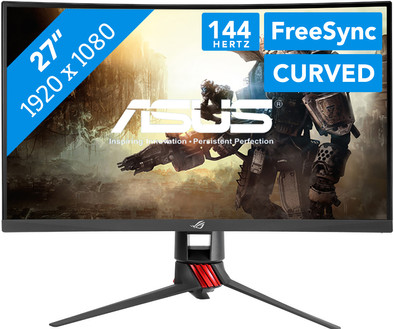
The Asus ROG Strix XG27VQ is a 27-inch curved gaming monitor for avid gamers. Thanks to FreeSync, tearing and stuttering will no longer be an issue. This technique synchronizes the frames of your AMD video card with the frames of the monitor. The refresh rate of up to 144Hz lets you experience smooth moving images. Via the DisplayWidget, you can easily tweak your game settings, and the Asus GamePlus hotkey ensures you can get more out of your games with in-game improvements. Adjust the blue light or choose from various crosshair options for shooters, for example. The ROG Strix XG27VQ has RGB light in the stand and on the back, so your gaming setup will look like a real gamer's hub.
Sharpness | Full HD (1080p) | |
|---|---|---|
Curved | ||
Aspect ratio | Standard (16:9) | |
Refresh rate | 144 Hz | |
Response time | 1 ms | |
Panel type | VA panel | |
Color depth | 17 million colors (8-bit) | |
Built-in speakers |
5 stars
1
4 stars
1
3 stars
0
2 stars
0
1 star
0
For my gaming setup with 3 monitors I was looking for a replacement monitor that meets the following criteria; 144 hertz - 1080p (1920x1080) and 27 inches. After a lot of poking around and searching decided to order this monitor and test how well I like it.
First and foremost, of course, there is the appearance of the monitor that catches the eye. It looks quite sleek and has a sturdy leg that looks tough. The screen edges are - especially for those thinking of a multi-monitor setup - quite narrow, which is certainly welcome for set-ups with more monitors. What may be in the way in terms of appearance is the red color in the foot. This one can seem a bit conspicuous. However, the leg is easy to install without the need for a screwdriver or the like. You have 2 different spots that are lit up once the screen has started up, which is a nice/nice addition for some; lighting is provided in the middle of the leg and the back is also lit. However, the lighting on the back of the screen isn't strong enough to bounce off the wall behind the screen, making it a bit of a useless addition, just as the red light at the bottom of the base can potentially be distracting while you're trying to focus on the activity on the screen itself. Fortunately, options are provided to disable it in the menu, just as there are a number of modes provided for this. Furthermore, the screen looks good; nice curve, handy facility to hide cables in a somewhat orderly way and an extra plate that hides the connections a bit so that they are not too noticeable.
After unpacking and admiring the monitor it was time to start it up and actually start testing the quality on a daily basis. Many reviews on websites are written using special software and tools that often test 'the extreme ends' of the monitor, but you don't immediately have an idea of what it could be like in day-to-day use. So I have not used tools and software.
A small minus that immediately struck me is that - without a doubt - you have to completely calibrate this screen yourself when connecting and starting up. There are monitors that are set up fairly well 'straight out of the box', where you hardly have to do anything. However, this was not the case with this screen. However, the menu with settings is nicely expanded with a lot of options that you should definitely take your time to browse through and set the monitor to your liking. The necessary navigation option is also provided by means of a small joystick on the back, which is easy to use. The other buttons for options also work nicely as desired, although they feel a bit cheap/loose.
After some calibration I came to a point where for me the screen was set 'as best as possible' to my liking. I wasn't quite happy with it to be honest, but I couldn't get any better than this. This is mainly due to the disappointing uniformity, which made it a difficult task to decide when it was good enough for me. You have an extensive range of settings that you can adjust to your liking, including various "pre-configured modes" such as Racing & Moba. Very handy is that you also have the option to save a profile; even up to 5 profiles. This is certainly a welcomed option. A number of 'gaming tools' from ASUS have also been added, including a permanent Crosshair and an FPS counter.
Thanks to the VA LCD panel, the colors come out nicely and there is also less loss on the image when you look at the screen from certain viewing angles. When playing or playing a film, TV show or game, the colors came out beautifully and the uniformity was less noticeable. Thanks to the 144 hertz everything was also fantastically smooth. The unfortunate thing is when you use other applications. In standard browsing on the internet, the uniformity struck me once again so hard, even when I noticed that there was a slight form of backlight bleeding (mainly visible on darker images).
As for the price for this monitor, it seems to me that it is still too high. The quality is there, but there is still plenty that leaves something to be desired, such as uniformity.
This monitor is very attractive to buy and try, although it is a bit strange in terms of marketing; by means of a few images on the official site of ASUS one tries to show what are certain differences between the average monitor and this one, which gives far from a realistic idea, which in turn can cause this monitor to be purchased thanks to deception of information.
Decision; A monitor with a lot of potential, which is quite good in many areas; however, the few points that leave something to be desired are just important points that make it very difficult for me to recommend this monitor. Provided the uniformity and misleading viewing angle had been much better, this monitor would be highly recommended.
Note:
Kevin Rombouts
20 December 2017
Automatically translated from Dutch
Nice screen nice big nice to play with. And cooperate.. Good price quality..
Jeffrey Jordens
15 June 2018
Automatically translated from Dutch
Product number | 793268 | |
|---|---|---|
Manufacturer code | 90LM03G0-B01970 | |
Brand | ASUS | |
Warranty | 2 years | |
Processing of your defect | Carry-in warranty | |
Old product returned for free |
Recommended display resolution | 1920x1080 | |
|---|---|---|
Sharpness | Full HD (1080p) | |
Aspect ratio | Standard (16:9) | |
Refresh rate | 144 Hz | |
Response time | 1 ms | |
Panel type | VA panel | |
Local dimming | ||
HDR support | ||
Contrast ratio | 3000 | |
Touchscreen | ||
Screen reflection | Anti-glare | |
Blue light filter | ||
Flicker-free technology | ||
Color depth | 17 million colors (8-bit) | |
G-sync | ||
G-sync Ultimate | ||
Adaptive Sync | ||
Type of adaptive sync | FreeSync | |
Resolution width | 1920 pixels | |
Resolution height | 1080 pixels | |
Anti-reflection type | Matte | |
Horizontal viewing angle | 178 ° | |
Vertical viewing angle | 178 ° |
Height | 37,1 cm | |
|---|---|---|
Width | 61,96 cm | |
Depth | 10,9 cm | |
Weight | 6,9 kg | |
Color | Black | |
Including stand | ||
Material | Plastic | |
Cable management | ||
Appearance | Gaming | |
Curved |
Number of HDMI connectors | 1 | |
|---|---|---|
Number of Female HDMI type A 1.4 ports | 1 | |
Number of headphone jacks | 1 | |
Type of headphone connection | 3.5mm (TRRS) | |
Number of Female Standard DisplayPort 1.2 ports | 1 | |
Number of female 3.5mm TRRS Audio Jack ports | 1 | |
Number of Female DVI-D Dual Link ports | 1 |
Adjustable in height | ||
|---|---|---|
Tiltable | ||
Pivotable stand | ||
Pivot function | ||
VESA mount option | ||
VESA mount | 100x100mm |
Energy consumption standby | 0,5 W | |
|---|---|---|
Energy consumption active | 50 W |
Built-in speakers | ||
|---|---|---|
Split screen | ||
Kensington lock | ||
Best tested |
Recommended for use | Gaming |
|---|
